Do your customers know when their order will actually arrive?
The clearer a customer is about when a package will reach them, the more confident they are about completing the order. Delivery promises let you show an expected delivery date while customers browse your products, and customize that date to match your operations and the shipping experience you actually deliver — a better shopping experience and clearer information for the customer. In this guide, you'll learn how to enable delivery promises, add and customize a new promise, and how the expected date appears on the product page.
Delivery promises show customers an expected delivery date while they browse a product. You enable them from shipping settings, choose a promise type such as same day or next day, set where it applies, and define preparation and delivery times. The feature is available on the Pro and Special plans.
📌 Article overview
- Enable delivery promises
- Add a new delivery promise
- How delivery promises appear on the product page
- Frequently asked questions
🔔 Important note: The feature is available to stores on the Pro and Special plans.
🚚 Enable delivery promises
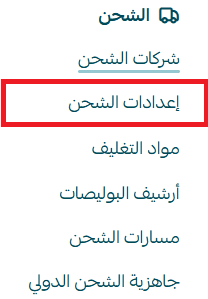
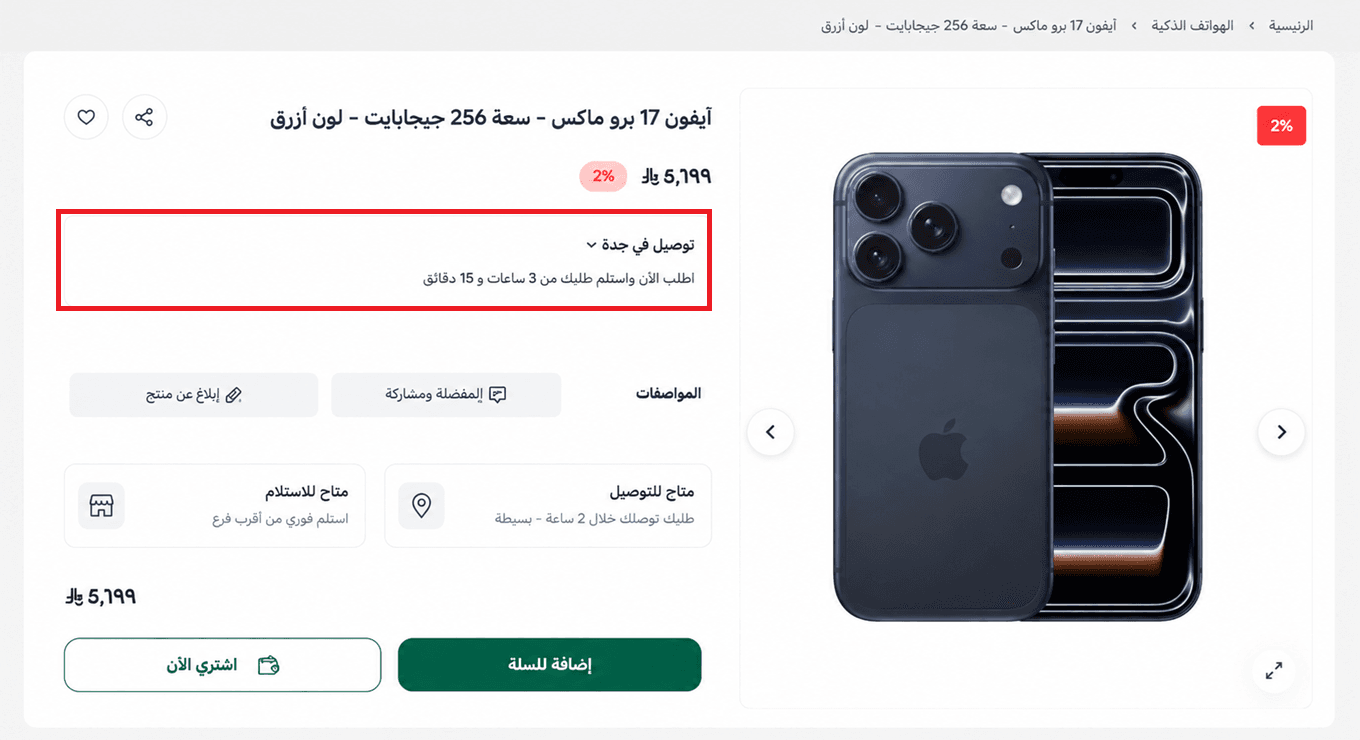
1. From the main menu in your dashboard, click (Shipping settings).
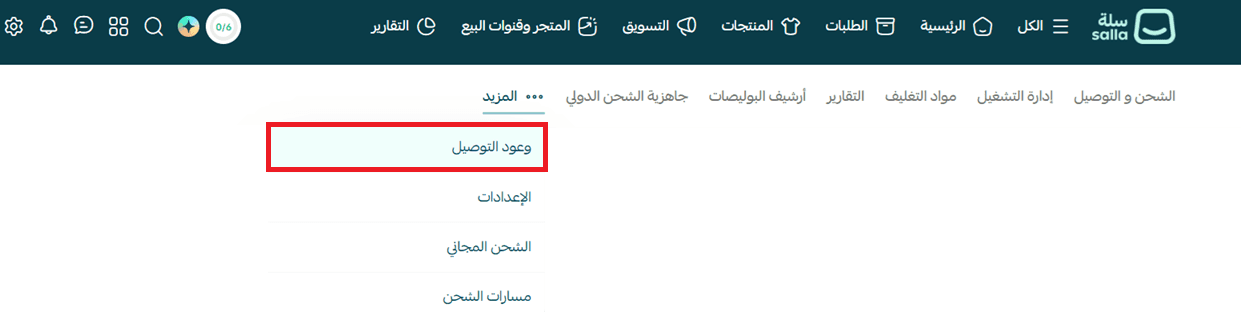
2. From the more menu, choose (Delivery promises).
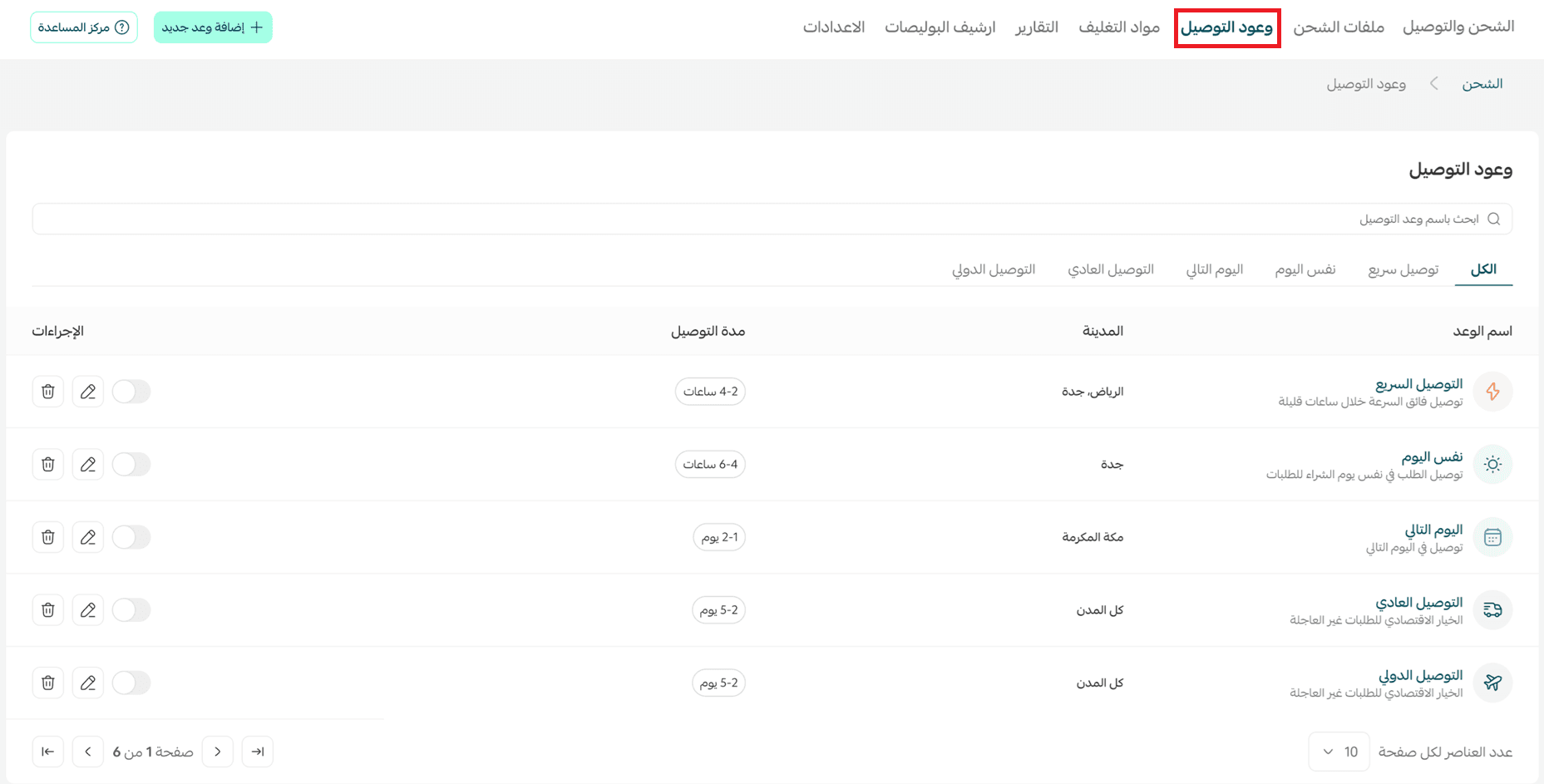
3. The delivery promises page lists the different promise types — express delivery, same day, next day, standard delivery, and international delivery. From here you can add a new promise, edit existing ones, or turn them on and off to match your operational and logistics setup.
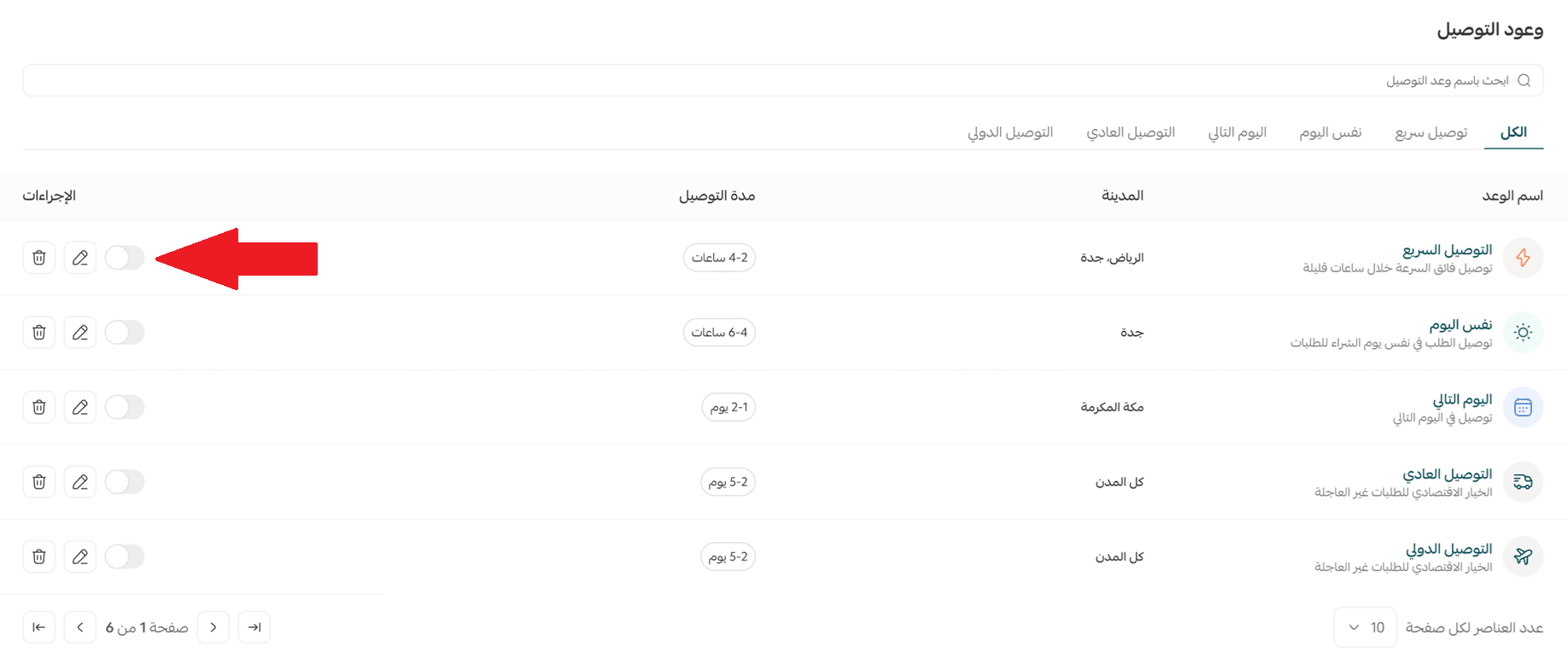
Five ready-made delivery promises appear by default, but they arrive disabled. Edit their settings, then enable them when you need them.
4. Customize the settings of an existing promise, or add a new one.
➕ Add a new delivery promise
1. From the main page, choose (Add a new delivery promise).
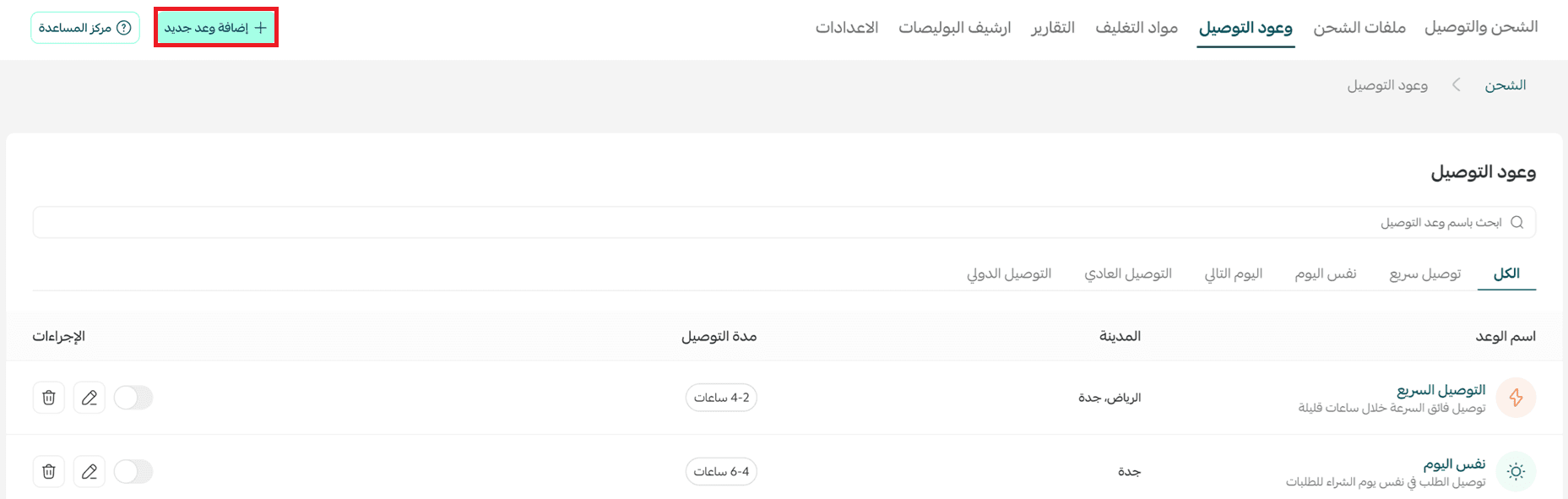
2. Fill in the basic information:
- Promise: the name of the promise as it appears to you in the dashboard. The customer does not see it.
- Promise type: choose the type (express delivery, same day, next day, standard delivery, or international delivery).
- Promise application level: decide how the promise applies geographically. There are two levels:
City level: choose the country, the region, and the city — or All, to apply it to every city in the region.
Warehouse level: choose the warehouse, then set the delivery scope either by city or by the coverage areas you already configured for that warehouse.
🔔 The pickup and delivery setting has to be enabled before you can set promises by coverage areas. To reach it, go to Settings, then Multi-markets, select the market, and click Pickup and delivery.
- Order preparation time: the time you need to prepare the order before it ships.
- Delivery time: the expected time for the order to reach the customer after it ships.
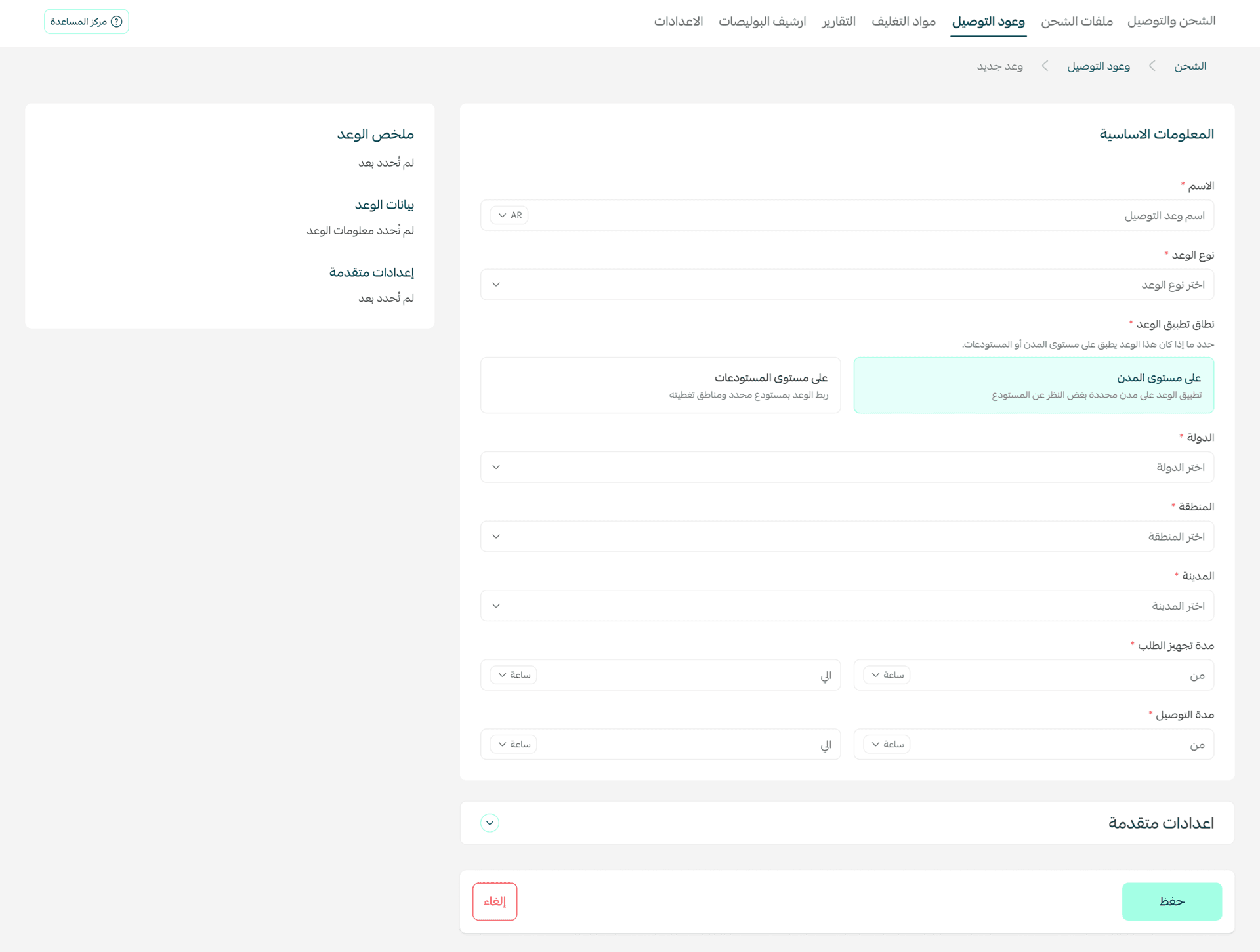
3. Under advanced settings, you can define:
- Promise display time: the time window during which the delivery promise is shown to customers.
- Include preparation time in the promise duration: when this is on, the preparation time is counted inside the delivery date shown.
- Promise display days: choose the days of the week the promise appears on.
- Exclude holidays: add holidays or exceptional days when you cannot commit to the delivery date, with the option to repeat them every year.
Once the settings are done, click (Save) to apply the promise, or (Cancel) to discard it.
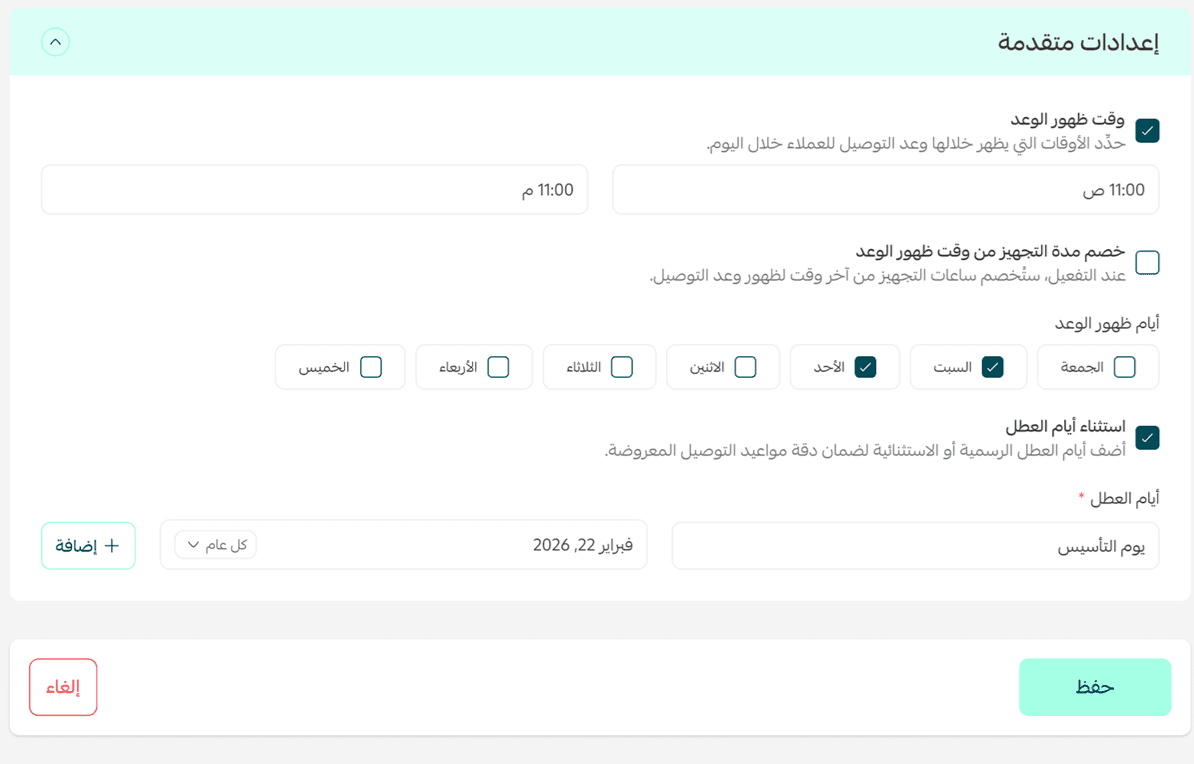
⏱️ How delivery promises appear on the product page
Once the feature is enabled and configured, the customer sees the expected delivery date directly on the product page, so they know when the order should arrive before they buy.
Frequently asked questions
❓ Where do delivery promises appear?
They appear while the customer is browsing the product.
❓ What is the difference between the “city level” and “warehouse level” application levels?
- City level: the promise applies based on the customer's location only, regardless of which warehouse the order ships from.
- Warehouse level: the promise applies only when the order ships from a specific warehouse, and you can tie it either to a particular city or to coverage areas set for that warehouse.
💡 Tip: Choose “warehouse level” if you have several warehouses with different operational capacity. Choose “city level” if your delivery policy is the same regardless of where the order ships from.
❓ What are holidays or exception days?
Holidays are the days on which delivery promises are not shown to customers on the product page — official holidays, stocktaking days, or any day you cannot commit to a delivery date.
❓ How do I choose the right delivery promise for my store?
It depends on your logistics and operations: how fast you prepare orders, the area you deliver to, and what your shipping partners can handle.
❓ What is the difference between the delivery promise types?
- Express delivery (delivery within hours): delivers the order within a set number of hours or minutes on the day of purchase.
- Same-day delivery: delivers the order on the day of purchase.
- Next-day delivery: delivers the order on the day after the order is placed.
- Standard delivery: delivers the order within several business days.
- International delivery: delivers orders outside the country, within the timeframe you set.
Pick the promise and customize it so it reflects the level of service you can actually commit to.
❓ Can I enable more than one delivery promise?
Yes. You can run more than one delivery promise at the same time and tailor each one by country, region, or city.
💡 Example: You can offer a 3-hour delivery promise in Makkah, same-day delivery in Jeddah, and 7–14 days for customers in the UAE.
You can also set the order preparation time and the delivery time independently for each promise, so the dates shown stay accurate for every area.
❓ Do delivery promises appear on every product?
Yes, according to the delivery settings enabled in your store.
❓ Can the expected delivery time be edited?
Yes. You can change delivery promise settings, including the delivery time, at any point from the dashboard.
📌 Important note
Delivery promises work hierarchically by priority. They are applied in this order:
Express delivery → same day → next day → standard delivery → international delivery.
Set each promise so its settings match the scope it applies to, and you will avoid conflicts between promises.