Have you lost repeat sales because your customers forgot to reorder their essential products?
The repurchase reminder feature gives you a smart tool to automatically notify customers about products they need at the right time. You can customize messages, discounts, and the target audience to increase sales and continuously build customer loyalty.
📌 Article overview
- Repurchase reminder feature
- Repurchase reminders page
- Repurchase reminder management options
- Advanced use cases for the repurchase reminder feature
- Frequently asked questions
Repurchase reminder feature
This feature allows you to automate reminders for customers about consumable or repeat-purchase products according to rules you define, from selecting the reminder timing and target customers to setting a dedicated discount percentage.
This way, you will never miss a repeat order, and you can easily and intelligently increase customer loyalty and revenue.
Using this feature, you can:
- Automatically recover repeat sales without manual follow-up.
- Improve the customer experience by reminding them about products before they run out.
- Increase customer lifetime value by encouraging repeat purchases.
- Use insights about the most frequently repurchased products to make more accurate marketing decisions.
Repurchase reminders page
- From the main menu bar, click Marketing.
- From the marketing menu, click Repurchase reminders.

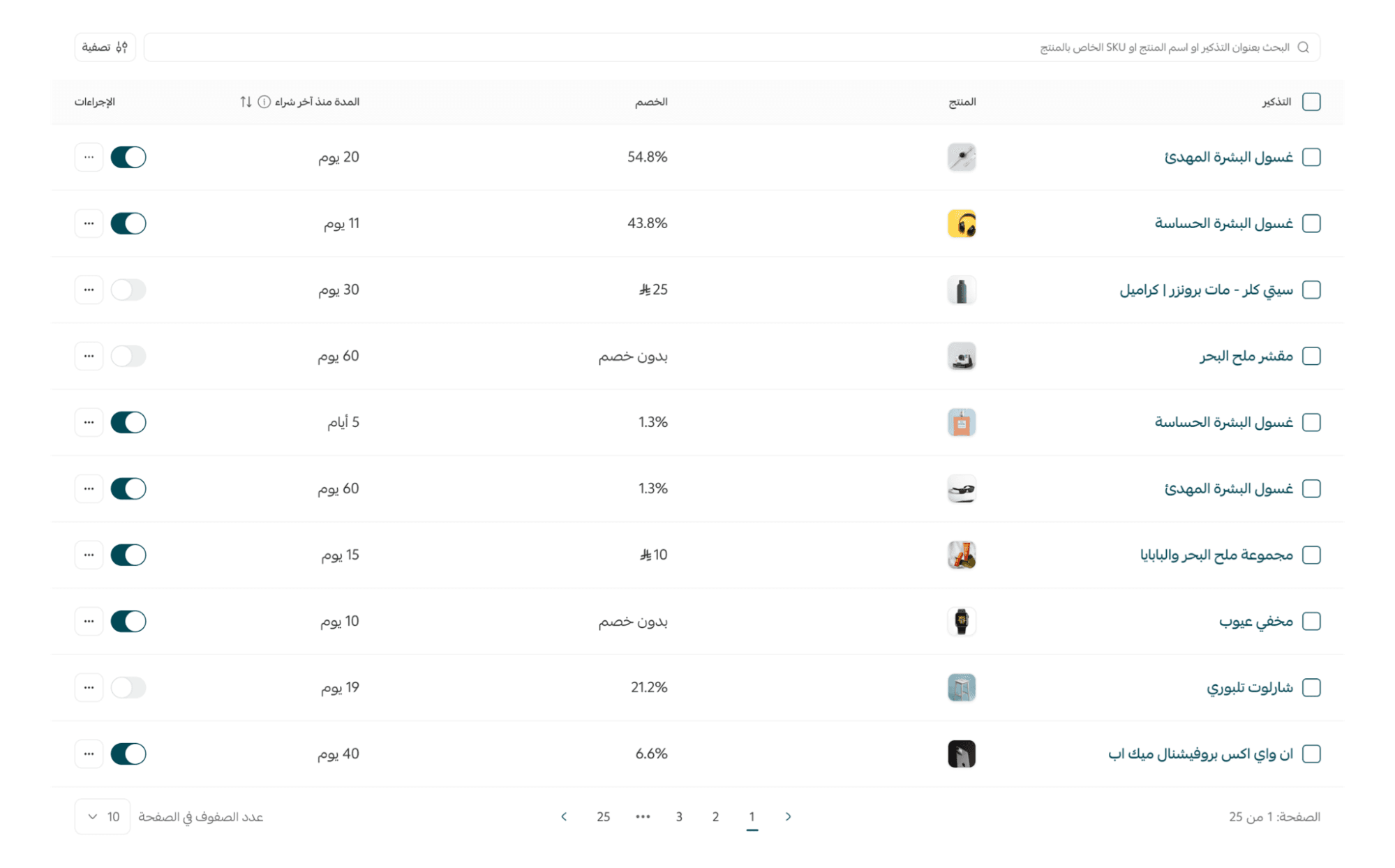
The list of previous reminders displays several details such as: the reminder name, the product, the discount included in the reminder, the time since the last purchase, and the available actions for each reminder.
To view the product name, simply hover the mouse cursor over it.

🧭 Managing repurchase reminder notifications
Creating a new repurchase reminder
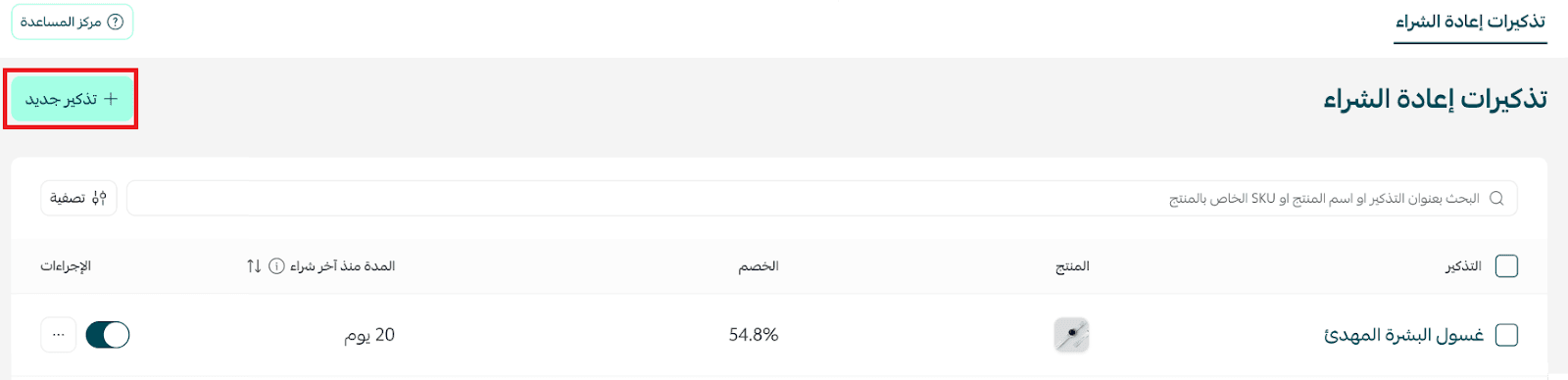
- From the Repurchase Reminders page, click + New Reminder.
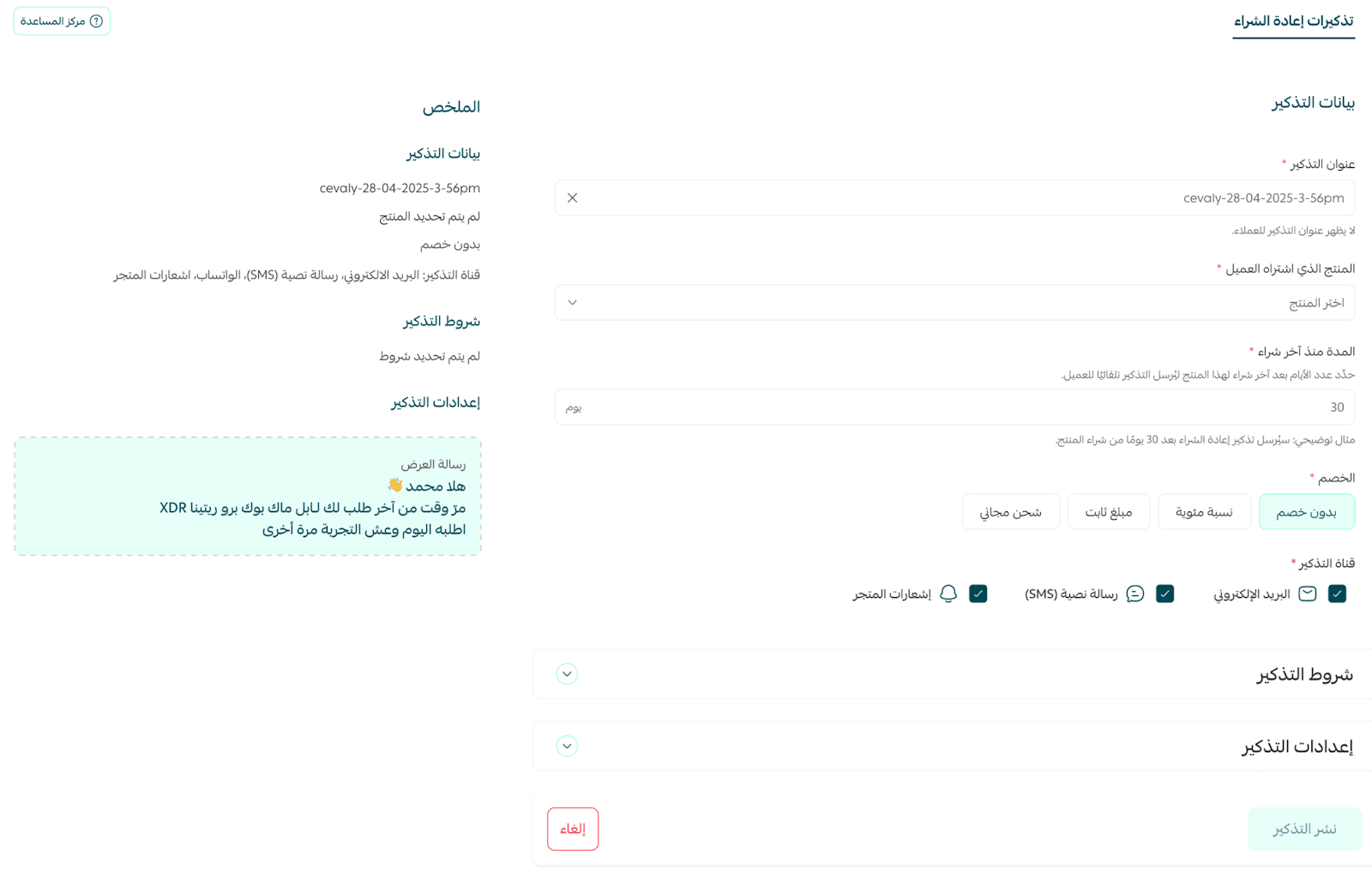
- Enter the required information to create the new repurchase reminder, then click Publish Reminder.
Enabling/disabling a reminder
Simply enable or disable the reminder option.

Editing or deleting a reminder
From the reminder options menu, you can edit the reminder or delete it permanently.

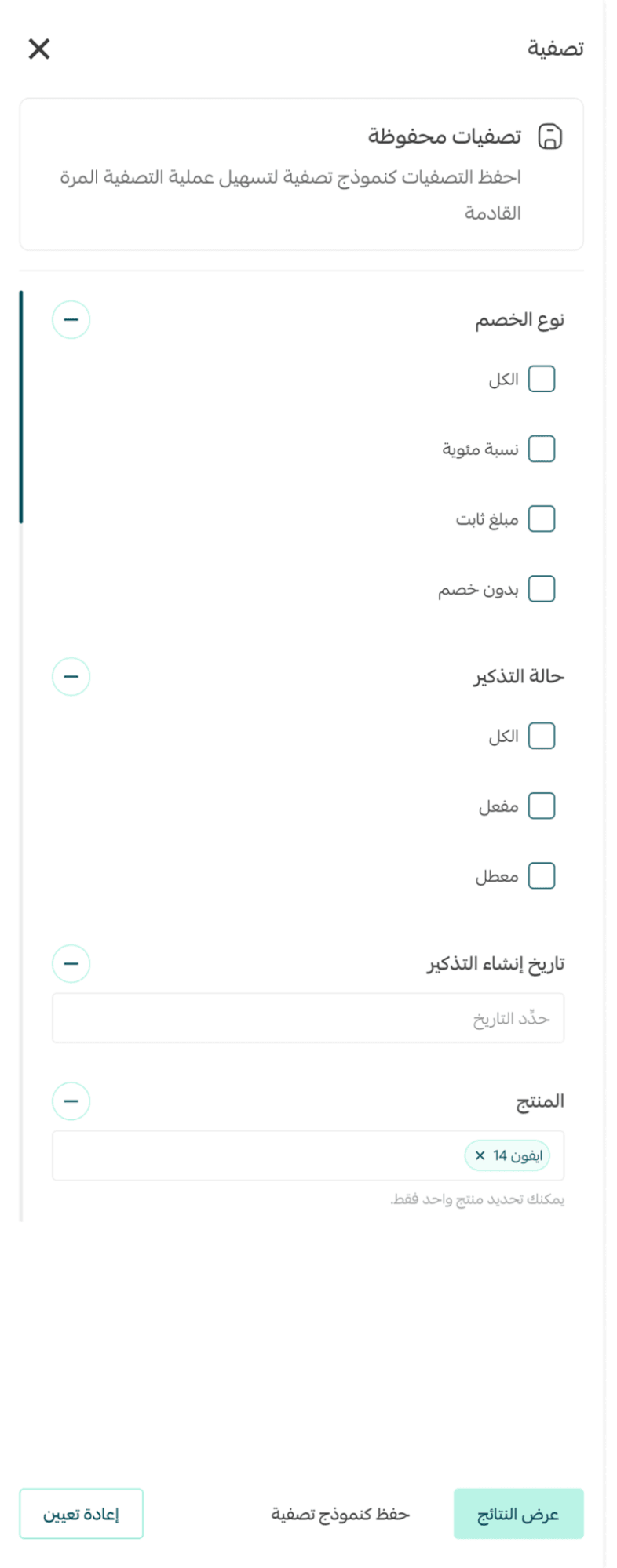
Filtering reminders
You can search for a specific reminder using the reminder name, product name, or the product SKU code.

For a more advanced search, click Filter.

Select the filters you need and click Show results.
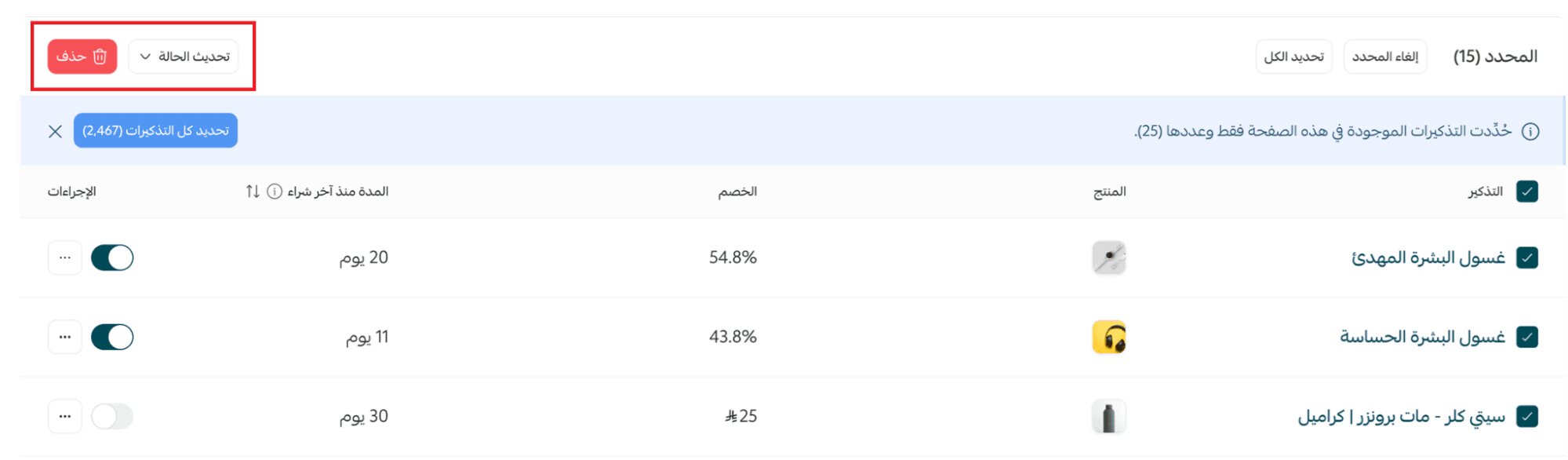
Actions on multiple reminders
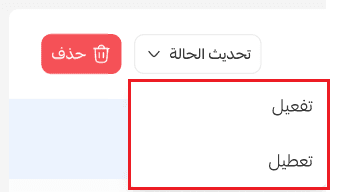
When selecting multiple reminders (some reminders or all of them), you can change the status of the selected reminders or delete them all.
Changing the status includes enabling or disabling reminders.
Advanced use cases and strategies for the repurchase reminder feature
Segment customers based on purchase behavior
Divide your customers into groups based on purchase frequency or order volume. Send tailored reminders to each group with different offers to maximize the likelihood of repeat purchases.
Identify peak timing for sending reminders
Analyze previous purchase data to determine the best time to send reminders. For example, 20 days after buying coffee or 30 days after purchasing vitamins. This increases the likelihood that the customer will repurchase before the product runs out.
Use reminders to enhance promotional offers
Link reminders with limited-time discounts for the product customers want to repurchase. This creates urgency and encourages customers to make quicker decisions.
Combine reminders with loyalty programs
Reward customers when they repurchase with additional points or benefits. This strengthens the relationship with the customer and increases loyalty to your store.
Monitor the most frequently repurchased products
Use the analytics dashboard to identify which products have the highest repurchase rate. Focus reminders on these products and create targeted campaigns to increase revenue.
Test different message formats
Experiment with different message styles (friendly tone, formal tone, motivational tone) to identify which generates the highest response rate.
Sometimes changing a simple phrase in an email can significantly increase clicks on the “Reorder” link.
Combine multi-channel notifications
In addition to email, send store notifications to reach customers who did not open the email.
This can significantly improve conversion rates.
Remind customers of related or complementary products
Send reminders for products that complement the original purchase. For example, after buying a coffee machine, remind the customer about coffee beans or machine filters. This is a smart strategy to increase the average order value.
Frequently asked questions
Can repurchase reminder discounts be combined with other discounts?
No. The customer can only use one discount. If a discount is included in the repurchase reminder, it is applied automatically and cannot be combined with other discounts.
Will a repurchase reminder be sent if the product is part of a product bundle?
A repurchase reminder is only sent if the product was purchased individually.
If the product was part of a bundle, the reminder will be sent for the entire bundle.
Which products can use the repurchase reminder feature?
The feature can be enabled for any consumable or frequently purchased products such as coffee, dietary supplements, pet supplies, cosmetics, or any product you choose manually.
Are booking products supported by the repurchase reminder feature?
No. Reminders cannot be activated for booking products due to their nature, which does not typically involve repeat purchasing in the same way.
What happens if the product has options (such as size or color)?
If the product includes options and a reminder is sent, the product will be added to the cart with the same options selected in the customer’s last purchase, saving time and ensuring a smooth repurchase experience.
How does the system determine when to send the reminder?
You can set the reminder period after the product is purchased, and the system will send it automatically based on the purchase date recorded.
Can specific customer groups or countries be targeted?
Yes. You can select customers from specific countries or groups such as new customers, returning customers, or any custom segment.
Can a discount or incentive be included with the reminder?
Yes. You can set a discount percentage, free shipping, or other incentives to encourage customers to repurchase.
How does the customer receive the reminder?
The reminder is sent through an in-app notification or a personalized email containing a “Reorder” link that opens the checkout page directly with the product already in the cart.
Can the reminder be modified or stopped after it is created?
Yes. You can modify any reminder settings or disable it at any time from the control panel.
Is this feature available for all plans?
The feature is available only for Pro and Special plan merchants.