Managing employees allows you to control permissions and assign tasks inside your store with ease, ensuring smooth operations and giving each employee the appropriate access based on their role.
📌 Article overview
- Assigning basic permissions for using Salla Point POS
- Assigning Salla Point–specific permissions
Assigning basic permissions for using Salla Point POS
Grant basic permissions to employees so they can use Salla Point POS and perform operations داخل the app.
Steps:
- From the main menu, go to All → Manage employees
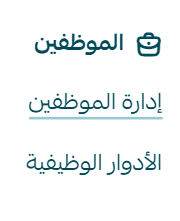
- Navigate to Add new employee, then assign role permissions
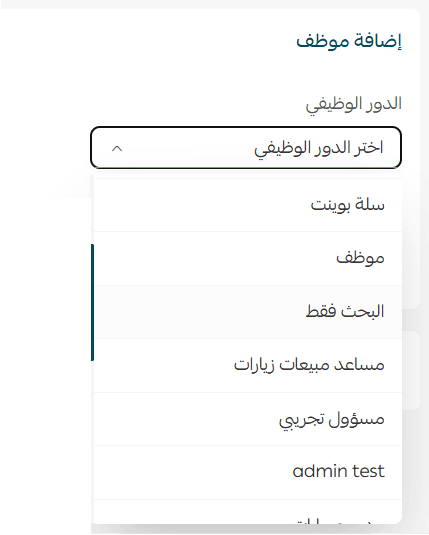
General permissions include:
- Create orders
- View all orders
- Edit orders
- Manage coupons
- Edit products
- And other administrative permissions
Salla Point specific permissions
These include permissions similar to general ones, in addition to permissions related to Salla Point features and branch payment methods.
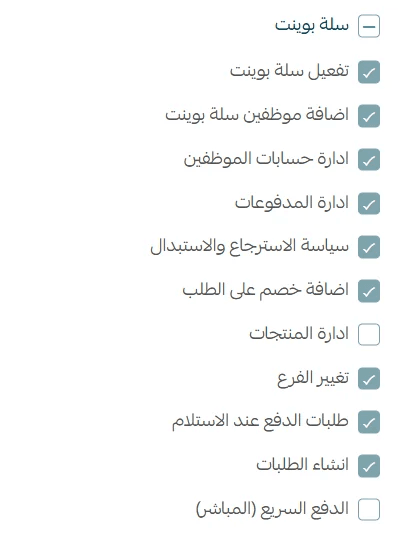
📝 Note: The store owner and general manager automatically have full permissions.
🔔 Important note: If you encounter an error when adding a product to the cart in the Salla Point app

❌ Disable the permission (View assigned orders only)
✅ Enable the permission (Create order)
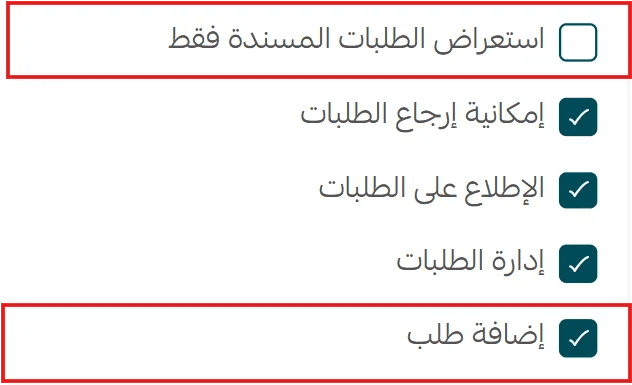
This setup ensures employees can use Salla Point efficiently without interruptions.