In managing online stores, you may face challenges in managing applications across multiple platforms, causing distractions and delays in modifications.
The integrated applications feature within the Salla control panel solves this problem, allowing you to manage and control some applications directly from within the Salla control panel without the need to switch to external pages, providing a smoother and faster store management experience.
In this article, we will review how to access and use integrated applications.
📌 Main topics of the article:
- About the integrated applications feature
- Steps to access the integrated applications installed in your store
- Frequently asked questions
🚀 About the integrated applications feature
Integrated applications are a feature within the Salla control panel that allows merchants to run and manage some applications directly from within Salla without needing to switch to external sites or pages for each application.
You can install integrated applications from the App Store:
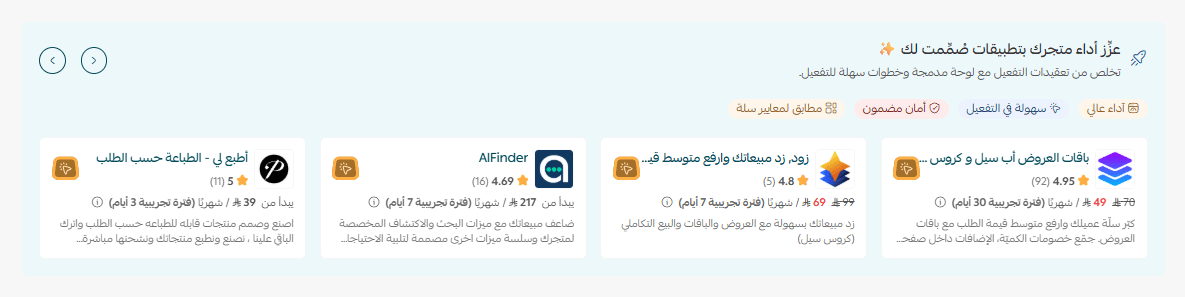
🔔 You can identify the integrated application through the alert:
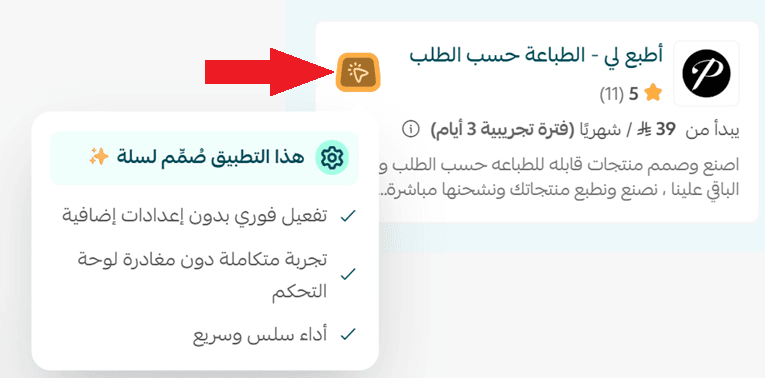
Purpose of the integrated applications feature
🧩 A unified experience that combines store and application management in one place with an integrated panel within Salla.
⚡ High speed and performance enhance your store's efficiency and simplify modifications.
🛠️ Easy activation with simple steps away from complexity.
🚀 Applications designed to meet Salla standards and support store performance improvement.
🔒 Guaranteed security with full control within the Salla control panel.
👣 Steps to access the integrated applications installed in your store
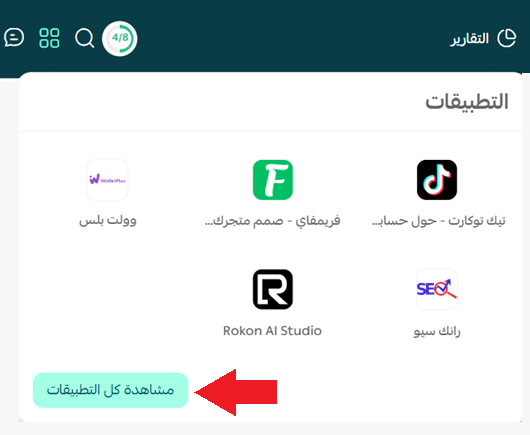
1. From the main menu, click on (Integrated Applications).

2. Browse the integrated applications available on the page, where you can click on the application to go to the application's page in your store, or click (View All Applications) to explore the rest of the applications installed in your store.
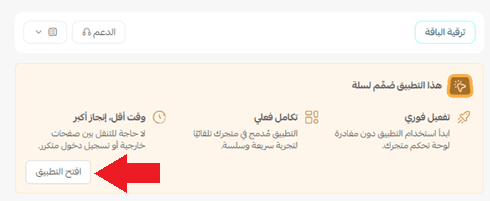
3. This alert will appear on the application's data page if it is an integrated application, click (Open Application) to manage and control the application.
Frequently asked questions
❓ Do I need to access an external site to control the application?
No, you can fully control the integrated application from within the Salla control panel through the integrated applications feature without the need for any external site.
💪 Try integrated applications now and start managing your store's applications from one place within Salla, with greater speed and ease 🚀