Which customers should see your next ad: the ones who bought last month, the ones who stopped buying, or the ones who filled a cart and walked away?
Building those segments used to mean learning a filter panel, guessing at date ranges, and repeating the exercise until the numbers looked right - sometimes with a third-party tool on top. Mushammir from Salla replaces that with a sentence. You describe the audience you want, and Mushammir builds the ad audience from your own store data. In this guide, you'll learn how audience creation works, how Mushammir decides on the criteria, how to write a description that returns a useful segment, and what to do when nothing comes back.
Mushammir from Salla lets you create an ad audience by describing it in plain words. It reads your store's own order and customer data, works out the right criteria, and returns a ready audience segment you can use in your ad campaigns. Paid plans only.
🔔 Note: creating ad audiences with Mushammir from Salla is available on paid plans only.
📌 Article overview
- How audience creation works in Mushammir from Salla
- How Mushammir sets the audience criteria automatically
- Why this matters for your store
- How to get started
- How to use audience creation well
- What to do if no results appear
- Frequently asked questions
✨ How audience creation works in Mushammir from Salla
1. Describe your audience 💬
Write the request the way you think about it, for example:
- "Customers who bought in the last 30 days and haven't come back"
- "Customers who bought more than once in the last 3 months"
- "Customers who added products to the cart and didn't complete the purchase"
2. Mushammir turns it into a ready audience ⚙️
From that one sentence, Mushammir:
- Interprets your description
- Analyzes the data inside your store
- Builds an audience list that is ready to target
No manual setup at any step.
3. Use it in your campaigns 📊
The audience Mushammir creates is ready for your marketing campaigns, so you skip the setup work and get to the advertising itself.
🎯 How Mushammir sets the audience criteria automatically
Mushammir does not fall back on fixed values or default numbers. It looks at your store's data and works out the criteria that fit your case.
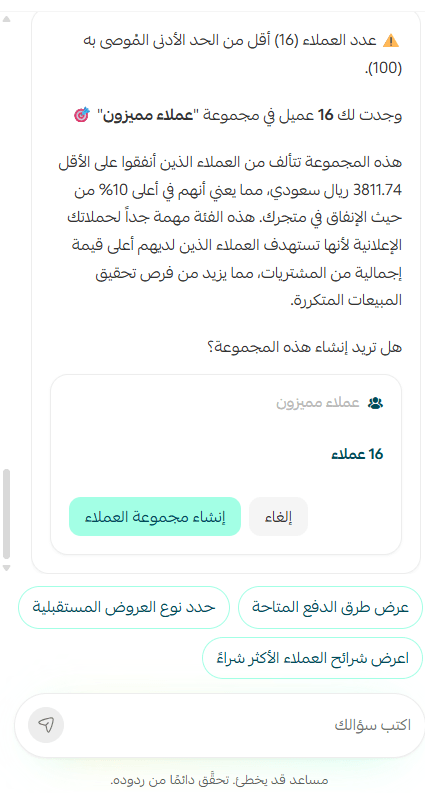
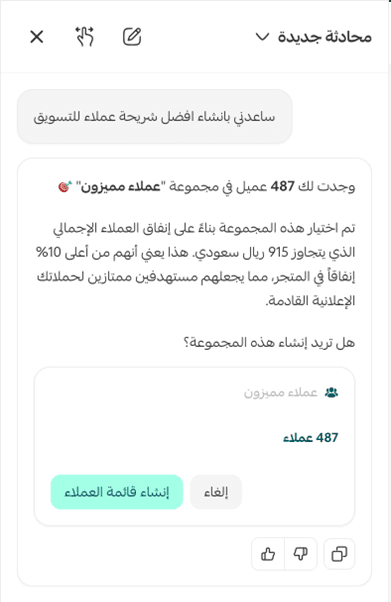
💡 Example: you ask for "my best customers".
🔍 Mushammir analyzes the order data in your store to understand buying behavior.
📊 It identifies your highest-value customer segment from the actual figures.
🎯 It builds the audience using those criteria automatically.
📋 It may also show you a plain-language explanation of the result, so you can see how it got there.
The audience you get is built on the reality of your store, not on generic settings.
✅ Why this matters for your store
Ad campaigns live or die on three things: how precisely you target, how fast you can act, and how few mistakes creep into the setup. Mushammir from Salla helps you:
✅ Build accurate audiences without technical experience
✅ Cut the work from long minutes down to seconds
✅ Get more out of the data your store already holds
✅ Launch campaigns faster and with better aim
Instead of leaning on outside tools or a technical specialist, the whole process happens inside your store.
🚀 How to get started
1. Open your Salla dashboard and go to Mushammir from Salla.

2. Write a description of the audience you want.
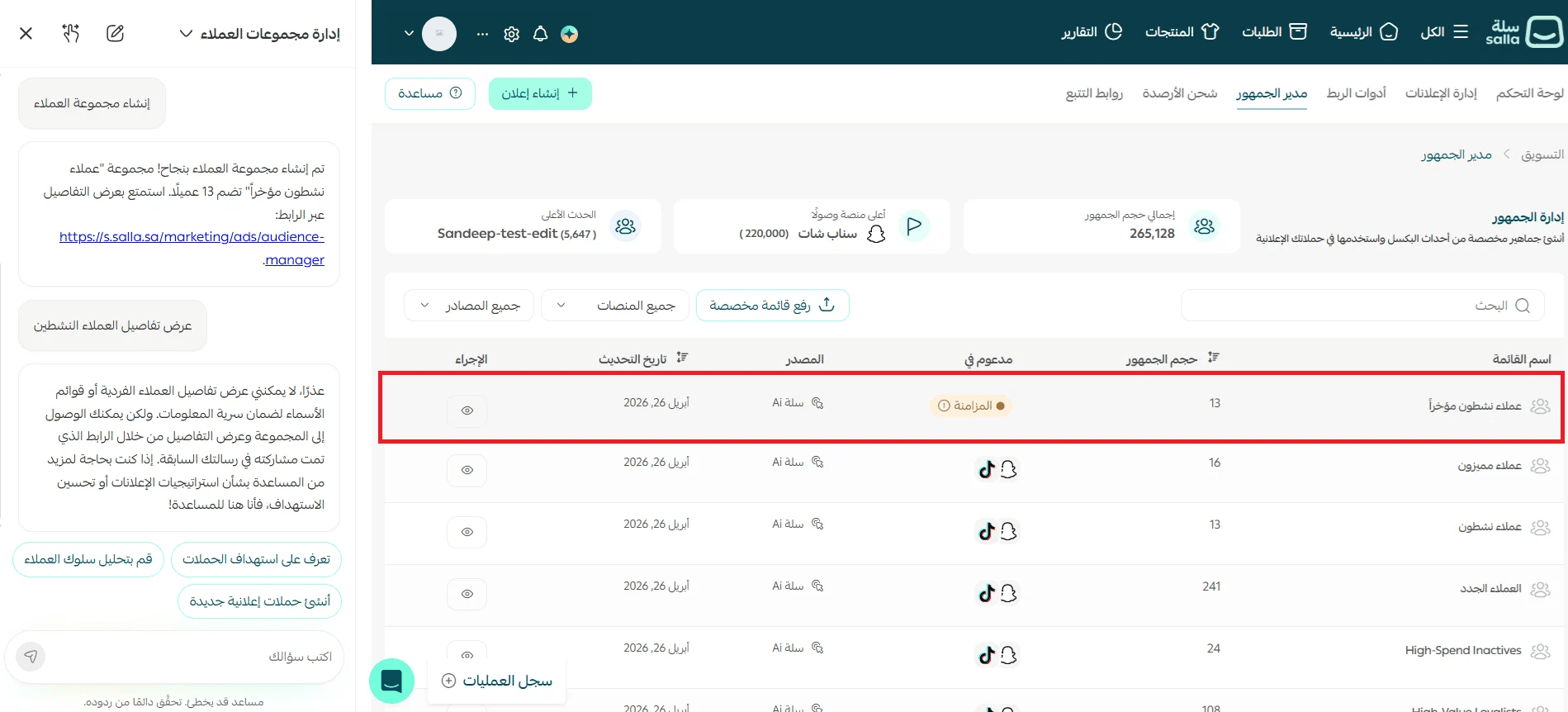
3. Use the audience directly in your ad campaigns.
📝 Important notes
- Creating ad audiences with Mushammir from Salla is available on paid plans only.
- Audience segments can take some time to finish syncing, so a new audience may not be usable the moment it is created.
📌 How to use audience creation well
Instead of working through filters and multiple settings inside a targeting tool, you now build a segment from one short description in the chat. Mushammir creates the audience; you decide how to use it in your campaigns.
1. Win-back audience
Reach the customers who stopped buying, so you can revive that revenue later.
Example prompt: "Create an audience of customers who bought in the last 60 days and haven't bought again."
Result: a ready audience list for your retargeting campaigns.
2. Cart abandonment audience
Reach the customers who showed intent but didn't finish checking out.
Example prompt: "Customers who added products to the cart and didn't complete the purchase in the last 7 days."
Result: an audience you can use for reminder campaigns or an incentive to complete the order.
3. Repeat buyers audience
Concentrate on the highest-value customers in your store.
Example prompt: "Customers who bought more than 3 times in the last 90 days."
Result: a premium audience for special offers or new product launches.
4. New customers audience
Start building a long-term relationship with the people who just found you.
Example prompt: "Customers who made their first purchase in the last 30 days."
Result: an audience suited to welcome campaigns or to nudging the second order.
💡 A simple way to phrase any request. Rather than thinking about filters, answer three questions and write the answers as one sentence:
1. Who do I want to reach?
2. What did that customer do?
3. Over what time period?
⚠️ What to do if no results appear
Sometimes Mushammir can't build an audience that matches your description, and you see a message like "No customers were found matching your criteria." When that happens:
- Widen the time period, for example from 30 days to 90 days.
- Simplify the description or drop a condition.
- Check that your store holds enough data to work with - orders and customers.
- Try phrasing the same idea a different way.
💡 The clearer and simpler the description, the more accurate the result. Results come from your store's real data, so the same request can return different segments in different stores.
❓ Frequently asked questions
Do I need any technical experience to build an audience?
No. You describe the audience in ordinary words and Mushammir handles the analysis and the criteria.
Is this feature available on every plan?
No. Creating ad audiences with Mushammir from Salla is available on paid plans only. [Verify: the Arabic says "paid plans" without naming which ones.]
Where do the audience criteria come from?
From your own store. Mushammir analyzes your order and customer data instead of applying default values, which is why the same request can return a different segment in another store.
Can I use the audience right after creating it?
Audience segments can take some time to sync. If a new audience isn't available yet in your campaign setup, give the sync a moment to finish.
Why did my request return no customers?
Usually the description is too narrow or the store doesn't hold enough matching data yet. Widen the time period, remove a condition, or rephrase the request.
✨ Building an ad audience no longer starts with a settings panel. It starts with a sentence - and Mushammir from Salla turns that sentence into a segment you can advertise to.
Try it now - describe your audience and let Mushammir from Salla get your next campaign ready.