Would a shopper searching the App Store for your brand actually find your app, or something else entirely?
Your app name is not a cosmetic detail. It is the first thing a shopper reads, the text the stores index when someone searches, and one of the details Apple and Google check before they approve a release. A name that is already taken, too long, or full of symbols can hold up your launch, and changing it after publishing costs money. In this guide, you'll learn how to choose an app name that passes review and works for your customers.
A good app name is between 3 and 30 characters, unique on both the App Store and Google Play, free of special characters and emoji, and free of any trademark you do not own. On a customer's home screen, keep it under 12 characters so the full name shows below the icon.
📌 Article overview
- Requirements for choosing an app name
- Best practices for an effective app name
- How your app name appears in the stores and on customers' devices
- Frequently asked questions
📌 Requirements for choosing an app name
1. Check that the name is available. Make sure the name you pick is not already in use on the Apple and Google stores. Search for your proposed name in each store's search box to confirm it is free.
2. Check ownership rights. Make sure the name does not infringe intellectual property rights or clash with a registered trademark, such as using the name of a well-known app like Snapchat.
3. Avoid special characters and symbols. Do not use special characters, symbols or emoji. They can get your app rejected by the app stores.
4. Stay within the character limit. The app name must be at least 3 characters and no more than 30 characters.
5. Skip hamzas, madd marks and diacritics. If you write the name in Arabic, leave out hamzas, madd marks and diacritics (tashkeel). They make the name harder for shoppers to type when they search for it in the app stores.
6. Proofread the spelling. Check the written name for spelling mistakes, since a misspelled name makes the app harder to search for and find.
✅ Best practices for an effective app name
Clarity and simplicity: pick a name that is clear and simple. A distinctive name is easier to remember and easier to search for.
Both languages: consider writing the app name in both Arabic and English to improve searchability and reach.
A name that reflects the app: choose a name that reflects the content and purpose of the app, so shoppers understand it quickly.
Easy to pronounce: pick a name people can say easily and remember.
Distinctive: aim for a name that is unique and clearly stands apart from other apps.
Aimed at your audience: review your app's features and benefits, define the audience you want, then choose a name that catches that audience's attention in particular.
No lookalike words: avoid words that resemble other names, to prevent confusion and keep your app distinct.
Test it with people: run small tests with a group of users to collect their opinions and see how they react to the name.
Room to grow: choose a name that can support a wider app in the future without losing its identity.
💡 Example: both of these bilingual formats are acceptable for an app name, pairing the English and Arabic versions with a separator: salla | [the Arabic name] or salla - [the Arabic name].
📌 How your app name appears in the stores and on customers' devices
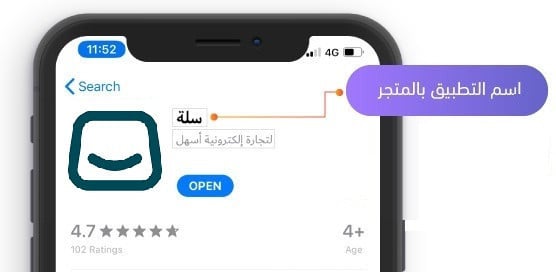
In the app store listing, the app name appears next to the app icon in bold, as shown below:
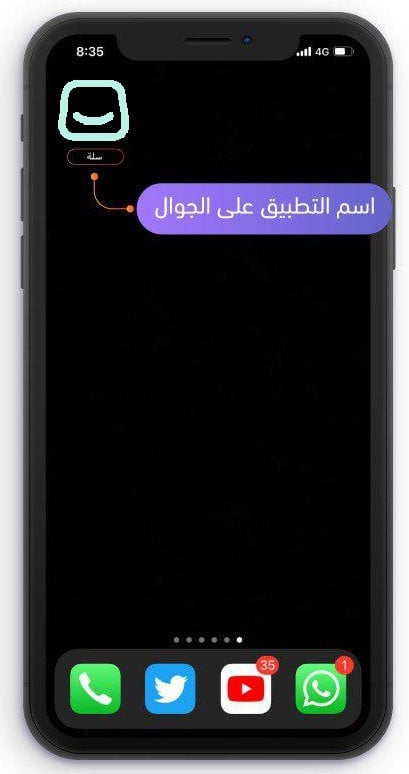
The app name on the customer's device is different: it appears on the phone screen underneath the app icon. Choose it with these rules in mind:
- One word is best. If your name in the app stores is two or three words, use a single word for the name on the phone.
- Use the language that suits the audience your app is aimed at.
- Keep the text under 12 characters so the full name shows under the app logo without any part of it being cut off, as shown below:
❓ Frequently asked questions
Why does the app name deserve so much care?
- The app name is one of the first things that attracts people to use the app.
- A well-chosen name improves how the app is indexed in the stores, which pushes it forward in App Indexing.
Can I edit the name after the app is published?
Yes, by purchasing the app data update service.
- The app name is first reviewed by the Salla team to confirm there are no obvious problems or violations. You are then told through App Maker and the technical support chat which changes are required, and you are given the option to edit and enter a new name.
- The name is then reviewed by the app store reviewers at Apple and Google during the store review stage. It can be rejected if they have additional requirements of their own, and in that case the Salla team makes it possible for you to edit the name again.
- Finally, once the app request has been published and the apps are live on the app stores, meaning the app request status has changed to launched, the name can only be changed for an additional fee through the app data update service. For more, see Purchasing an app data update.
What should I do if the name is already taken in the app stores?
Either change the name completely, or add a word to it. Example: add a word such as store, or add a part in English.
📝 Important notes
Settle the name before your app request reaches the launched status. Up to that point edits are free; afterwards every change goes through the paid app data update service.
Spend the time on the name now. It costs nothing to change while your request is still in progress, and it is the one detail that follows your app through search, review and every home screen it lands on.