If you want to improve your online store experience or scale your business, choosing the right Salla plan is the first step toward success.
In this guide, you will learn about the key features of Salla store plans, how to renew your subscription, and how to manage automatic renewal. This helps you make the right decision based on your store’s needs and growth stage.
📌 Article overview
- Explore Salla store plan features
- Renew your store plan
- Cancel automatic plan renewal
- Practical examples for choosing the right plan
Steps to Explore Salla Store Plan Features
1. Access Store Plans
From the side menu in the control panel, click Store Plan.
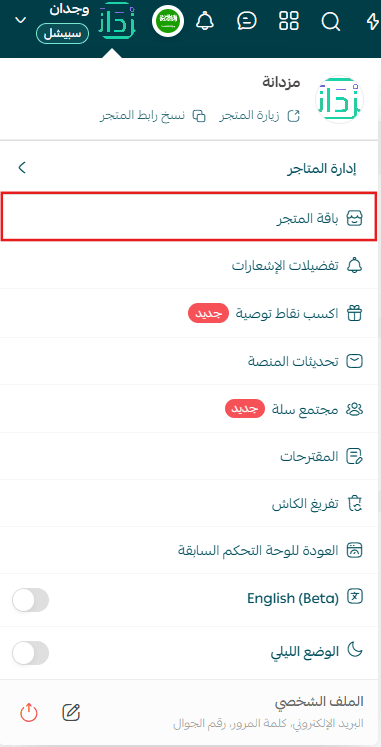
2. View plan details
From the Store Plan tab, the page will display your current plan along with the subscription expiration date.
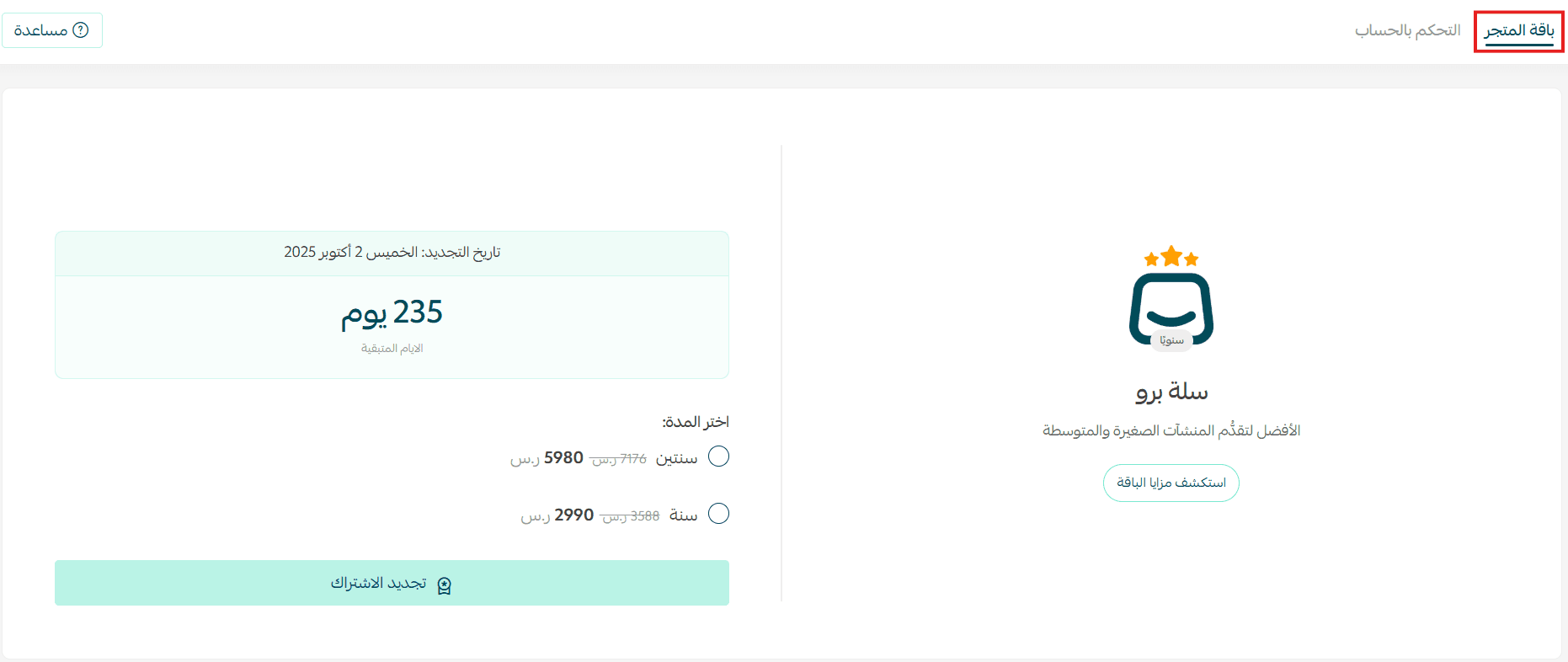
This page gives you a clear overview of your store plan status.
Important Notes
- Your store plan subscription renews automatically by default. To disable automatic renewal, refer to the FAQ section below.
- You will receive a renewal notification via email and WhatsApp 48 hours before your plan expires.
- When subscribing to paid plans and enabling automatic renewal, the subscription fee will be charged using the default payment method. The charge will be processed on the expiration date of your current plan. You can also choose to renew manually up to one month or seven days before expiration.
Renew Your Subscription
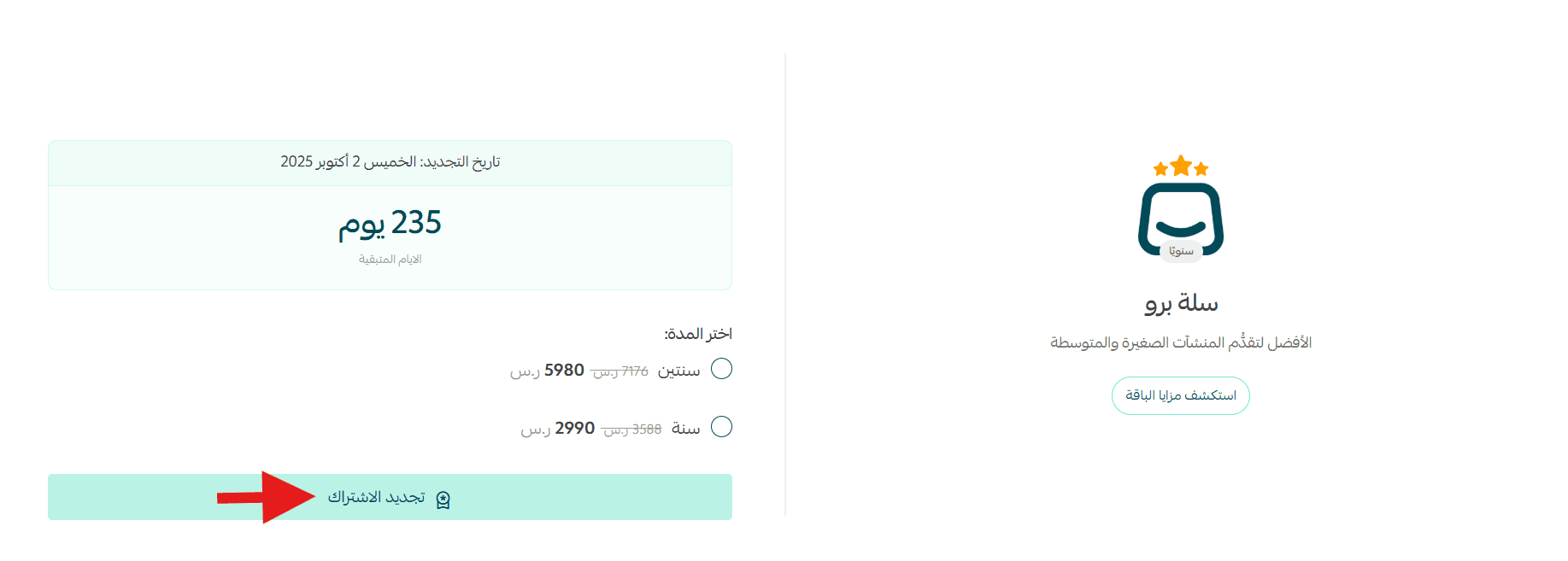
1. Start renewal
Click Renew Subscription.
2. Complete payment
Choose the payment method that suits you, complete the payment details, then click Confirm Payment.
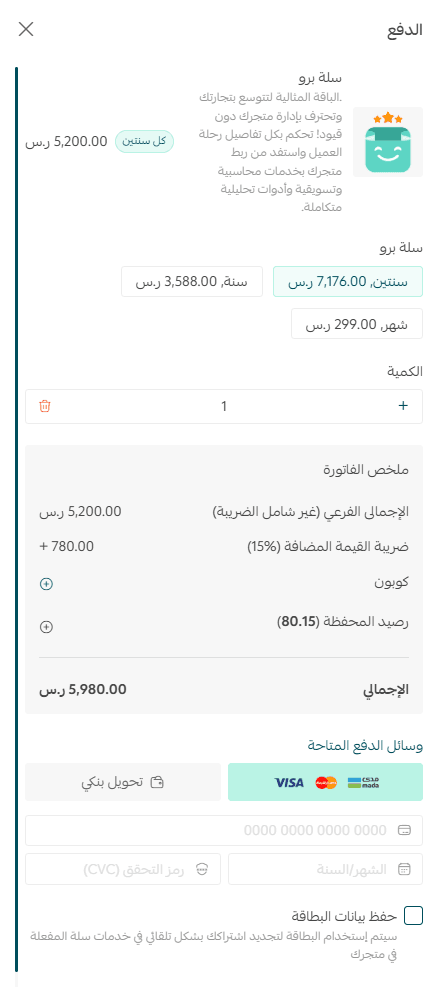
If you choose bank transfer, you can upload up to four transfer receipts.
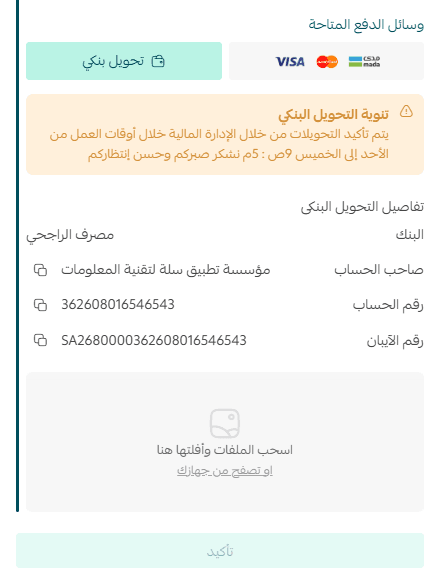
Once the request is processed, you will be able to enjoy the features of your renewed plan.
Bank Transfer Rejection Handling
⚠️ If your subscription renewal request is rejected when using bank transfer, a notification explaining the reason will appear on the Store Plan Management page.
You can:
Click Resubscribe to submit a new subscription request

Review the uploaded attachments from the View Subscription Request page and resubmit
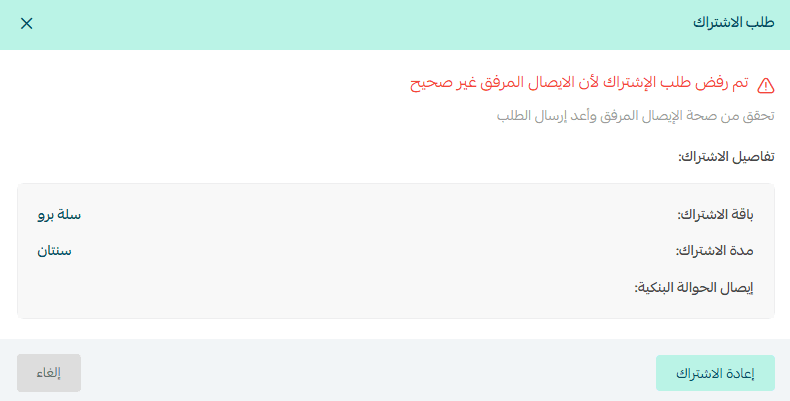
This ensures full visibility and control over your subscription process.
Cancel Automatic Subscription Renewal
✅ Automatic renewal is enabled by default after subscribing to a store plan.
Steps to disable automatic renewal
- From the All menu under the Payments section, click Wallet and Invoices.
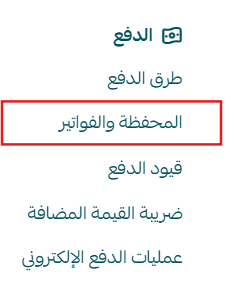
- From the tab bar, click Wallet and Invoices.

- In the Active Subscriptions section, click the three dots, then select Disable Automatic Renewal.
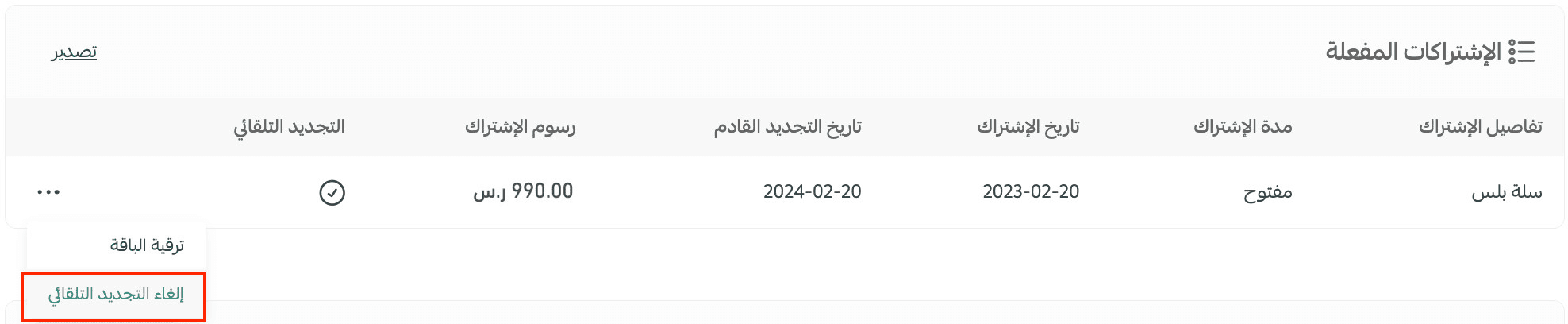
To enable automatic renewal again
From the Wallet and Invoices page, go to Active Subscriptions, click the three dots, then select Enable Automatic Renewal.
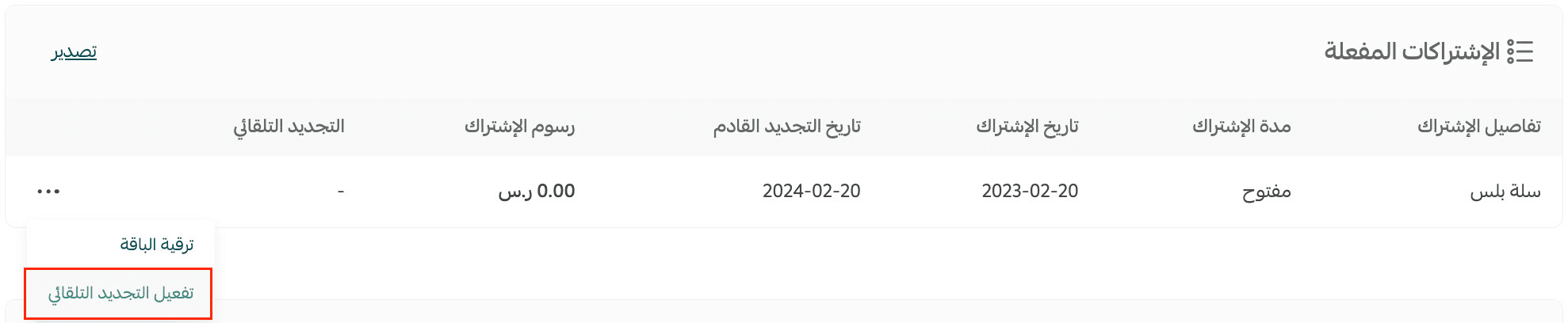
📝 Important note: Automatic renewal cancellation is available only once and only during the store’s first subscription.
Practical Examples for Choosing the Right Plan
Salla Basic Plan | Free Start
Start your ecommerce journey for free with unlimited products and sales and no commissions.
💡 Practical example
A small online store selling local souvenir gifts. The merchant offers a limited product range and wants to start selling online without extra costs.
The Salla Basic plan allows the merchant to launch for free, sell unlimited products, and grow gradually without financial pressure.
Salla Plus Plan | Advanced Capabilities
Deliver a better customer experience with multiple payment options and integration with major shipping companies so you can grow with confidence.
💡 Practical example
An online store specializing in ready-to-wear clothing. The merchant wants to provide flexible digital payment options and reliable shipping partners.
The Salla Plus plan supports this goal by improving checkout confidence, logistics efficiency, and overall customer trust, helping the store attract more customers and increase revenue.
Salla Pro Plan | Professional Ecommerce Growth
Advanced tools designed to support scaling and expansion, with marketing features and social media integrations that help you manage your store professionally.
💡 Practical example
An online store selling electronics and tech products. The merchant plans to expand locally and internationally and needs advanced marketing tools, social media integration, and campaign management.
The Salla Pro plan provides the features needed for growth, including multi-branch and multi-employee support, helping the merchant manage operations efficiently and deliver an exceptional customer experience.
Frequently Asked Questions
How can I pause my Salla plan subscription?
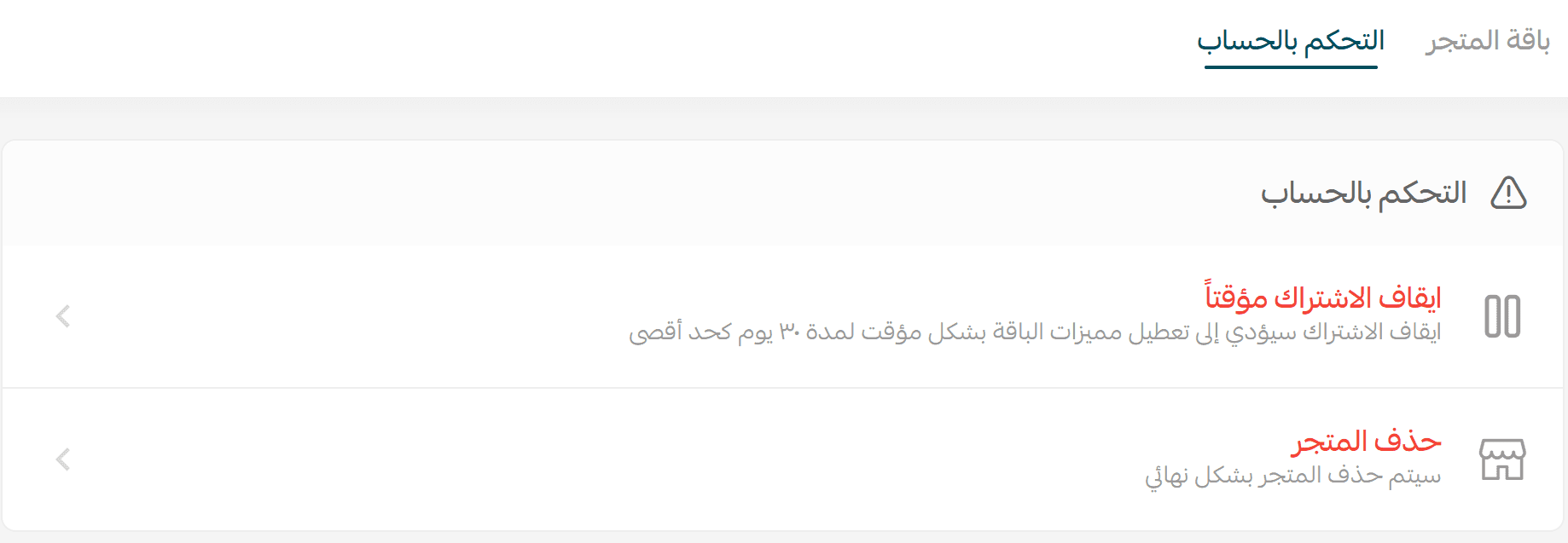
You can temporarily pause your subscription for Salla Plus and Salla Pro annual plans for up to 30 days at no cost, with a maximum of two pauses per year.
Steps to pause your subscription
- From the side menu in the control panel, click Store Plan.
- From the Settings tab, click Account Control.

- Manage the subscription pause options based on your needs.
Final Takeaway
Choosing the right Salla Store Plan helps you build confidently, scale efficiently, and invest only in what your business truly needs.
Whether you are just starting or preparing for growth, Salla plans give you the flexibility, tools, and control to move forward with clarity.
Review your options, choose wisely, and let your store grow at the right pace.