You can now easily activate Salla Chat WhatsApp notifications and purchase credit to ensure faster and more effective communication with your customers.
In this article, we walk you through the steps to set up WhatsApp notifications and customize them based on your store’s needs.
📌 Article overview
- How to access Salla Chat WhatsApp notifications
- Managing WhatsApp notification settings
- Purchasing WhatsApp credit points
- Message pricing guide by region and message type
How to access Salla Chat WhatsApp notifications
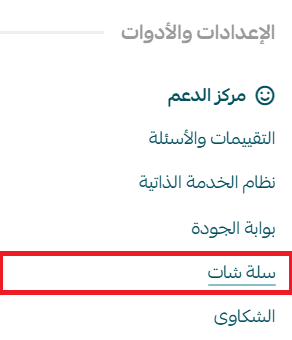
- From the main menu, click Salla Chat
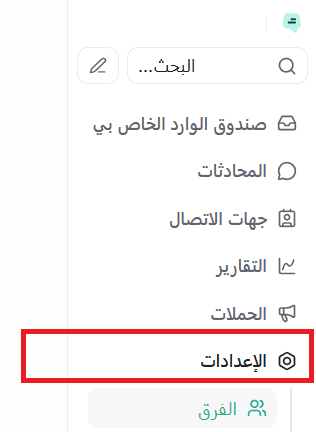
- From the Salla Chat menu, click the Settings icon
- Then select WhatsApp notifications
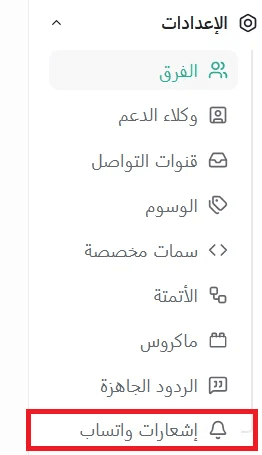
📝 Important note: The WhatsApp notifications option appears and is automatically activated once WhatsApp is enabled as a communication channel in Salla Chat. No separate installation is required.
Managing Salla Chat WhatsApp notification settings
1. Verification code
Instead of sending verification codes via SMS, they can be sent directly to the customer via WhatsApp.

2. Conversation request
A notification sent to the customer to initiate an instant WhatsApp conversation.

3. Order notifications
You can enable order-related notifications via WhatsApp instead of SMS, such as:
- Order received
- Payment link
- Order status updates
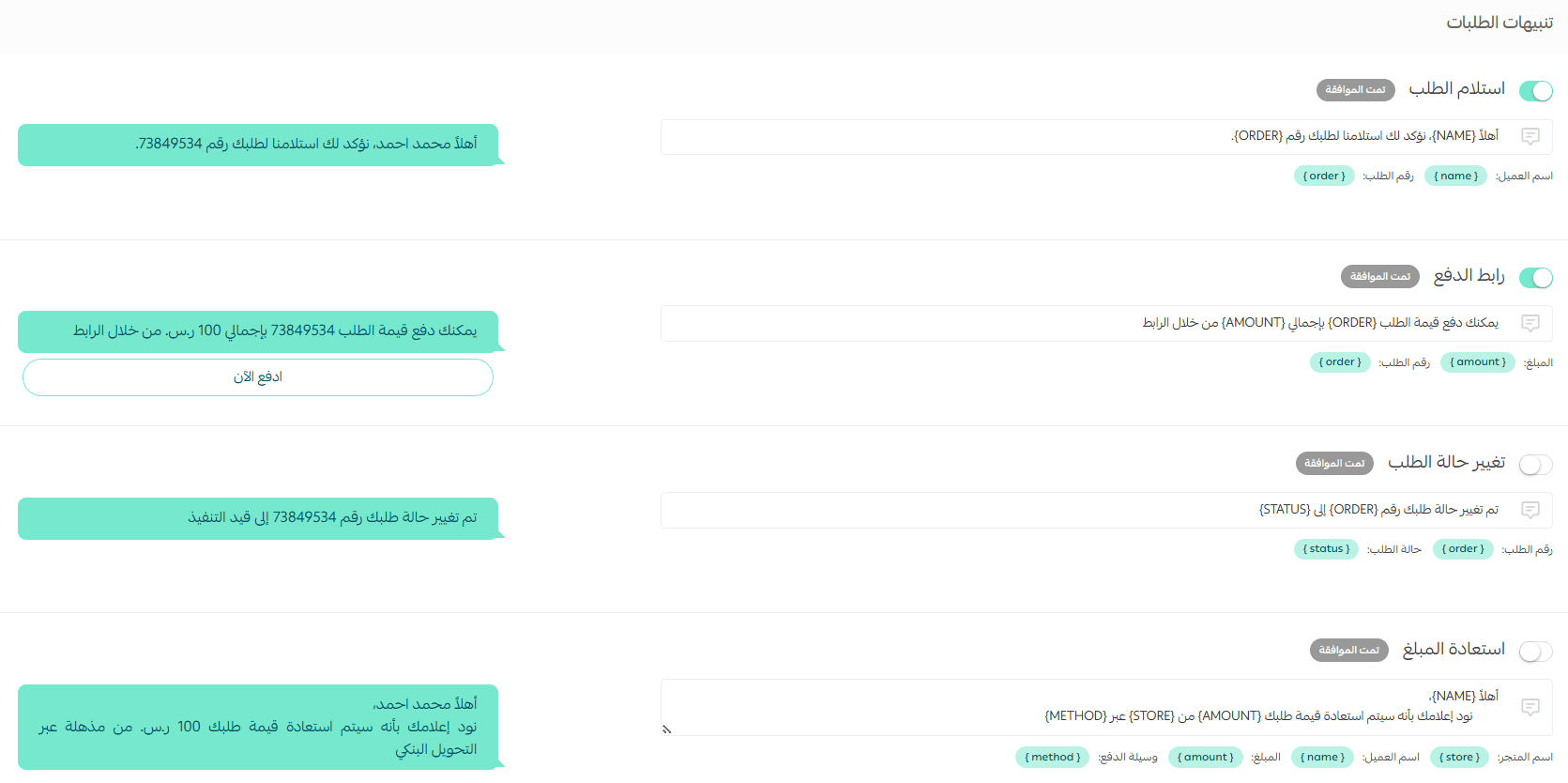
You can also send:
- Refund notifications via WhatsApp

- Order review requests via WhatsApp

4. Employee notifications
Send WhatsApp alerts to employees when they are assigned to follow up on an order.
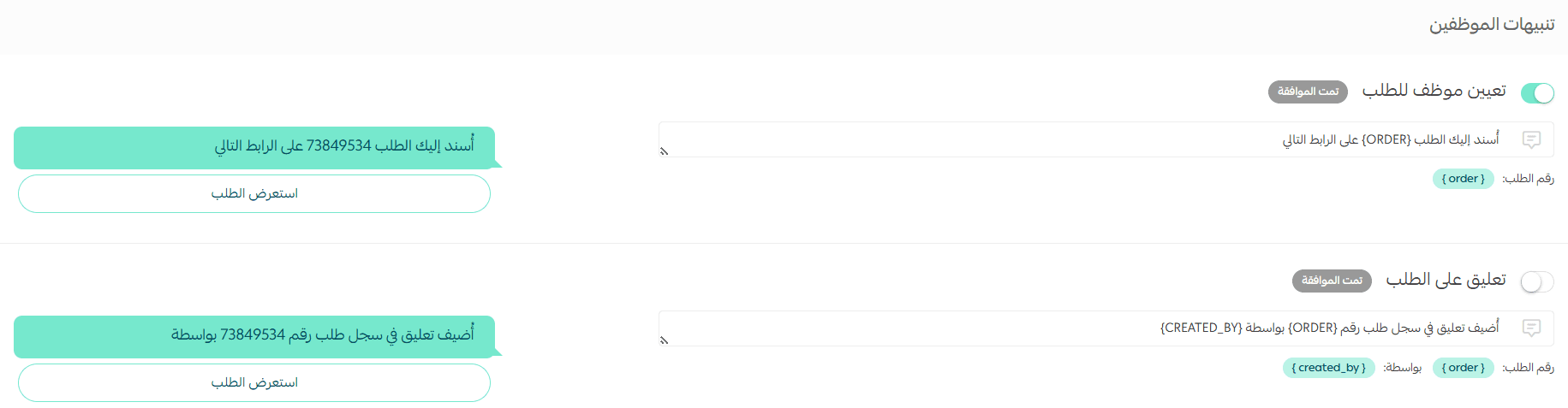
For more details, refer to the assigning orders to employees article.
5. Product notifications
Customers will receive a notification when a product they are interested in becomes available.

6. Abandoned cart notifications
Set up messages sent to customers for abandoned carts, with or without discounts.
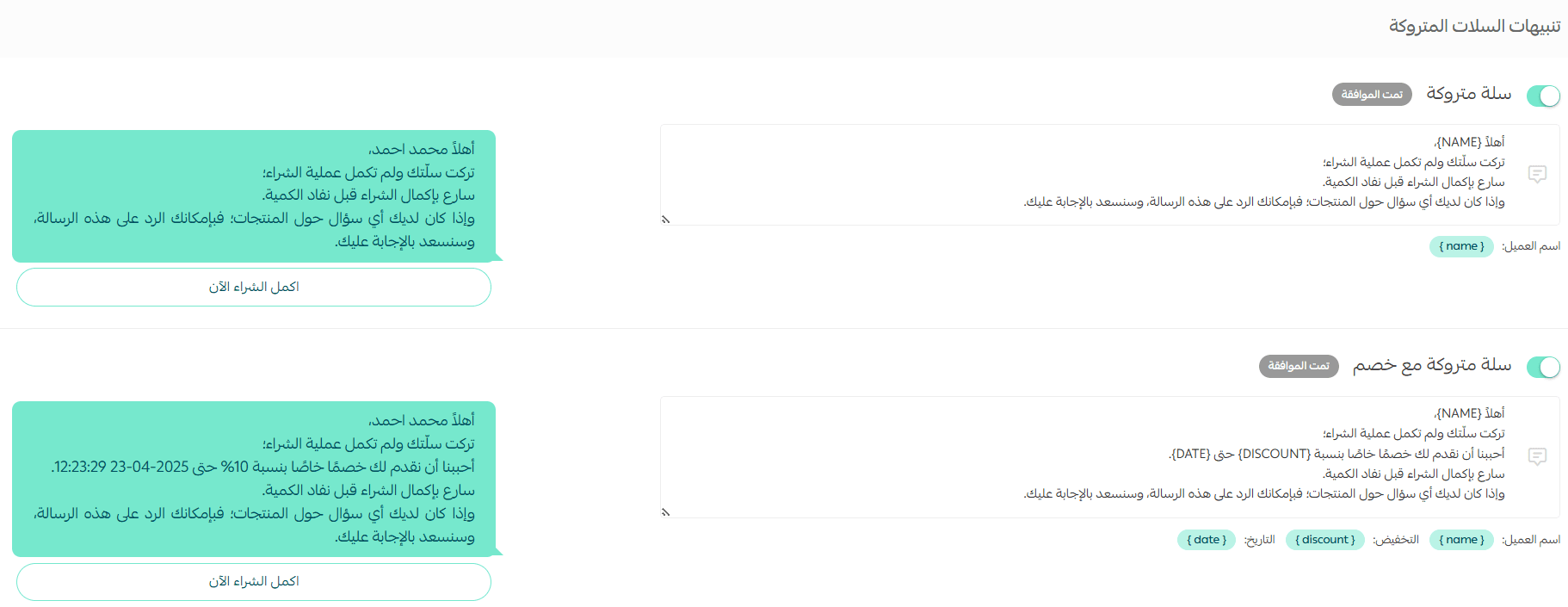
🔔 Note: To enable abandoned cart notifications within reminder settings, the merchant must have sufficient wallet balance.
For more details, refer to the abandoned cart reminders with discounts article or the abandoned cart reminders without discounts article.
📝 Important notes:
- After activating one or more WhatsApp message templates, they are submitted for review by Meta (WhatsApp’s parent company).
- Approval takes up to 48 hours, after which you can start using the templates to send messages automatically.
💡 Example: If you activate a template like “Your order has been received successfully”, it will not be sent immediately. Only after Meta approves it can the message be automatically sent to customers.
Purchasing WhatsApp credit in Salla Chat
In Salla Chat, messaging via most platforms is free, except WhatsApp, due to additional fees imposed by Meta.
To send WhatsApp messages, you need to top up your points balance:
- Click the (+) icon to add credit

- Select the number of points by entering the amount, then click Confirm payment
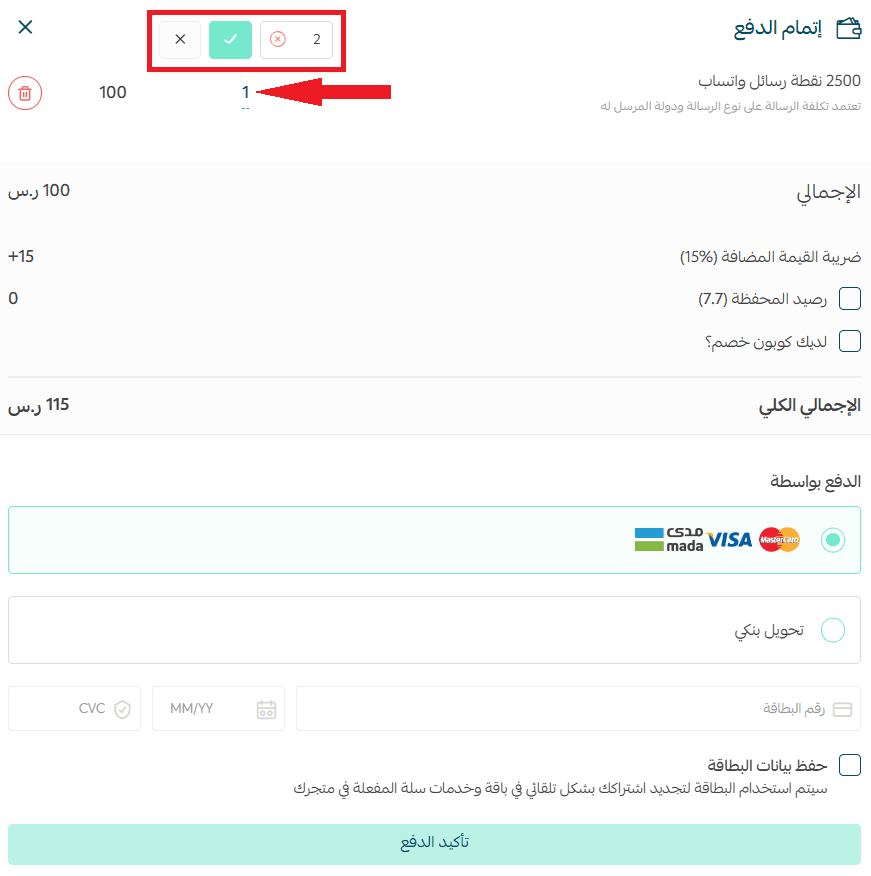
📝 Note: For every SAR/AED 100 added, you receive 2,500 points to use for sending WhatsApp messages.
Message pricing guide by region and message type
Message types
Message pricing varies depending on the type:
- Marketing messages
Promotional messages such as product recommendations, abandoned cart reminders, etc. - Utility messages
Informational messages such as booking confirmations or invoices, which may include links or attachments. - Service messages
Messages initiated by you or your team to communicate with customers or respond to inquiries. - Authentication messages
Verification messages such as OTPs, account recovery, or identity confirmation.
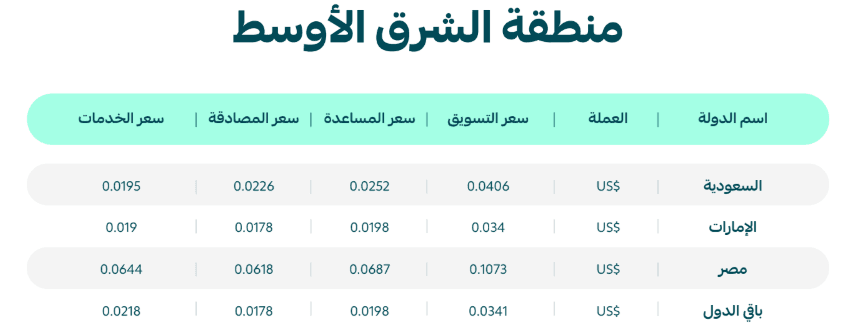
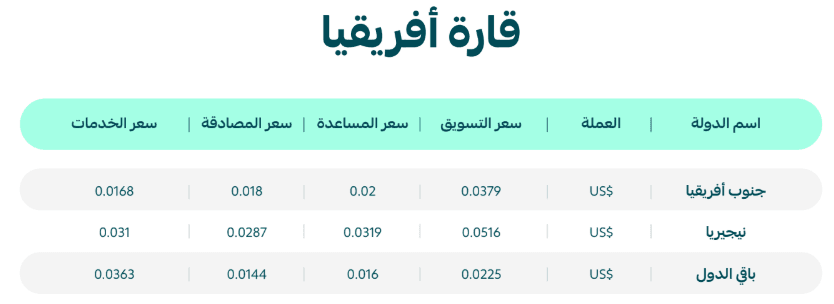
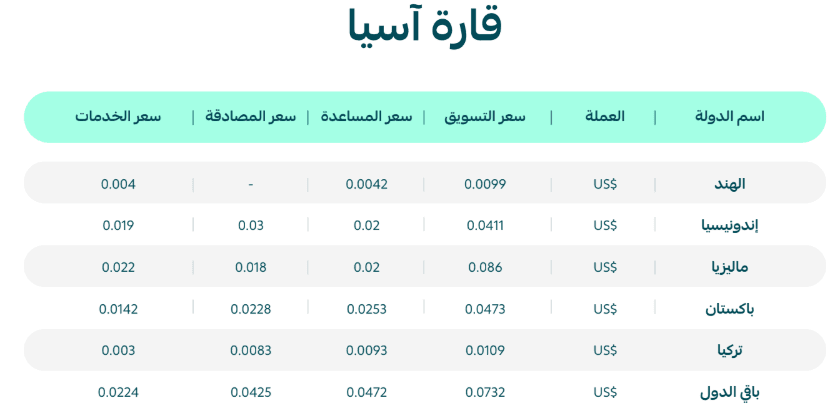
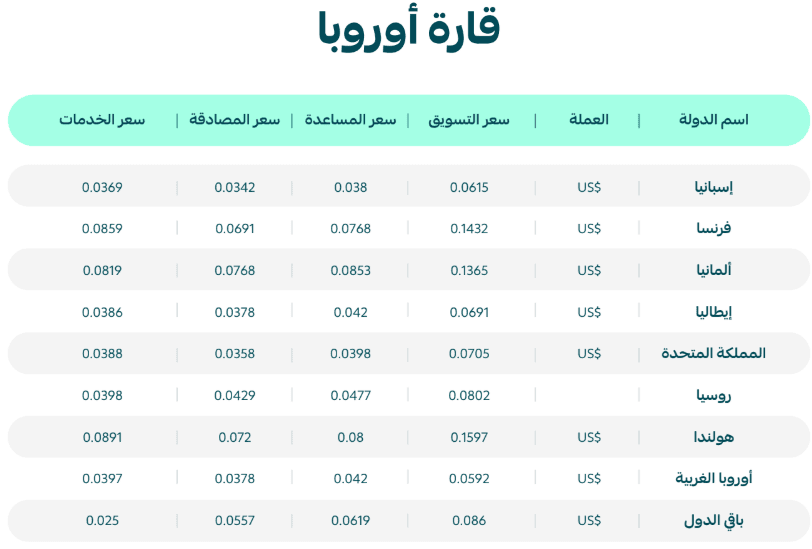
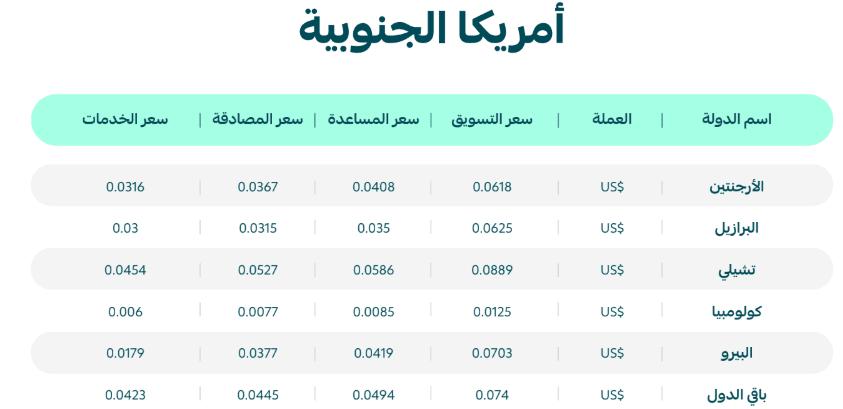
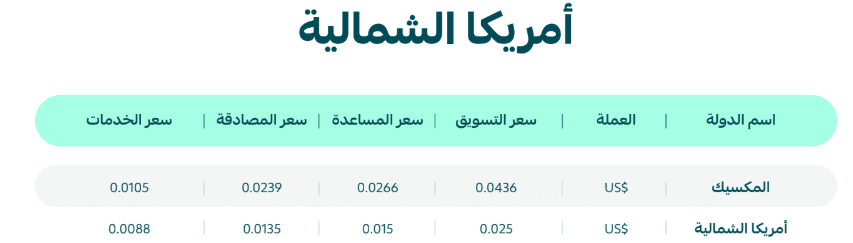
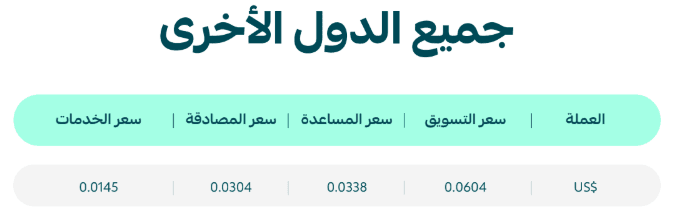
Message pricing by region
Pricing varies depending on the destination region:
- Middle East
- Africa
- Asia
- Europe
- South America
- North America
- Other countries
How message pricing is calculated
To calculate how many points will be deducted per message:
- Set message type (e.g., marketing, service, etc.)
- Select the destination country
- Match the message type and country in the pricing table
- Find the price in USD (e.g., $0.015)
- Multiply by 100 to get the number of points
Example: The cost of a marketing message inside Saudi Arabia is $0.0406
So the deducted points will be: 0.0406 × 100 = 4.06 points