When dealing with a large number of orders, updating their statuses manually can become time-consuming and exhausting, especially when refunds need to be issued or loyalty points must be returned to customers.
Salla now provides additional options within the order status update experience using an Excel file, making order management more flexible and comprehensive.
With these new settings, you can perform multiple actions, such as issuing refunds or returning products to inventory, in bulk and in a secure way.
📌 Article overview
- Options for updating orders using an Excel file
- Steps to update order status by importing an Excel file
- Practical use cases for updating order statuses
- Frequently asked questions
Options for updating orders using an Excel file
Using Excel to update orders allows you to:
- Save significant time and effort when managing large numbers of orders.
- Maintain accurate order, inventory, and loyalty points data.
- Execute financial or logistical operations directly during the file upload process without handling each order individually.
When importing the Excel file to update order statuses, the following options will appear:
- Refund order amounts to customers: Return the payment amounts for all orders included in the file.
- Return order products to inventory: Restore products from canceled orders back to stock.
- Deduct loyalty points earned from orders: Remove loyalty points granted for those orders.
- Return used loyalty points to customers: Add used loyalty points back to the customer’s wallet.
- Update suspicious order statuses: An additional option that allows updating orders with exceptional or flagged statuses.
Steps to update order statuses by importing an Excel file
Stage 1: Export selected orders to an Excel file
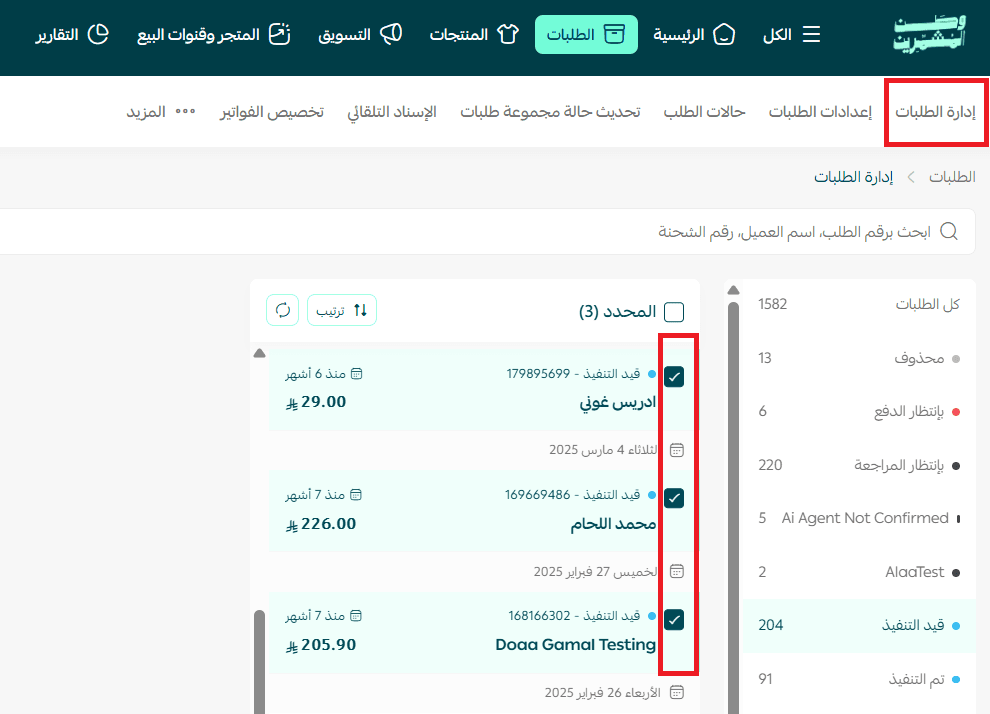
- From the Orders page, select the orders you want to export.
- From the Actions section, choose the file format needed for exporting orders and click Execute Action.
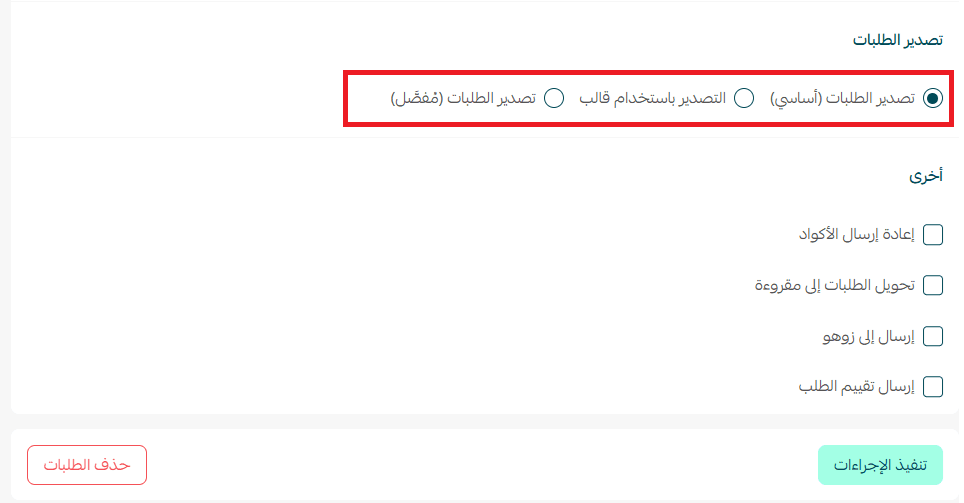
A confirmation message will appear indicating that the process was completed.

3. Download the exported orders file either from the store email or from All → Export Logs.
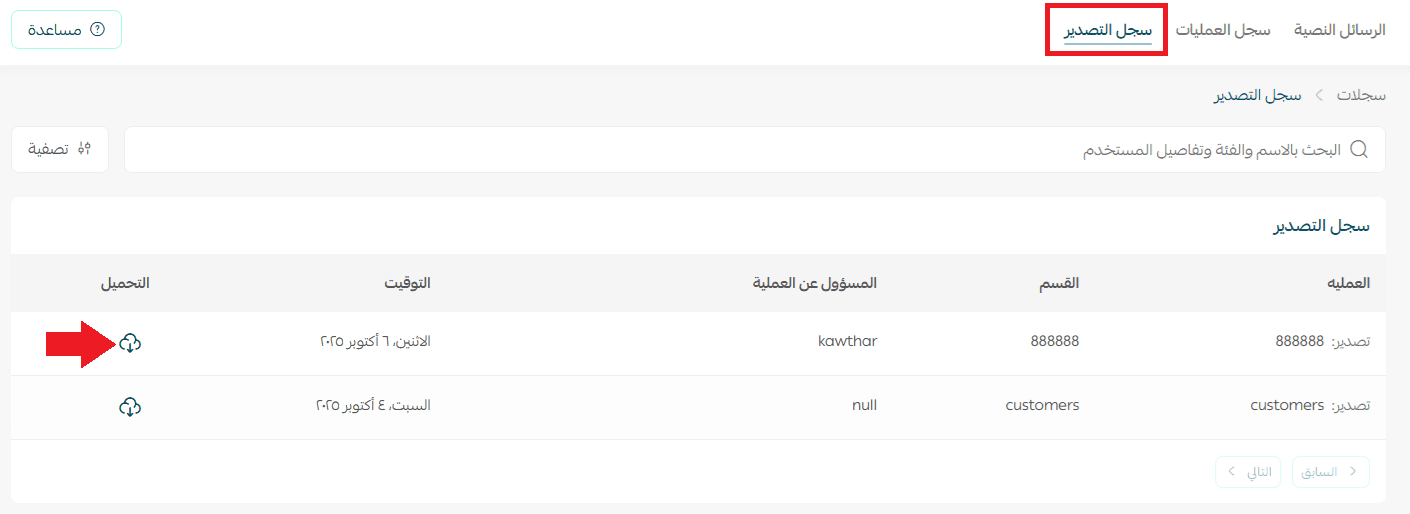
The file will contain the full details of the selected orders.
Stage 2: Modify order statuses and save the file
Edit the required fields in the Excel file, such as:
- Order status
- Loyalty points
For example, you can change the order status to Delivered, as shown in the example.
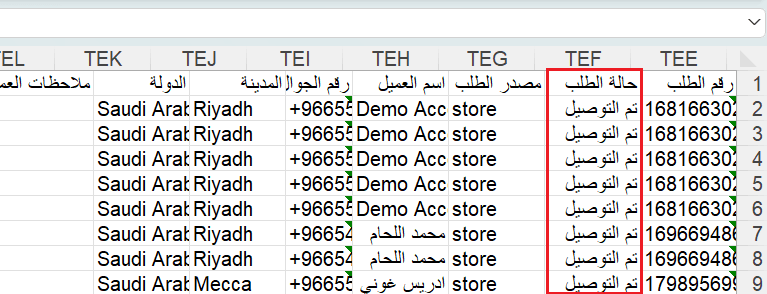
Stage 3: Import the Excel file
- From the Update Multiple Orders Status page, click Select File, then choose the Excel file to upload.
- After selecting the file, choose the desired import options, then click Save.
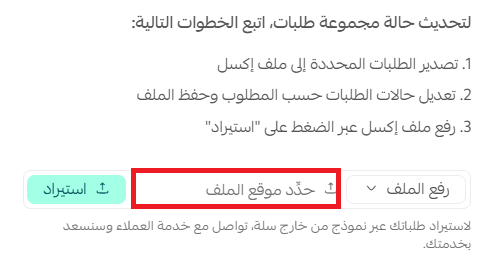
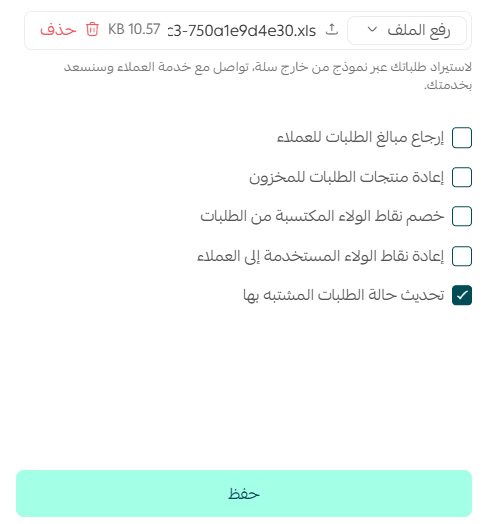
The system will begin updating the orders.

3. To verify the updated orders, search for any of the modified orders in the orders page and confirm their new status.

Practical use cases for updating order statuses
Processing refunds in bulk
Instead of processing each return individually, a merchant can export all returned orders within a specific period (e.g., a week), refund the payments, and restore products to inventory in a single process, saving time and reducing errors.
Managing loyalty points accurately
When adjusting loyalty campaigns or rewards programs, merchants can deduct points earned from older orders or return used points to customers directly through the Excel file, maintaining loyalty program credibility.
Updating orders by shipping company or branch
Merchants working with multiple shipping companies can update order statuses for each shipping provider in bulk or update orders shipped from a specific branch without manually filtering each order.
Handling suspicious or exceptional orders
If certain orders contain warnings or errors, merchants can temporarily bypass protection settings and update statuses for flagged orders to speed up operations without manually handling each case.
Restoring inventory for large order cancellations
If a batch of orders is canceled due to an error or a marketing campaign issue, merchants can quickly restore sold products back into inventory while updating order statuses and notifying customers.
Periodic analysis and operational improvements
Merchants can export orders from a specific period, update their statuses, and analyze the update data to identify patterns—such as frequently delayed orders or high refund rates—to improve processes and make strategic decisions.
Frequently asked questions
Can I update only specific orders?
Yes. You can filter orders by status, shipping company, payment method, or date range before exporting and updating them using the Excel file.
What happens if I use an incorrect status in the file?
The system will display an error message indicating that the status is invalid, and the update will not proceed until the format is corrected.
Can I refund amounts or loyalty points for multiple orders at once?
Yes. You can perform all operations, including refunds, loyalty point returns, and status updates—in bulk using the same Excel file.
How can I confirm the operation was completed successfully?
You can verify the results by clicking Operation Logs at the bottom of the page

Where you will see the number of orders that were successfully updated.

Start using the new Excel order update options today to make managing your store’s orders faster, more efficient, and more accurate.