Your product pages are complete. But are they any good?
A filled-in field is not the same as a useful one. A product called "Product 1" has a name, and a description that says "excellent smartwatch" has a description, yet neither helps a customer decide. That is the gap the product content quality score closes: instead of checking only whether your data exists, it judges how well your product name, description and main image actually do their job. In this guide, you'll learn how the score is calculated, how to read the feedback on a low-scoring field, and how to use the AI suggestions to improve a product before you save it.
Salla's product content quality score rates the name, description and main image on every product page, using AI to judge the quality of what you wrote rather than just whether the field is filled. Where the name, description or SEO title needs work, AI suggests a replacement you review before saving.
📌 Article overview
- How the content quality score works
- How to view and improve a product's quality score
- What AI improves
- How to read the quality feedback
- Best practices for a higher quality score
- When this feature helps most
- Frequently asked questions
🎯 How the content quality score works
The system rates three elements on each product page:
- The product name.
- The product description.
- The main image.
The score combines two sources:
- The content quality judged by AI, which accounts for 65% of the score.
- The existing data quality rules, such as whether a field is filled and how many words it contains, which account for the remaining 35%.
So the number you see reflects the real quality of your content, not simply the presence of data.
💡 Note: If AI cannot run for any reason, the system falls back to the previous scoring method automatically, with no interruption to the service or to how quality scores are displayed.
👣 How to view and improve a product's quality score
1. From the main menu, click (Manage products). A quality score appears next to every product in the list, along with an alert on the products that need attention.
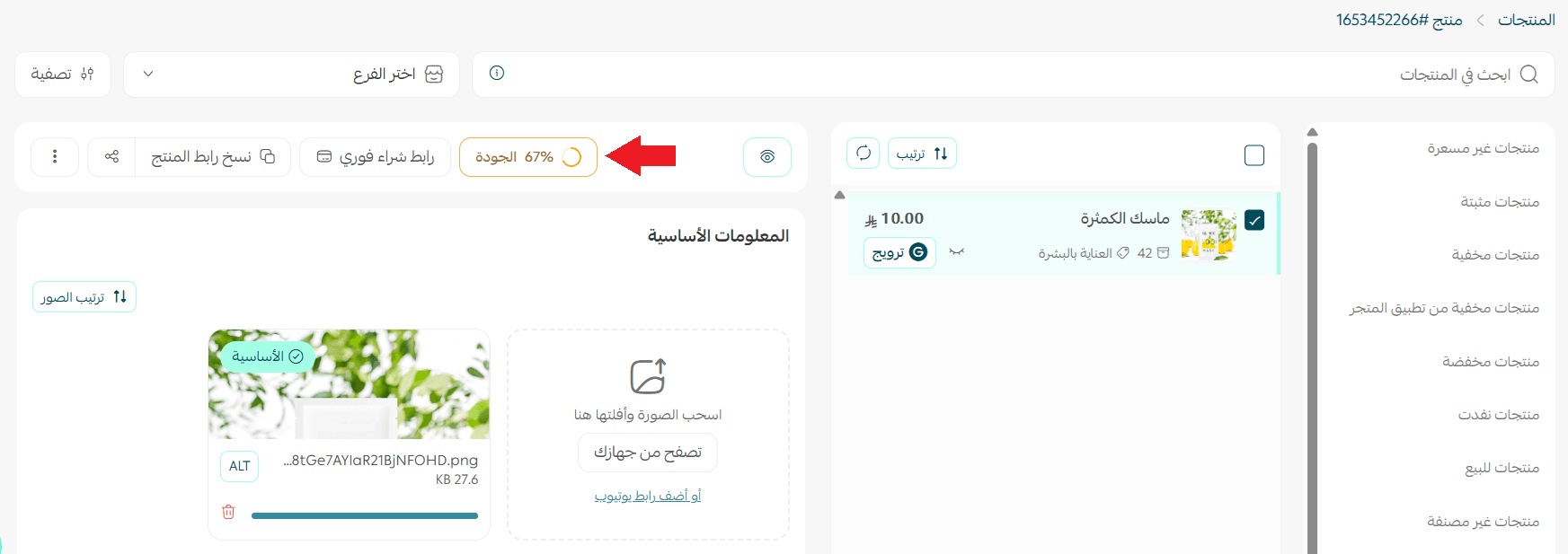
2. Click the product you want to review to open its quality score details.
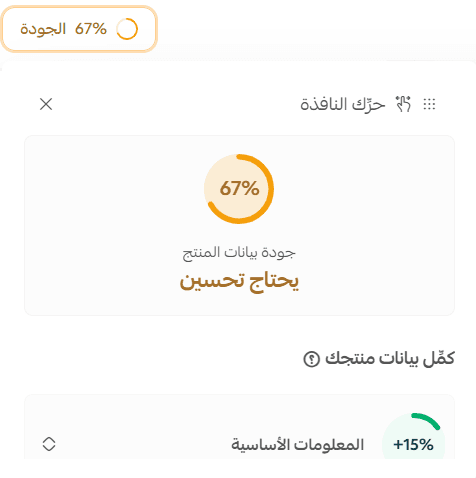
3. Hover over any element with a low score, such as the product name or the description, to read why the score is low, for example "no description".
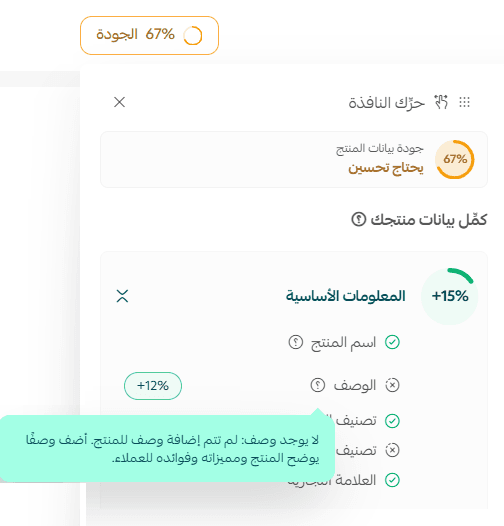
💡 Note: AI rates three main elements on the product: the name, the description and the main image. Each one gets a rating that reflects the quality of the content, not just whether it exists.
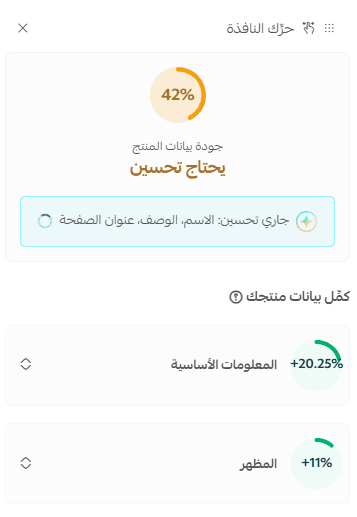
4. Check whether the (Improve product quality) button appears on the product page. It only shows up when the product name, the description or the product page title (SEO) needs work.
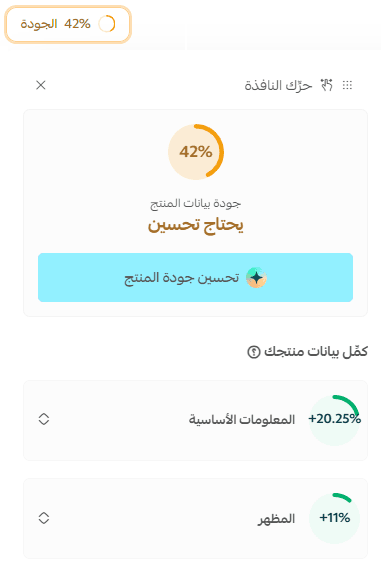
5. Click (Improve product quality). AI then generates new suggestions for the product name, the description and the page title (SEO), based only on the data already stored on the product.
6. Review the suggestions shown inside the fields. You can handle each field independently of the others:
- Accept the suggestion as it is.
- Edit the suggestion manually before saving.
- Reject the suggestion and revert the field.
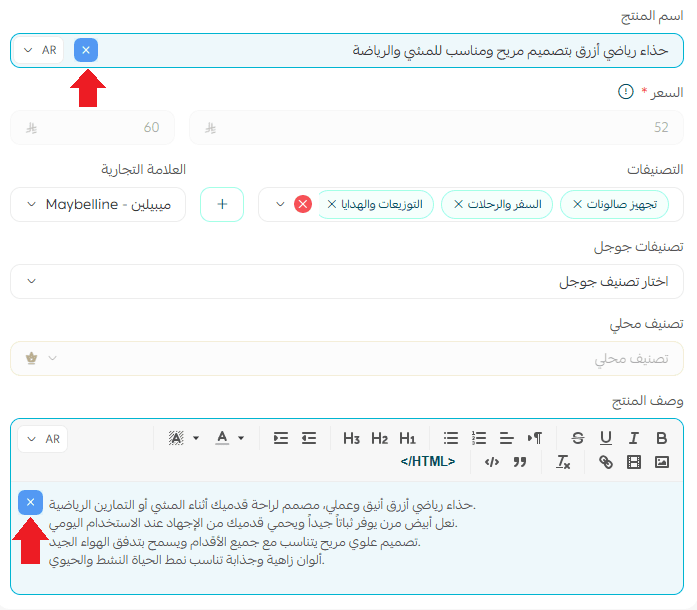
✅ Good to know: AI never edits your product data directly. It works only from the information already on the product, and it will not invent specifications, features or claims that are not there.
7. Click (Save) to apply your choices to the product. Nothing is saved before you do.
If the low score comes from something else, such as the main image, the category or the options, the system shows you the reason and recommendations for fixing it, and the (Improve product quality) button does not appear for those cases.
🤖 What AI improves
AI suggests improvements to:
- The product name.
- The product description.
- The page title (SEO).
Every suggestion is generated from the product data you already have, with no information or specifications added from outside it.
📝 Important notes
Nothing is applied automatically, and no change is saved until you approve it and click save.
You can edit or reject any suggestion before saving.
AI works only from existing product data and does not add information that is not available.
Improvement suggestions are currently generated in Arabic only. English content is not modified.
🔍 How to read the quality feedback
When a field scores low, a message explains why and tells you what to do about it. The message you see depends on the rating that field received.
Product name
Rating | What the message asks you to do |
Good | Add one key detail that sets the product apart, so the name is more precise and easier to spot in search results. |
Needs improvement | Add what distinguishes the product, such as the brand, the model or the version, to improve its chances of appearing in search. |
Weak | Don't stop at codes or numbers. Add the product type and its most important features so it can be found in search. |
Very weak | Rewrite the name so it states what the product is and includes the details customers search for. |
Product description
Rating | What the message asks you to do |
Good | Strengthen the description by naming the product's benefits or how it is used, to help your customer decide. |
Needs improvement | Explain what the product offers and how your customer benefits, so they can judge whether it fits their need. |
Weak | Add specific information, such as the material, the dimensions, what is included, or how to use it. |
Very weak | Rewrite the description in full so it explains the product and its benefits and gives your customer what they need to know. |
No description | Add a description that introduces the product and sets out its features and benefits for the customer. |
Main image
Rating | What the message asks you to do |
Good | Improve the lighting or the angle so the product and its details stand out better. |
Needs improvement | Cut down the distracting elements and make the product the focus of the shot, so its details read clearly. |
Weak | Replace the image with a clearer one, lit and angled so the shape and details of the product are visible. |
Very weak | Replace the image with one that shows the whole product and lets customers recognize it at a glance. |
No image | Add a clear main image of the product so customers can recognize it. |
💡 Note: The messages you see differ from field to field. All of them exist for the same reason: to help you improve the product content and raise its quality score.
✅ Best practices for a higher quality score
Product name
Aim for a name that is:
- Clear, and describes the product directly.
- Easy to understand.
- Inclusive of the brand or the key specification where it matters.
- Free of internal codes and generic names.
💡 Example:
❌ Product 1
✅ Wireless Bluetooth headphones with noise cancellation
Product description
Make sure the description answers the questions your customer is actually asking:
- What is the product?
- What are its main features?
- How is it used?
- Who is it for?
The clearer and more useful the description, the higher the content quality.
💡 Example:
❌ Excellent smartwatch.
✅ Smartwatch with a 1.8-inch AMOLED display, heart rate tracking, water resistance to 50 meters, and battery life of up to 7 days.
Main image
For a better rating, use an image that is:
- Clear and high quality.
- Showing the complete product.
- Set against a suitable background.
- Free of distracting elements.
🚀 When this feature helps most
Improving a product before you publish it
When you add a new product, check its quality score before publishing to confirm that the name, description and main image are clear enough for customers.
💡 Example: You created a new product, but the name was short and the description carried very little information. After reviewing the score and applying the improvement suggestions, the product page was clearer and ready to publish.
Reviewing low-scoring products
When you notice products with a low quality score, open them to see why, then fix the fields that need attention.
💡 Example: A product scored low because its name was generic, such as "new product". Replacing it with a name that describes the product raised the quality score.
Improving a large catalog gradually
If your store carries a large number of products, use the quality score to decide which products to fix first, and work through them in stages instead of updating everything at once.
💡 Example: Start with your best-selling or most-visited products, then move on to the ones with the lowest quality scores.
Fixing a product page that isn't performing
If a product isn't getting the sales or engagement you expected, the product page may not be making its value clear.
💡 Example: Review the quality score, read the reasons behind it, then improve the product name, description or main image using the recommendations shown.
❓ Frequently asked questions
❓ Why did my product's quality score drop even though all the fields are filled in?
Because the score no longer depends on the presence of data alone, it also measures the quality of the content. A product name or description can exist and still fail to explain the product clearly, which lowers the score.
❓ Which elements does AI rate?
AI currently rates three main elements:
- The product name.
- The product description.
- The main image.
Each one receives a rating that reflects the real quality of the content.
❓ Does AI edit my product data directly?
No. AI only shows its suggestions inside the fields. You can accept, edit or reject each one, and nothing is saved until you click save.
❓ Can AI add information that isn't in my product?
No. Suggestions are based only on the information already in the product data. AI does not add specifications, features or claims that are not there.
❓ Can I edit a suggestion or undo it?
Yes. Review each suggestion before saving, then accept it, edit it or reject it. If you don't save, the original content stays exactly as it was.
❓ When does the improve product quality button appear?
Only when the product name, the description or the page title (SEO) needs improvement. If the low score comes from something else, such as the image, the category or the options, you get recommendations without the (Improve product quality) button.
❓ What happens if AI can't run?
The system automatically falls back to the previous rules-based scoring method, with no effect on how quality scores are displayed or on your experience.
❓ Does the feature work on English content?
Not yet. Improvement suggestions are currently generated in Arabic only, and the English version of your content is not modified.
❓ Does the quality score affect how the product appears to customers?
The quality score is an indicator that helps you improve your product content. The clearer and more complete that content is, the better the experience for your customers, and the more it can support how your product pages appear in search engines and how often they convert.
Let AI help you write stronger content for your products, while the final decision stays with you.