Do you know how much store credit your customers are sitting on, and how much of it they actually spend?
Wallet credit is money you have already committed. It comes back to you as repeat orders when customers use it, and it quietly expires when they don't. The customer wallet report in your Salla dashboard tracks every movement of that credit: what was added, where it came from, what customers spent, and what is still waiting to be used. In this guide, you'll learn how to open the customer wallet report, what each metric means, and how to read the numbers.
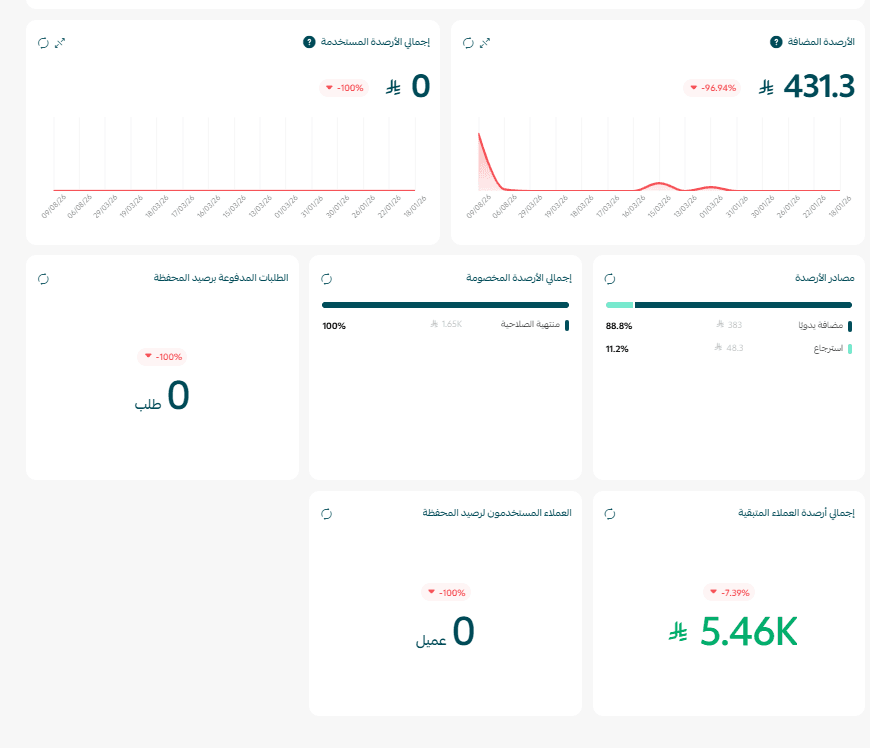
The customer wallet report shows the total credit added to customer wallets, the credit customers used, where the credit came from, the credit that expired unused, the orders paid with wallet credit, and the balance still available across your customers' wallets.
📌 Article overview
- How to open the customer wallet report
- What each wallet metric means
- Practical examples for reading your wallet report
- Frequently asked questions
👣 How to open the customer wallet report
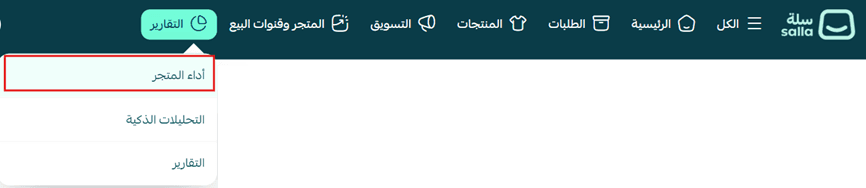
1. From your store's main menu, click (Reports), then choose (Store performance).
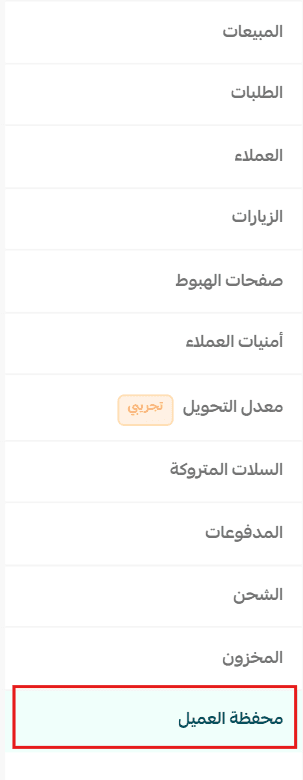
2. Choose the (Customer wallet) report.
🎯 The customer wallet dashboard shows the key indicators for how credit moves through your store: the total credit added and used, where the credit came from, the credit still remaining, and how many customers spent from their wallet. Together they let you see how customers engage with the wallet and where you can improve your rewards programs and lift credit usage.
🎯 What each wallet metric means
Credits added
What is it?
The total amounts added to customer wallets during the selected date range.
Why it matters
It shows how much credit you have granted customers, and which sources of credit are being used most.
Total credits used
What is it?
The total amounts used or deducted from customer wallets during the selected date range.
Credit usage covers:
- Paying for orders.
- Manual deduction by the merchant.
- Deduction through an external API.
Why it matters
It shows how far customers actually spend their wallet credit, and what that does to purchases in your store.
Credit sources
What is it?
The breakdown of added credit by where it came from:
- Cashback: credit earned from purchase rewards and offers.
- Order returns: amounts added to the wallet as a result of returned orders.
- Manual addition: credit the merchant adds to customers directly.
- External API: credit added through external integrations.
Why it matters
It tells you which sources contribute most to your customers' credit.
Expired credits
What is it?
The total wallet credit that expired during the selected date range and is no longer available for customers to use.
📝 Important notes
[Verify: the Arabic source labels this metric "total deducted credits" while the definition it gives describes credit that has expired. Confirm the label used in the dashboard.]
Why it matters
It tracks the credit customers never used, so you can adjust your wallet policy and prompt customers to spend their balance before it expires.
Orders paid with wallet credit
What is it?
The number of unique orders in which customers used wallet credit as a payment method during the selected date range.
Why it matters
It measures how far the wallet has taken hold as a payment method, and what it contributes to purchases in your store.
Remaining customer credits
What is it?
The total credit currently available across your customers' wallets. It counts only positive, unexpired balances.
Why it matters
It tells you how much credit customers can still spend, which gives you a read on the sales the wallet could bring in.
Customers who used wallet credit
What is it?
The number of customers who used their wallet credit to complete at least one order during the selected date range.
Why it matters
It shows how widely the wallet is used across your customer base, and how engaged customers are with your credit system.
💡 Practical examples for reading your wallet report
Example 1: credits added went up
Example:
Last month: SAR 10,000.
This month: SAR 25,000.
What does it mean?
Customers were granted more credit, whether through cashback, returns, or manual additions.
What can you do?
- Check the credit sources to see which program is having the most effect.
- Follow whether customers actually spend that credit and turn it into orders.
Example 2: wallet credit usage dropped
Example:
Orders paid with the wallet fell from 500 orders to 200 orders.
What does it mean?
Customers may not know they have credit available, or they are not finding the right moment to spend it.
What can you do?
- Run campaigns reminding customers of the credit waiting for them.
- Encourage customers to apply their wallet balance during checkout.
Example 3: expired credits went up
Example:
Expired credit rose from SAR 1,000 to SAR 5,000.
What does it mean?
Customers are letting credit run out before they use it.
What can you do?
- Send customers a reminder before their credit expires.
- Review the validity period so it fits how your customers actually shop.
💡 Tip: Do not judge the wallet on a single number. Watch credits added and credits used, the credit sources, and the number of customers spending from their wallet, to get a clear view of what the wallet is doing for your sales.
❓ Frequently asked questions
Where do I find the customer wallet report?
From your store's main menu, click (Reports), choose (Store performance), then choose the (Customer wallet) report.
Where does the credit in a customer's wallet come from?
From four sources: cashback on purchase rewards and offers, refunds from returned orders, credit you add manually, and credit added through an external API integration.
Does "remaining customer credits" include expired balances?
No. It counts only positive, unexpired credit, so the figure represents what customers can still spend today.
What counts as credit being used?
Paying for an order with wallet credit, a manual deduction you make as the merchant, or a deduction made through an external API.
My expired credit keeps rising. What should I change?
Remind customers before their credit expires, and review the validity period. Credit that expires unused is a reward that never earned you a repeat order.
🔥 Review your wallet report regularly to understand customer behavior, measure how well your rewards programs work, and give customers a reason to come back and spend their balance, so loyalty grows and the shopping experience in your store improves.