This guide answers the most common questions about domain management and DNS settings, whether you're just starting, growing your store, or managing advanced configurations.
Beginner stage (Starting your store)
Do I need a custom domain from the start?
You can start with a Salla default domain, but a custom domain is highly recommended early on to build a professional identity and make your store easier to share.
What should I consider when choosing a domain?
- Matches your brand name and identity
- Short and easy to remember
- Preferably registered for a longer period (better for SEO trust)
Do long domain names affect performance?
Yes. Long domains can:
- Confuse users
- Negatively impact search engine ranking (Google, Bing, etc.)
What are the benefits of a custom domain?
- Builds credibility
- Enables branded email (e.g., contact@yourstore.com)
- Easier marketing and sharing
- Supports SEO and analytics tools (e.g., Google Analytics)
Is domain purchase one-time or recurring?
Domains require annual renewal.
What happens if my subscription ends?
- Domain remains active if still valid
- Store reconnects to the domain after subscription renewal
Can I recover an expired domain?
Yes, within 14 days after expiration.
Does adding a domain affect store settings?
No. It only changes the store URL, not products or configurations.
Why can’t I register a domain?
- Your plan may be Basic
- The domain name is already taken
Can I delay domain purchase?
Yes, you can set it up later without affecting your store.
Growth stage (Operating & scaling)
Why doesn’t the domain work immediately?
DNS updates take 24–48 hours. This is normal.
What are the domain options in Salla?
- Transfer domain to Salla
Full control on Salla - Connect external domain
Managed externally, linked to Salla - Buy new domain via Salla
Fully managed by Salla
Should I use Name Server or CNAME?
- Name Server: for main domain only
- CNAME: for main + subdomains
Does changing the domain affect orders?
No. Data remains saved, but it's recommended to update the campaign links.
What happens if I don’t renew my domain?
- Domain becomes inactive
- Store access may stop
- Enable auto-renewal to avoid this
Advanced stage (Multiple stores/restructuring)
Can I use one domain for multiple stores?
No. A domain can only be linked to one store at a time, but it can be transferred.
When is domain transfer rejected?
Usually if the receiving store is on the Basic plan.
Can I cancel a transfer?
- Yes, before entering the verification code
- No, after confirmation
Are fees refundable?
No, once the request is submitted.
What happens to the old store after transfer?
It reverts to the default Salla domain, without affecting data.
Does domain transfer affect SEO or identity?
No. Only the access URL changes.
How long does transfer take?
Up to 7–10 days.
What are the requirements to transfer a domain?
- At least 60 days before expiration, or
- 60 days after registration/renewal
Also required:
- Matching email
- EPP code
- Domain unlocked
- Privacy protection disabled
Where do I get the EPP code?
From your domain provider.
Should I manage my domain in Salla or externally?
- On Salla→ easier management
- Extrerna → more flexibility for advanced setups
Can I permanently lose my domain?
Yes, if not renewed for a long time—it may become available to others.
What is a subdomain?
A subdomain is part of your main domain.
- Example:
- Main domain: mywebsite.com
- Subdomain: store.mywebsite.com
Useful for keeping your main site and store connected.
DNS Settings Management
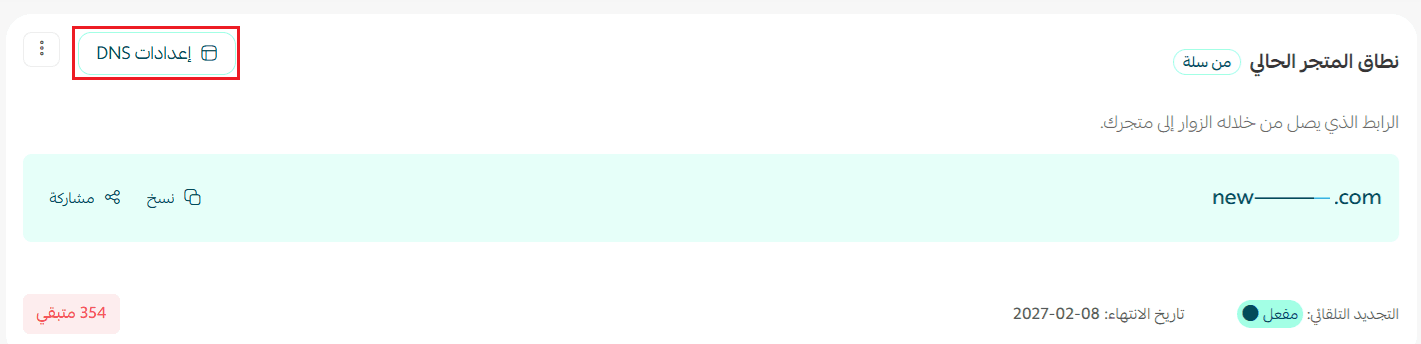
Access DNS settings:
From Store Domain → DNS Settings
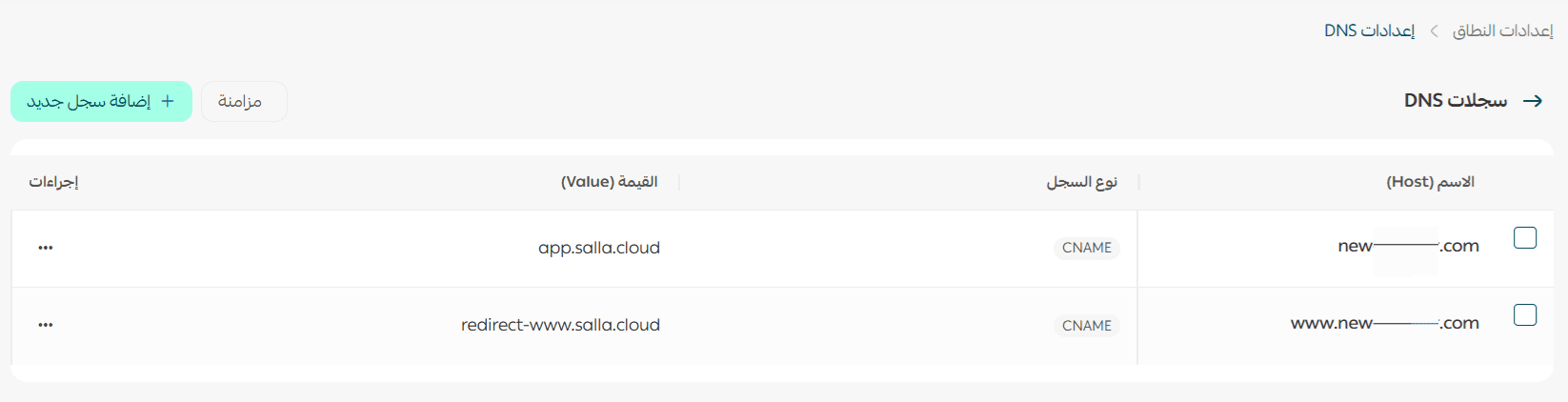
What can you do?
- View all DNS records
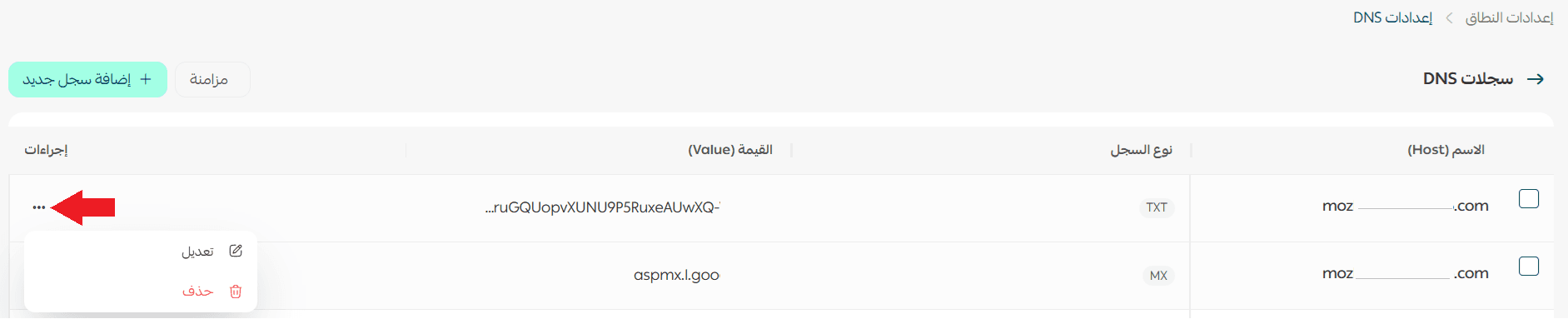
- Edit or delete existing records
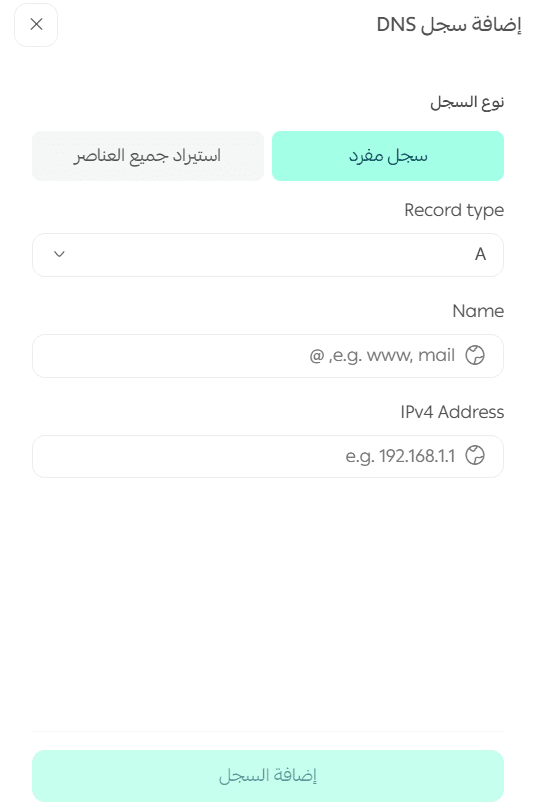
- Add new records
Add a new record:
- Click Add New Record

2. Select record type
3. Enter required values
4. Click Add Record
Tip: Proper domain and DNS setup ensures better reliability, branding, and performance for your store.