As merchant workflows grow and platform capabilities expand, clear and intelligent navigation becomes essential.
The Unified Navigation System is designed to give merchants a smoother and more focused experience. It offers faster access, clearer structure, and full control over all store sections from one place.
📌 Article overview
- The All menu
- Fixed sections and primary links
- Smart usage scenarios
- Frequently asked questions
The All Menu
1. Open the All menu
From the main navigation bar, click All.

2. Explore the full platform structure
A full page menu will appear, displaying all platform sections grouped into clear categories such as Orders, Products, Customers, Marketing, Online Store, and more.
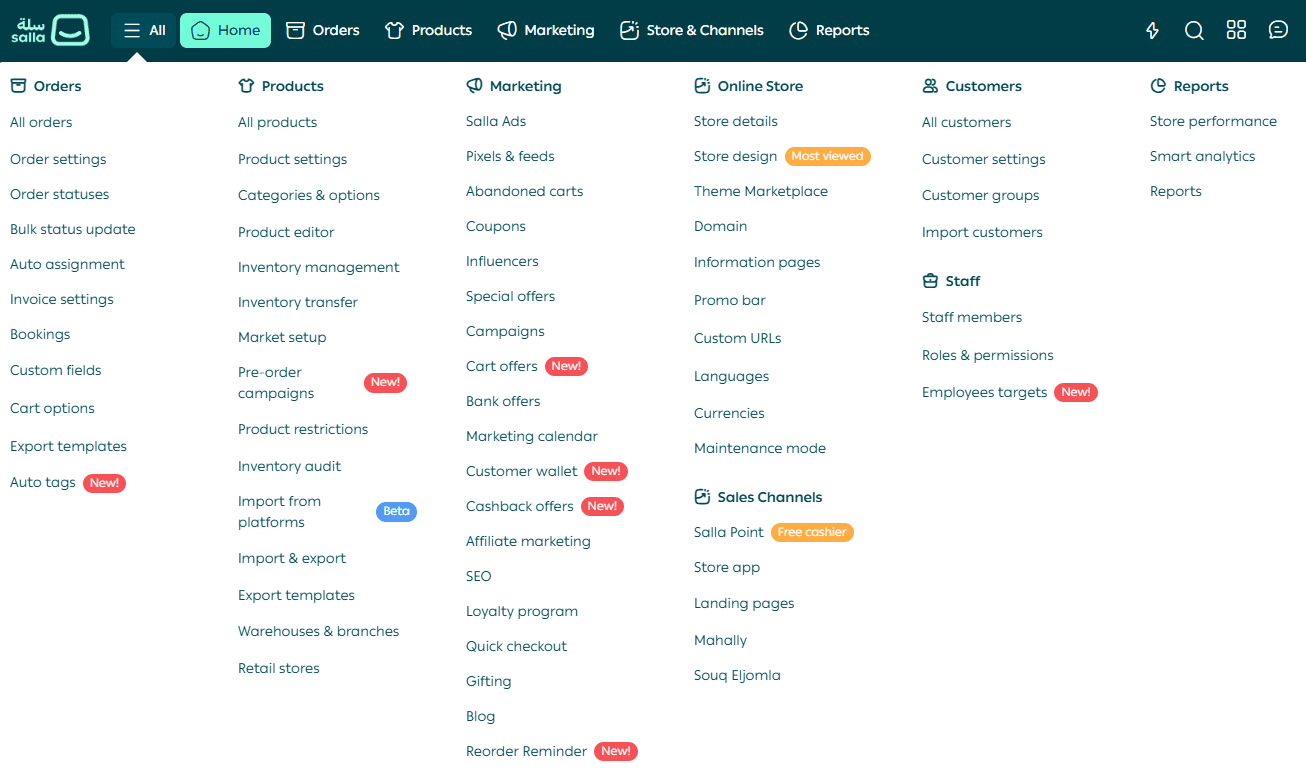
This menu gives you fast, direct access to any page or feature, helping you save time and manage your store more efficiently.
Fixed sections and primary links
At the top of every page within the platform, you will see six primary links.

These links represent the most important sections or pages related to your current context, helping you move between key tasks without losing focus.
Smart usage scenarios
Faster navigation and higher productivity
Use the All menu and fixed primary links together to move quickly and clearly across the platform. This reduces distraction and makes daily tasks easier to complete.
For new merchants
Use the All menu to explore all platform sections and discover features you may not have noticed before. This is an important step toward a confident and successful start.
When handling repetitive tasks
Continue working as usual. The Quick Access Panel will appear automatically and show your most visited pages, making repeat access faster without searching.
During onboarding or training
The Unified Navigation System helps new team members understand store structure and navigation easily, without complex explanations or lengthy training.
Quick access panel
The Quick Access Panel is a smart feature available from the Home section.
It appears automatically and highlights the pages you visit most often.

You can also pin up to 10 favorite pages for instant access, without navigating through menus or searching.
Frequently asked questions
Can I change the order of sections in the All menu?
At the moment, the order cannot be customized. The menu is designed based on the most common merchant usage patterns.
What if I cannot find a page in the primary links?
You can always access it through the All menu in the top bar, or through the More option within the primary links on each page.
Do the fixed links change based on my usage?
The six links remain fixed based on the section you are browsing. In the future, the Quick Access Panel will support personalization based on your preferences.
Is the new navigation system available on mobile?
Yes. The Unified Navigation System is fully responsive and designed to work efficiently across all screen sizes, including mobile devices.
Final takeaway
The Unified Navigation System is built to help you move faster, stay organized, and stay in control.
With clear structure, smart shortcuts, and consistent access across devices, managing your store becomes simpler and more intuitive every day.