Thousands of shoppers open Mahally every day looking for products like yours. Is your store one of the ones they can find?
Mahally is Salla's own sales channel: a single app where customers browse local stores, compare products, and buy without ever leaving the experience. For merchants it is free extra reach, but it comes with a short list of conditions, a few rules about which products show up, and one decision you cannot undo. In this guide, you'll learn the answers to the questions merchants ask most before and after they join.
Mahally is a Salla sales channel that puts your products in front of shoppers browsing thousands of local stores in one app. To list on Mahally you need a Salla store on a paid plan such as Plus or Pro, a verified store, and acceptance of the Mahally terms.
📌 Article overview
- What Mahally is and who can join
- How your products appear on Mahally
- Orders, payment, and shipping
- The shopper's experience
- Leaving Mahally
🎯 What Mahally is and who can join
❓ What is Mahally?
Mahally from Salla is a complete sales channel that lets Salla merchants display and market their products, free of charge, to thousands of new customers in one place. Shoppers can move between tens of thousands of local stores on Salla and millions of products, and search by product name, category, and city.
❓ What are the requirements for listing my products on Mahally?
1. You have a store on Salla.
2. You are subscribed to one of the paid plans, such as Plus or Pro.
3. Your store is verified.
4. You accept the Mahally privacy policy and terms of use.
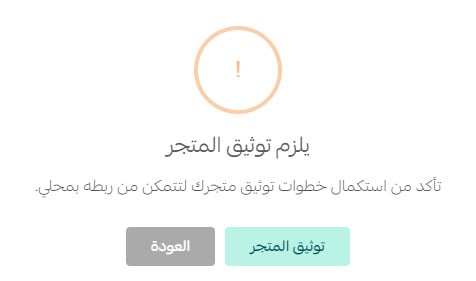
❓ Does my store have to be verified before it can launch on Mahally?
Yes. Your store must be verified before you can go live on Mahally.
❓ Do I need to sign up for a new platform to use Mahally?
No. You can start using Mahally straight from your Salla dashboard.
❓ Are there any fees for selling on Mahally?
No. There are no fees.
🔍 How your products appear on Mahally
❓ Why are some of my products missing from Mahally?
A product priced at SAR 0 will not appear, because Mahally only lists products that can actually be bought.
Products that have sold out do stay visible on Mahally, and shoppers get the option to be notified when the product is back in stock.
To make sure everything shows correctly, give every product a valid price and complete its details.
❓ Does the (Mahally category) option appear for every product type?
It appears for every product except the following types:
- Booking
- Donating
- Financial support
These product types are not displayed within the Mahally categories.
❓ Can I assign a product to more than one Mahally category?
No. Each product can be assigned to one Mahally category only.
❓ Can I choose any category I like for my product?
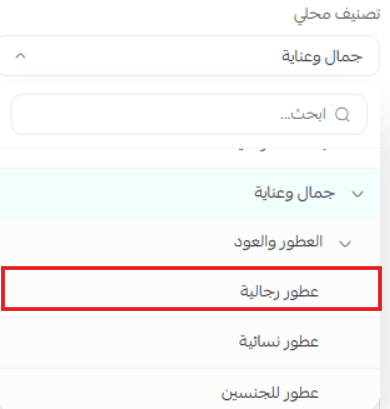
Yes, you can assign your product to whichever category suits it on Mahally, as long as you pick the deepest level in the tree.
💡 Example: The main category (Beauty and care) has several subcategories, one of them (Perfumes and oud), which in turn has its own subcategories, including (Men's perfumes). You cannot assign your product to the main category (Beauty and care) or to the subcategory (Perfumes and oud), but you can assign it to (Men's perfumes). In other words, always choose the last level.
❓ Will my products still appear on Mahally while my store is in maintenance mode?
No. Your products will not appear on Mahally while maintenance mode is switched on in your store. As soon as you turn maintenance mode off, they go back to appearing normally.
🛒 Orders, payment, and shipping
❓ Which payment methods are available on Mahally?
Customers who buy your products on Mahally can pay using the same payment methods you already offer in your store.
❓ Which shipping options are available on Mahally?
Customers who buy your products on Mahally are shipped by the same shipping companies you already use in your store.
❓ Do Mahally orders arrive differently from my store's orders?
No. Orders reach you exactly the same way, with no extra step to take, and you manage Mahally orders using the same process you already use for orders placed directly in your store.
❓ When can a customer rate an order?
A customer can leave a rating immediately after completing the order only for digital products and digital cards.
✅ The shopper's experience
❓ What does a shopper get out of Mahally?
1. Search across more than 60,000 Salla stores.
2. A range of payment methods and fast shipping options.
3. A view of every previous purchase made through Salla.
4. Shipment tracking.
❓ Is Mahally available on the web?
Yes. You can visit Mahally through this link for a comfortable browsing experience.
❓ Can my existing customers sign in to Mahally with their Salla account?
Yes. If you already have customers in your store, they can sign in to Mahally with the same account details and start browsing right away.
❓ How do customers earn supporter badges?
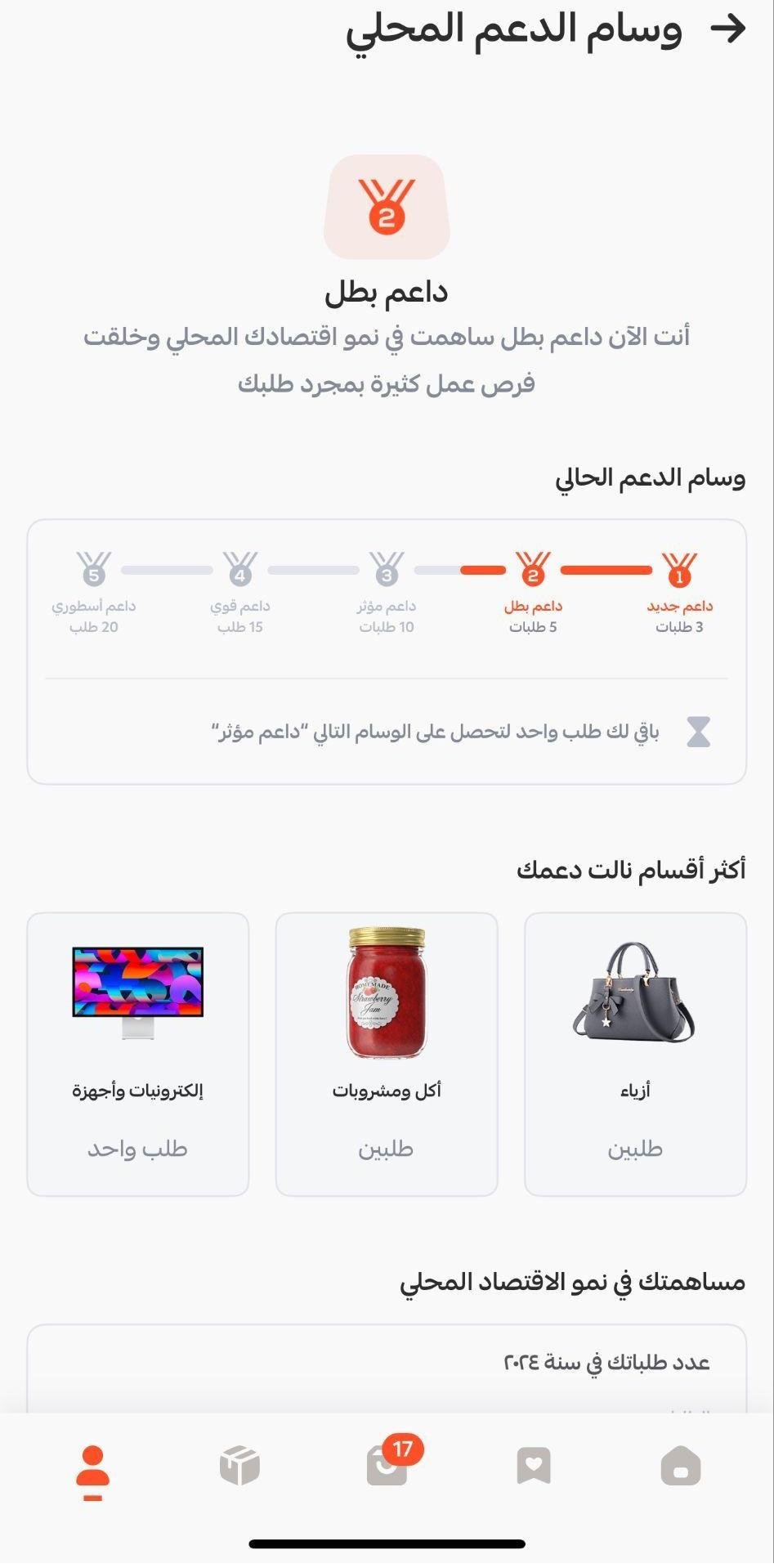
Stage 1: new supporter
- The customer earns the new supporter badge after completing their first 3 orders.
- It encourages new users to keep using the app and order more often.
Stage 2: champion supporter
- After 5 completed orders, the customer earns the champion supporter badge.
- It marks the point where repeat buying is becoming a habit.
Stage 3: influential supporter
- The customer earns the influential supporter badge at 10 orders.
- It reflects how committed and confident the customer has become with the app.
Stage 4: strong supporter
- Once 15 orders are complete, the customer is awarded the strong supporter badge.
- It shows the customer is among the most active and engaged members of the app, and it reinforces their sense of achievement.
Stage 5: legendary supporter
- The customer earns the legendary supporter badge on reaching 20 orders.
- This is the highest badge. It reflects real loyalty and ongoing engagement, and encourages the customer to keep that level of activity going.
📝 Leaving Mahally
❓ Can I leave Mahally after joining?
Once you have joined Mahally, you cannot cancel or opt out, and your listed products will stay visible for as long as they are active.
If you run into any problem, contact your merchant success manager.
📝 Important notes
- Joining Mahally is a one-way decision. Review the terms before you switch it on.
- Verification and a paid plan are both required, so sort those out first if you want to list quickly.
Mahally costs you nothing to join and puts your catalog in front of shoppers who were never going to type your store name into a browser. The work that pays off is on your side of it: complete product data, a real price on every item, and the right last-level category.