Apple Support is Apple’s official service for providing technical assistance and customer support for its products and services. The service is designed to help users resolve technical issues, receive guidance on platform usage, and access the correct resources, while maintaining a high standard of privacy, security, and support quality.
This guide explains how to contact Apple Developer Support via email, step by step.
Ways to contact Apple Support
You can reach Apple Support using the method that best fits your situation:
- Phone
Direct phone calls for immediate assistance, with local numbers available in many regions.
Send a detailed inquiry and receive a written response from Apple Support.
- Live Chat
Communicate in real time with an Apple support specialist for faster assistance.
Steps to request Apple Support via email
1️⃣ Visit the Apple Developer website
Go to the official Apple Developer Program website and click Account.

2️⃣ Sign in with your Apple ID
Log in using an active Apple ID associated with your developer account.

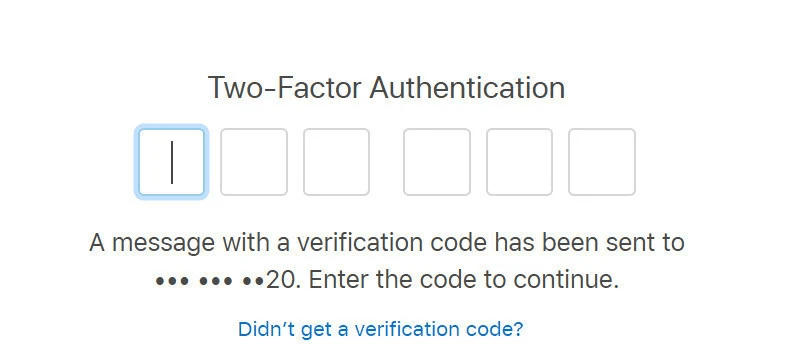
3️⃣ Enter the verification code
You may be asked to enter a verification code sent to the phone number linked to your Apple ID.
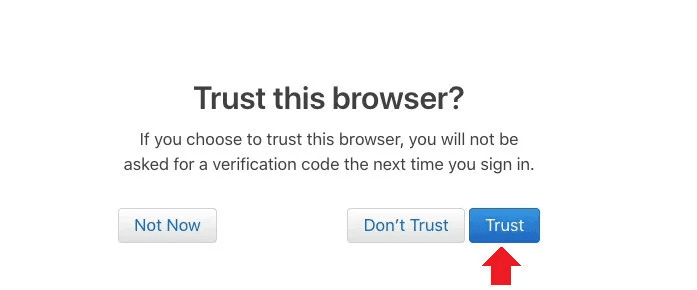
4️⃣ Trust the browser
When prompted, select Trust to continue in the current browser.
5️⃣ Open the support section
After signing in, your developer account dashboard will appear.
Scroll to the bottom of the page and click Contact Us.

6️⃣ Select the support category
From the list of developer support categories, choose:
Membership and Account

This option is used for issues related to developer enrollment, membership status, and account verification.
7️⃣ Choose the issue type
Select the category that best matches your issue, such as:
- D-U-N-S Number
If you’re facing issues entering or validating your D-U-N-S number.
- Program Enrollment
For questions related to enrolling as an Individual or Organization in the Apple Developer Program.

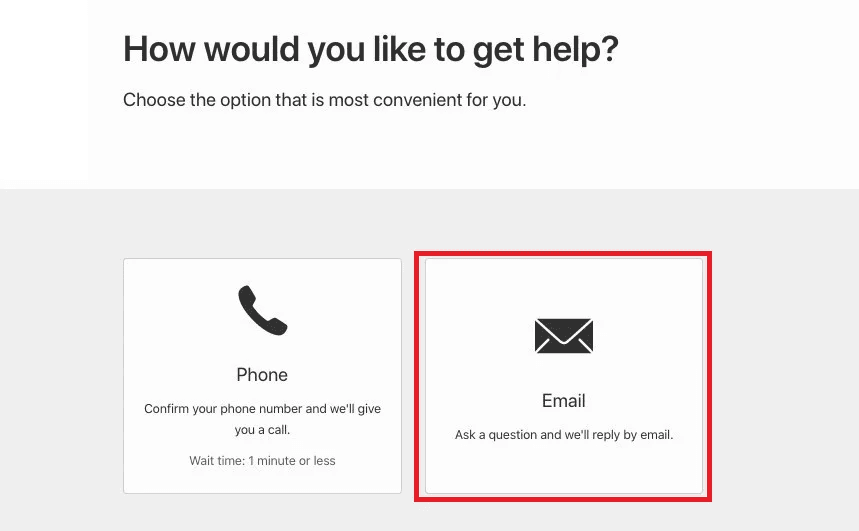
8️⃣ Choose email support
On the “How would you like to get help?” page, select Email.
9️⃣ Write your message
Enter your message clearly in the Message field, then click Submit.

🔟 Wait for Apple’s response
After submitting your request, you’ll receive a confirmation email stating that your request will be reviewed.
Apple Support typically responds within two business days.
📌 Be sure to monitor your email for updates or follow-up requests.
Frequently Asked Questions
What should I do after submitting my email request?
An Apple Support representative will contact you via the email associated with your Apple ID, usually within two business days or less.
To ensure faster resolution:
- Monitor your inbox regularly
- Respond promptly to any follow-up questions
- Upload requested documents if needed
You should also keep your Case ID, which appears after submission, and reference it in any future communication with Apple Support.
What languages are supported by Apple Developer Support?
Currently, Arabic is not supported for Apple Developer Program support. Communication is available in English only. If needed, you may use a translator.
How should I describe my issue in the email?
For best results, include:
- A clear description of the issue
- Your company name
- Your Case ID or Enrollment ID (if available)
Providing complete and accurate details helps Apple resolve your request more efficiently.
💡 You may also request assistance from Salla’s App Support team to help you draft a clear and effective message if needed.