The Mahalk – SHEIN dropshipping app gives you a smoother and more efficient way to manage your online store. With the app, you can access thousands of trending products from platforms like SHEIN and AliExpress and add them directly to your Salla store with just one click.
It also enables automatic order fulfillment and tracking, saving you time and effort, so you can focus on what matters most: growing your sales.
📌 Article overview
- How to install the Mahalk app
- How to activate the Mahalk app
- Managing the Mahalk app
How to install the Mahlak app
- From the main menu, click All, then under Tools, select App Store.
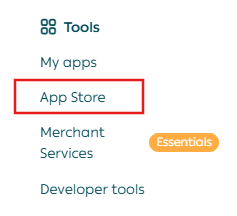
2. Search for Mahalk using the search bar.

3. From the Mahalk app page, click Install.

The Mahalk app is now successfully installed on your store.

How to activate the Mahlak app
- After installing the Mahalk app, you will receive a WhatsApp message containing your login credentials for your new Mahlak account.

2. Once you log in, the app’s dashboard will appear, allowing you to start managing products and orders.

For more details, see the guide on adding products.
Managing the Mahalk app
Renewing the app subscription
- From the app page, click Renew Subscription.

2. Select the plan that best fits your store, then click Proceed to Payment.

3. Enter your card details to complete the payment.

🎉 Congratulations! Your subscription has been renewed successfully.
Deleting the Mahalk app
To remove the app from your store:
- From App Actions, click More.
- Select Delete.

For more details about product types and how to add products using the Mahalk app visit their website.