A temporary storefront is more than just a placeholder: it’s a strategic tool. By customizing your Maintenance Mode page, you can turn downtime into an opportunity to build trust, set expectations, and attract customers before your official launch or relaunch.
This article explains the importance of Maintenance Mode, how to activate it, and best practices for using it effectively.
📌Article overview
- Why Maintenance Mode matters
- Steps to enable Maintenance Mode
- Store under maintenance
- Store in “Coming Soon” mode
- Best practices for using Maintenance Mode
Why Maintenance Mode matters
Maintenance Mode gives you full control over when your store is visible to customers and helps you present a professional image at all times.
Key benefits include:
- Time to prepare your store
Allows you to set up products, design, and configurations without pressure.
- Protecting your store’s image
Prevents customers from seeing an incomplete or unpolished store.
- Full merchant control
Your store remains inaccessible to visitors until it is fully ready to launch.
Steps to enable Maintenance Mode
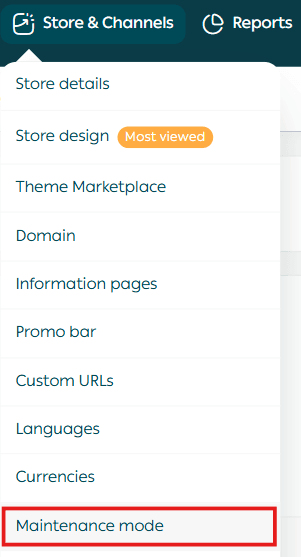
From the main menu in your Salla dashboard, click Store & Channels, then select Maintenance Mode.
On the Maintenance Mode page, click the Enable button.
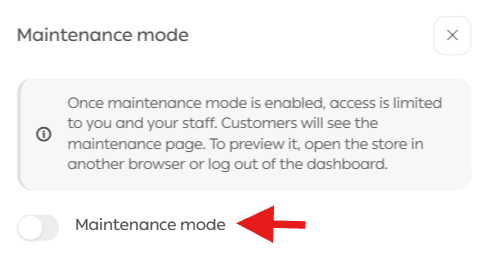
Note: You have full control over the messages displayed to visitors and customers from the Maintenance Mode settings.
Store under maintenance
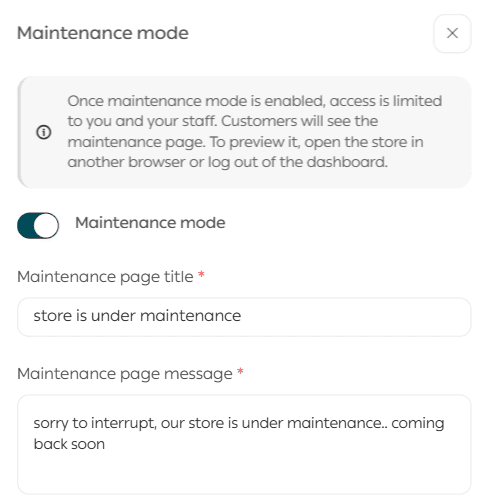
When you enable Maintenance Mode, visitors will see a message indicating that the store is temporarily unavailable.
You can:
- Customize the main title
- Edit the default message
- Add details explaining the maintenance period
This helps set clear expectations during downtime.
Store in “Coming Soon” mode
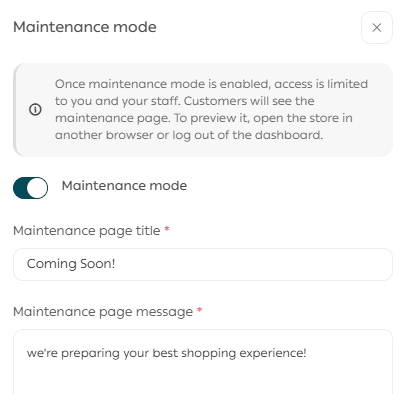
You can also use the same page to display a “Coming Soon” message.
This option is ideal for:
- New stores preparing for launch
- Major updates or rebranding
Customize the title and message to:
- Announce the launch date
- Share updates
- Communicate any information you want customers to know in advance
Best practices for using Maintenance Mode
- Add a clear and direct message
Clearly state whether your store is under maintenance or launching soon.
- Provide an emergency contact method
Include a support channel such as live chat or an email address.
- Notify customers in advance
Announce maintenance periods ahead of time through social media or email to avoid confusion.
💡 Whether your store is under maintenance or preparing to launch, customizing the title and message helps you communicate clearly with your audience and build anticipation before going live.