Visit reports help you understand visitor traffic within your store and analyze their behavior, giving you a clearer view of your store's performance and enabling data-driven decisions to enhance customer experience and increase conversion opportunities.
📌 Main topics
- Visit report
- Practical examples to help you read visit reports
- Integration with Google Analytics
Visit report
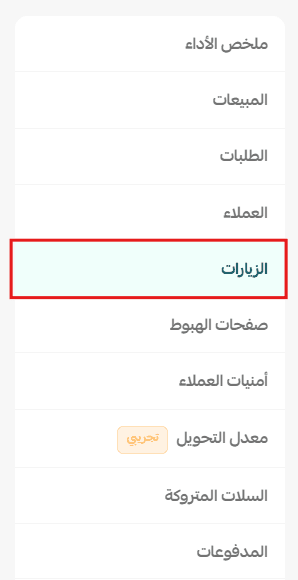
1. From the main store menu, click (Reports), then click (Store Performance).

2. Select the report type (Visits).
🎯 The visit dashboard displays key indicators related to your store's visitor traffic, such as total visits, distribution by browser, most visited cities and pages, and the search terms that led customers to your store.
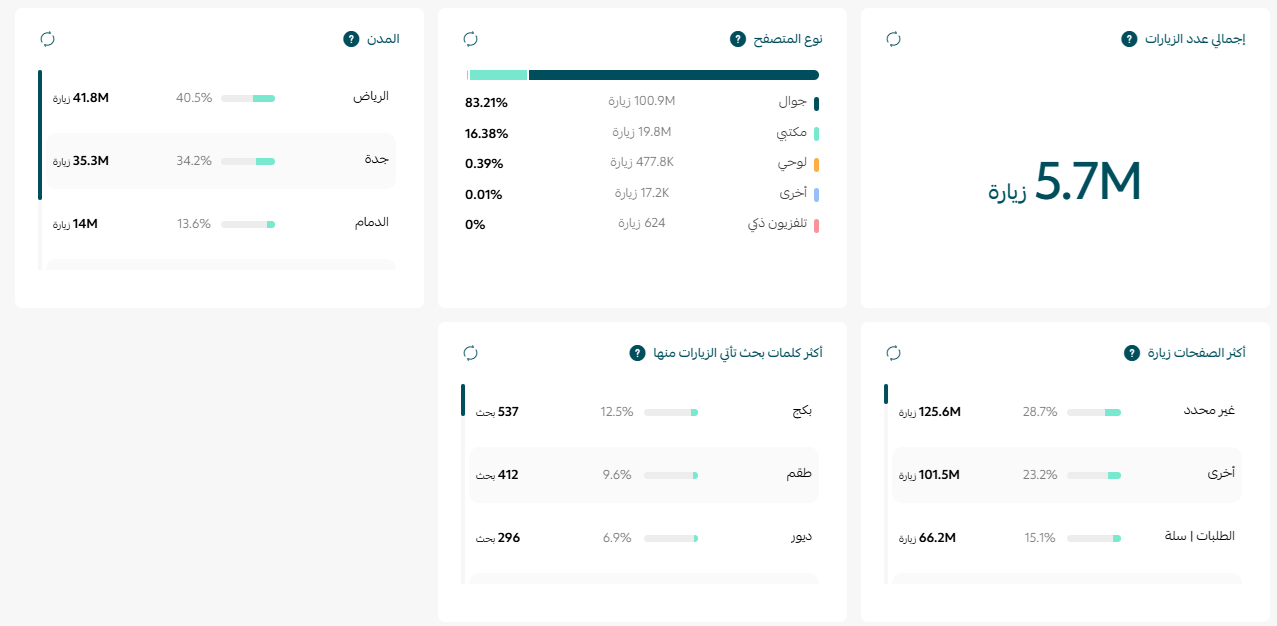
Total visits
This is the total number of store visits during the time period you specify.
Browser type
Displays the distribution of visits by the browser used, such as Google Chrome, Safari, Firefox, etc., helping you identify the most used browsers by your store visitors.
Cities
Shows the cities from which the largest number of your store's visitors came, ranked from highest to lowest, helping you identify the areas most interested in your store.
Most visited pages
Displays the most visited pages within your store, ranked by number of visits, helping you identify the pages and content most attractive to visitors.
Most search terms leading to visits
Displays the keywords customers used in search engines to reach your store, helping you understand the most impactful words in attracting visits and improving your store's visibility in search results.
💡 Practical examples to help you read visit reports
- Example 1: Visits increased but sales did not
Example:
- Last month: 15,000 visits and 500 orders.
- This month: 25,000 visits and 510 orders.
What does this mean?
There are more visitors, but only a small percentage completed a purchase, which may indicate a problem with the shopping experience or that the visits are not from the target audience.
What can you do?
- Review product pages and ensure information and images are clear.
- Ensure the checkout process is easy.
- Review advertising campaigns and ensure they target the right audience.
- Example 2: Visits dropped suddenly
Example:
Visits dropped from 20,000 to 12,000 visits in a week.
What does this mean?
Possible reasons:
- Stopped advertising campaigns.
- Decreased visibility in search results.
- End of a season or occasion.
- Data measurement issue.
What can you do?
- Review current marketing campaigns.
- Check your store's visibility in search engines.
- Compare the current period with the same period last year if your business is seasonal.
- Example 3: A city with high visits but low sales
Example:
Riyadh represents 40% of visits but only achieves 15% of sales.
What does this mean?
There is interest from customers in this city, but they do not complete the purchase.
What can you do?
- Review shipping options and prices for this city.
- Ensure the availability of required products.
- Create a dedicated campaign for city residents to encourage purchases.
- Example 4: A city showing growth in visits
What does this mean?
There is increasing interest in your store in this area.
What can you do?
- Target the city with advertising campaigns.
- Offer special deals if it represents a promising market.
- Ensure shipping services are ready for the area.
- Example 5: A product page gets many visits but few sales
What does this mean?
The page attracts customers, but something prevents them from buying.
Possible reasons:
- Price.
- Images.
- Product description.
- Lack of reviews.
- High shipping cost.
What can you do?
- Improve the product description.
- Add clearer images.
- Add customer reviews if available.
- Review the price compared to competitors.
- Example 6: The homepage is the most visited
What does this mean?
Most customers start their shopping journey from there.
What can you do?
- Highlight best-selling products.
- Continuously update banners and offers.
- Make it easy to access important categories.
- Example 7: A search term brings many visits
Example:
The term "leather women's bags" has become one of the most common terms through which customers reach your store.
What does this mean?
There is high interest in this type of product.
What can you do?
- Create a dedicated page or category for these products.
- Use the term in product titles and descriptions.
- Create content that supports its appearance in search results.
- Example 8: Search terms do not bring visits
What does this mean?
Products may not be optimized for search engines, or customers may be searching using different terms.
What can you do?
- Review product titles.
- Improve product descriptions.
- Use the terms customers search for within product and category pages.
- Example 9: Most visitors use a specific browser
Example:
80% of visitors use Google Chrome.
What does this mean?
It is important to ensure that the store experience works efficiently on this browser.
What can you do?
- Test store pages on the most used browsers.
- Ensure images, buttons, and checkout pages work correctly.
- Example 10: Change in browser or device distribution
What does this mean?
The way customers access your store may change over time, such as increased mobile usage.
What can you do?
- Review the mobile browsing experience.
- Ensure fast page loading times.
- Test purchase steps on the most used devices.
💡 Tip: Do not rely solely on the number of visits to measure your store's success. An increase in visits does not necessarily mean an increase in sales, so be sure to compare visit reports with sales reports and conversion rates to fully understand the customer journey and make more accurate decisions.
Integration with Google Analytics
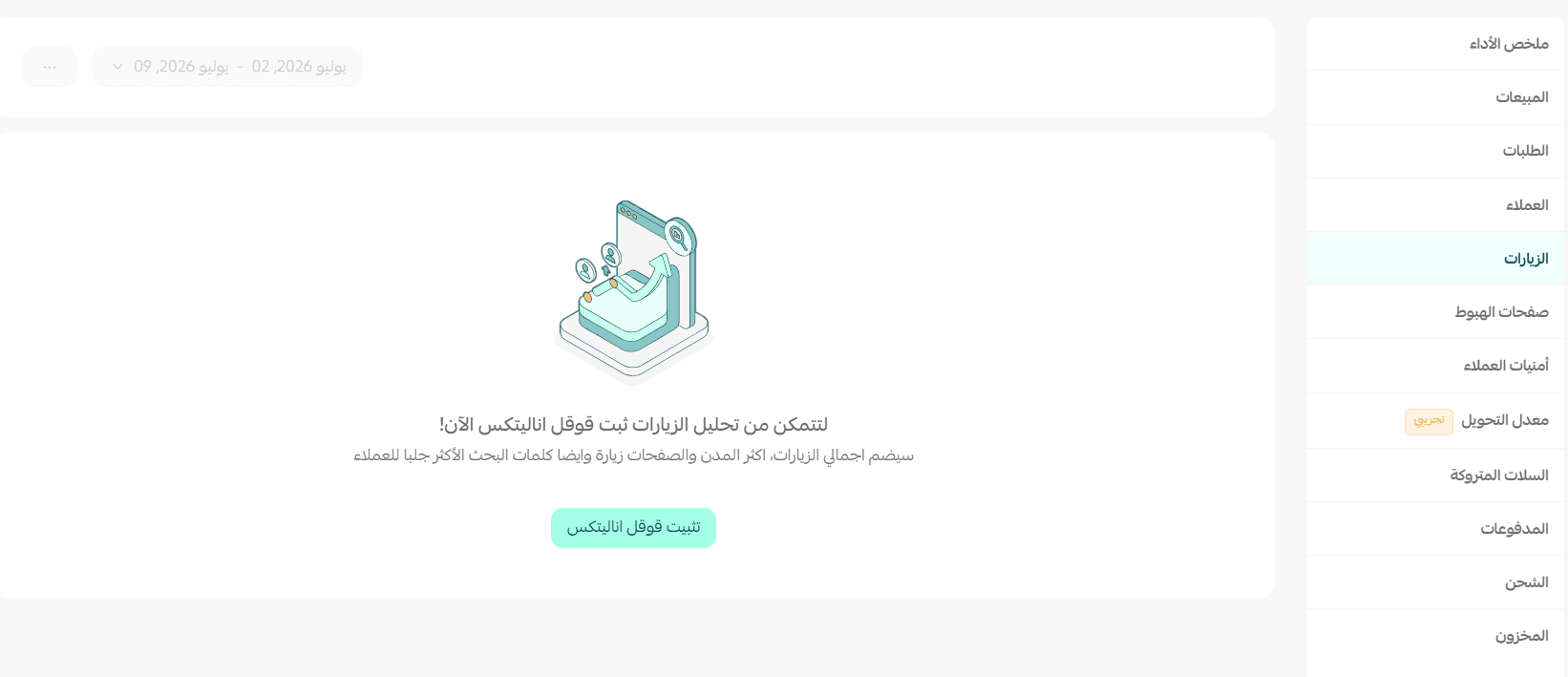
Detailed visit reports rely on Google Analytics, and if you do not see visit data within the visit report, ensure the store is linked with the application so you can view visit data within the reports.
📖 For more details on linking the store with Google Analytics
Continuously follow visit reports to understand the behavior of your store visitors, identify the most visited pages, the most active cities, and the keywords that bring visits, to develop your marketing strategy and improve the shopping experience within your store. 🚀