How many product catalogs are you maintaining just to run ads on four platforms?
A catalog is the feed that lets an advertising platform read your products: names, descriptions, prices and images, kept in sync with your store. Salla Catalog collapses that work into a single unified link. You pick the language and the currency, and the same link serves every platform you advertise on, instead of one catalog per channel. In this guide, you'll learn how to reach Salla Catalog in your dashboard, generate the link, and connect it to your ad platforms.
Salla Catalog is a unified product feed that turns your store's products into one link you can share with advertising platforms. You choose the language and currency, generate the link from your dashboard, and connect it to Snapchat, TikTok, Google, Meta and X without building a separate catalog for each.
📌 Article overview
- How to reach Salla Catalog in your dashboard
- Choosing the language and currency for your catalog link
- Connecting the catalog to your ad platforms
- Frequently asked questions
🚀 How to reach Salla Catalog
1. From your dashboard menu, go to the marketing section, then click (Tracking tools).
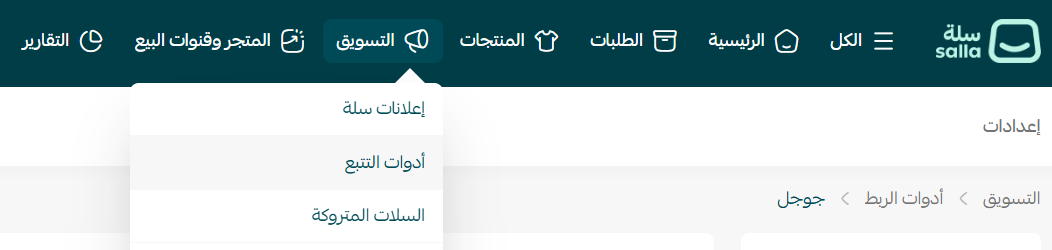
2. From the (Tracking tools) list, click (Catalog).

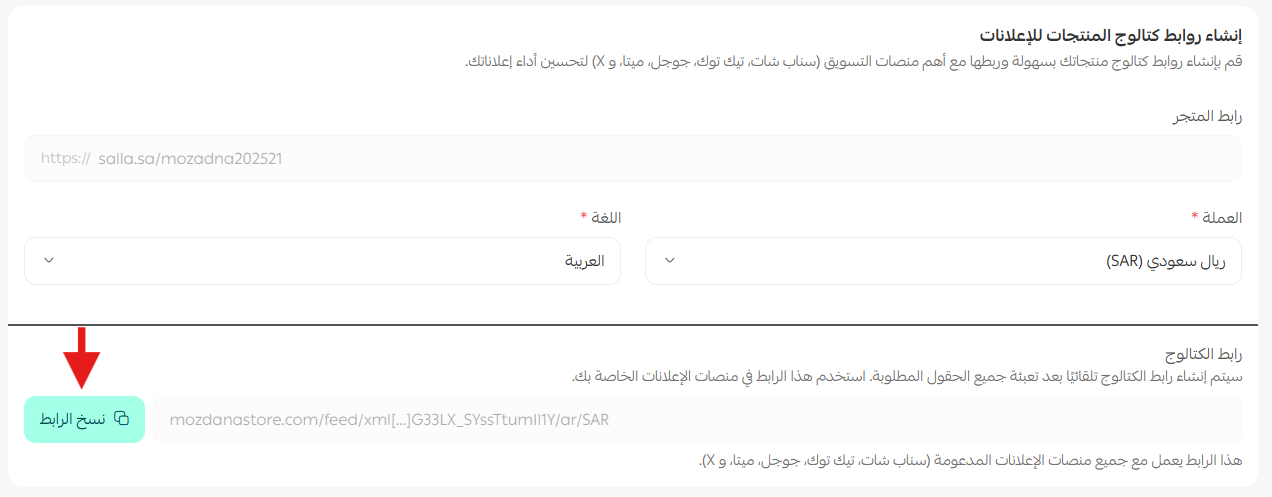
3. Choose the currency and the language, then generate your product catalog links and connect them to the main marketing platforms, Snapchat, TikTok, Google, Meta and X, to improve how your ads perform.
📝 Important notes
The link is generated from the language and currency you select, so you don't need to store a separate link for every combination.
Product names, descriptions and prices in the catalog follow the language and currency you chose.
Any change you make to a product in your store is reflected in the catalog, so the feed your ad platforms read stays current.
❓ Frequently asked questions
❓ Do I need to save multiple links?
No. The link is generated automatically from the language and currency you select, so there is no need to save more than one.
❓ Does the catalog work with every platform?
Yes. You can use it across the main advertising and social platforms.
❓ Can I control how product descriptions appear?
Product names, descriptions and currency follow the language and currency you selected for the catalog link, so the feed matches the market you are advertising in.
❓ Does the catalog update automatically when I change a product?
Yes. Any update you make to your products is reflected in the catalog straight away.
One link, every platform, always in sync with your store. Set up Salla Catalog once and spend your time on the ads themselves rather than on keeping four product feeds alive.