Abandoned cart reports help you understand how many customers added products to their cart but did not complete the purchase, analyze the potential sales value that was not realized, measure the effectiveness of abandoned cart reminder messages, and identify products that frequently appear in these carts.
These reports give you a clearer view to understand customer behavior during shopping, discover reasons for cart abandonment, and make decisions that help increase order completion rates and recover some of the lost sales.
📌 Main topics
- Abandoned cart report
- Practical examples to help you read abandoned cart reports
Abandoned cart report
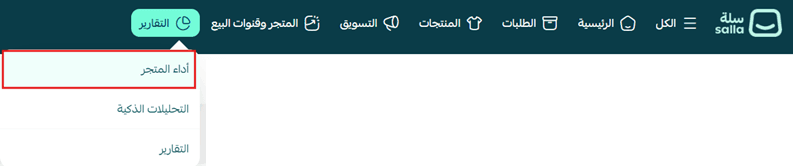
1. From the main store menu, click (Reports) then click (Store Performance).
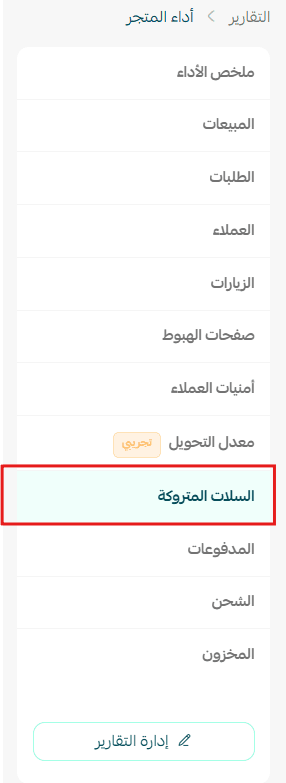
2. Choose the report type (Abandoned Carts).
🎯 The abandoned cart dashboard provides a comprehensive view of the performance of incomplete shopping carts by displaying the number of abandoned carts, potential lost revenue, the percentage of carts recovered after reminders, and the most frequently repeated products in abandoned carts, helping you discover lost sales opportunities, improve the shopping journey, and increase order completion rates.
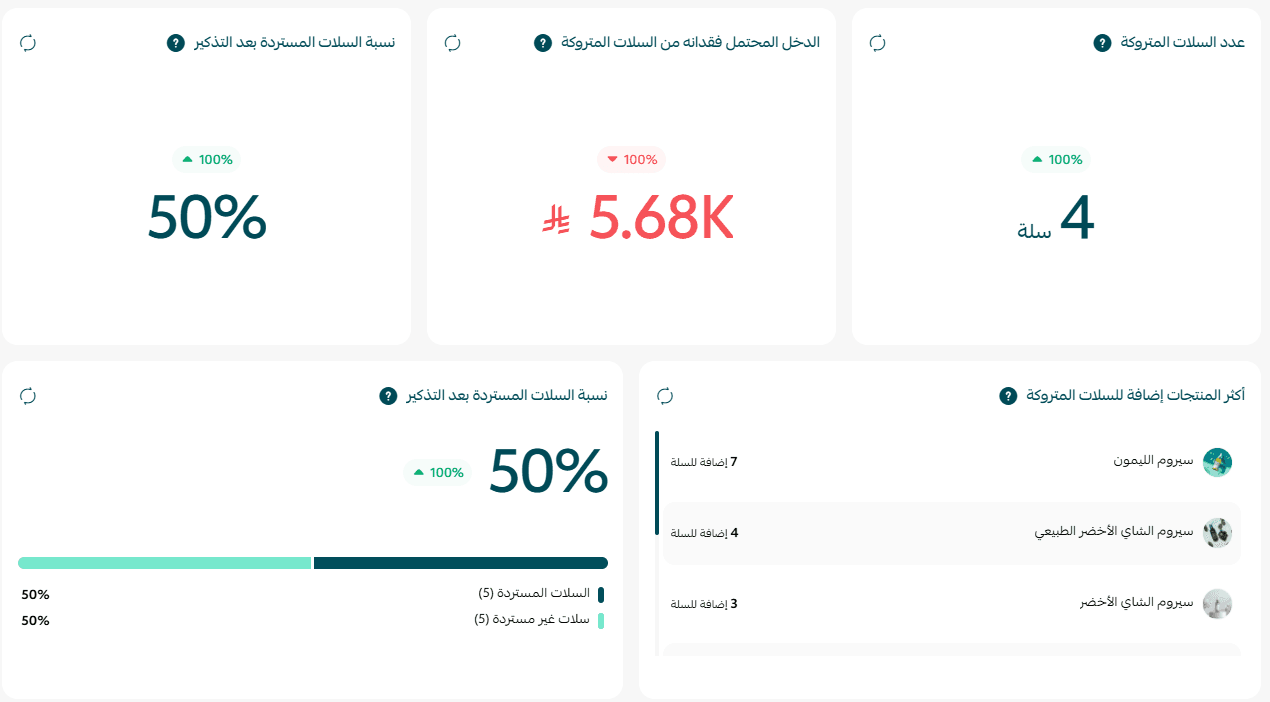
Number of abandoned carts
What is it?
Displays the number of shopping carts where customers added products but did not complete the purchase within the specified period.
How is it calculated?
Number of abandoned carts = Number of active carts (one cart per customer).
Important rules:
- Includes only carts from the last 60 days.
- Does not include carts from visitors who did not log in.
- Does not include empty carts or those with a value of zero.
- Does not include carts created from the control panel or via the Buy Now option.
Why does it matter?
Helps you understand the volume of customers who left the store before completing the purchase, allowing you to take actions to recover these sales.
Potential lost revenue
What is it?
Displays the total value of abandoned carts, which is the expected revenue that could have been achieved if customers completed their purchases.
How is it calculated?
Potential lost revenue = Sum of the values of all abandoned carts.
Why does it matter?
Helps you measure the size of sales opportunities lost by the store and determine the impact of abandoned carts on revenue.
Percentage of carts recovered after reminders
What is it?
Displays the percentage of abandoned carts that turned into completed orders after sending reminder messages to customers.
How is it calculated?
Recovery rate = (Carts turned into orders ÷ Total reminder messages sent) × 100
Why does it matter?
Helps you measure the effectiveness of abandoned cart reminder messages in encouraging customers to return and complete the purchase.
Most added products to abandoned carts
What is it?
Displays the products that are repeatedly added to abandoned carts, ranked by the total value of the carts.
Why does it matter?
Helps you identify products that customers hesitate to buy, allowing you to improve their presentation or review reasons for abandonment.
💡 Practical examples to help you read abandoned cart reports
- Example 1: Increase in abandoned carts
Example:
Last month: 350 abandoned carts.
This month: 620 abandoned carts.
What does it mean?
More customers are adding products to their cart but not completing the purchase.
What can you do?
- Review the checkout steps and ensure they are easy.
- Test the payment process yourself.
- Review shipping costs or any fees that may appear at the final stage of purchase.
- Example 2: Increase in potential lost revenue
Example:
Last month: SAR 95,000.
This month: SAR 180,000.
What does it mean?
A significant amount of potential sales was not realized due to abandoned carts.
What can you do?
- Activate abandoned cart reminder messages.
- Offer a simple incentive like a discount coupon or free shipping to recover these orders.
- Example 3: Decrease in cart recovery rate after reminders
Example:
Last month: 24%.
This month: 11%.
What does it mean?
Fewer customers returned to complete the purchase after receiving reminder messages.
What can you do?
- Review the content of reminder messages.
- Try sending the reminder at a different time.
- Add an appropriate incentive to complete the order.
- Example 4: Increase in cart recovery rate
Example:
Last month: 14%.
This month: 30%.
What does it mean?
Reminder messages have become more effective in bringing customers back to complete the purchase.
What can you do?
- Continue using the current messages.
- Test additional improvements like personalizing messages or adding product recommendations.
- Example 5: Product frequently appearing in abandoned carts
Example:
One product consistently appears among the most present products in abandoned carts, but it is not frequently purchased.
What does it mean?
Customers are interested in the product, but something is preventing them from completing the purchase.
What can you do?
- Review the product price compared to competitors.
- Improve the product description and images.
- Review customer reviews.
- Offer a special deal or free shipping for this product.
- Example 6: Increase in abandoned carts while sales remain stable
Example:
The number of abandoned carts increased by 40%, while sales did not change significantly.
What does it mean?
There is greater interest in products, but a percentage of customers still leave before completing the purchase.
What can you do?
- Monitor the performance of abandoned carts in the coming period.
- Analyze the most present products in the carts.
- Improve the payment experience to reduce the cart abandonment rate.
💡 Tip: Do not rely solely on the number of abandoned carts when evaluating your store's performance, as this number may increase in conjunction with an increase in visitors or orders. Be sure to track the number of abandoned carts along with potential lost revenue and the cart recovery rate after reminders to get a clearer picture and understand how successful your store is in recovering lost sales.
🔥 Regularly follow abandoned cart reports to discover lost sales opportunities, improve the shopping experience, and measure the effectiveness of reminder messages, helping you increase order completion rates and achieve more sales for your store.