Your app's name is only half of what a shopper sees before they decide to tap download.
When your store app goes live through Salla App Maker, the app stores show two short pieces of copy alongside the name: the app subtitle and the promotional text. Both are small, both are easy to overlook, and both do a lot of work in the few seconds a shopper spends on your listing. Getting them right improves how your app is found and how many people install it. In this guide, you'll learn what each field is, how long it can be, where it appears, and how to write copy that earns the download.
The app subtitle is a line of up to 30 characters shown directly under your app name in the app stores, summarizing what your app does. Promotional text is a separate field of up to 170 characters that appears above your app description on the App Store only, and you can update it at any time after publishing without submitting a data update request.
📌 Article overview
- What the app subtitle is and how to write one
- What promotional text is and when to use it
- Important notes
- Frequently asked questions
🎯 What is the app subtitle?
The app subtitle sums up your app in one short phrase. Use it to explain the value of your app in more detail than the name alone can, rather than repeating the name.
Skip generic claims like "the best app in the world." Highlight the features or everyday uses your audience actually cares about instead.
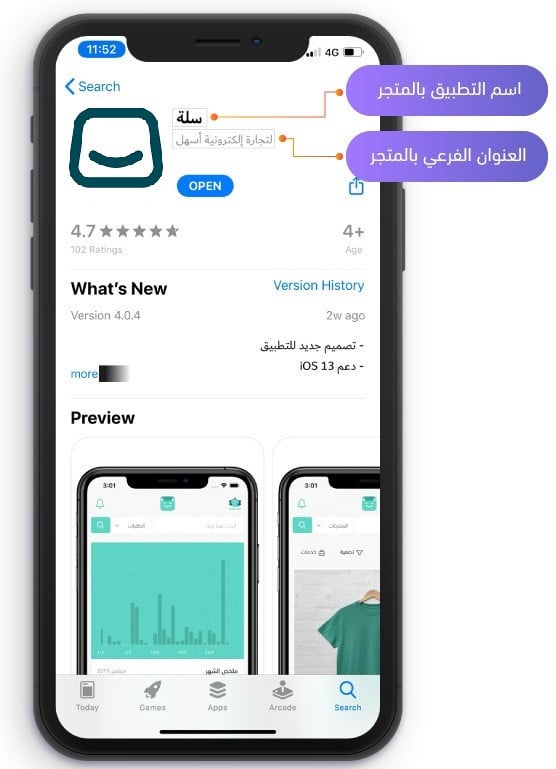
The subtitle can be up to 30 characters and appears just below the app name in the app stores. Aim for 4-5 words that describe what your store sells in the simplest way possible.
Here is how it appears in the store, below the app name:
📣 What is promotional text?
Promotional text appears on the App Store only - Google Play does not have an equivalent field.
On the App Store it sits at the top of your app description and can run up to 170 characters.
The useful part is that you can update promotional text at any time after publishing, without submitting a data update request. That makes it the right place for news about your app: a limited-time offer, a seasonal campaign, or a feature that is on the way.
For more on how to change it, see the My Apps page in the Apple app dashboard.
📝 Important notes
- The subtitle is part of your published app data. Changing it requires a data update request, unlike promotional text.
- Character limits are counted by the app stores, not by Salla, and spaces count.
- Write both fields in the language your customers shop in, and keep the tone consistent with your store.
❓ Frequently asked questions
Can I use the same text for the subtitle and the promotional text?
You can, but it wastes a slot. The subtitle should describe what your app is; the promotional text should say what is new or on offer right now.
Does the promotional text show on Google Play?
No. Promotional text is an App Store field only. Google Play shows your app name, subtitle and description.
How often can I change the promotional text?
As often as you like once the app is published. No data update request and no new review are needed.
What happens if my subtitle is longer than 30 characters?
The app stores will not accept it. Trim it to 30 characters or fewer before you submit your app data.
Your app name tells shoppers who you are. The subtitle tells them what you sell, and the promotional text tells them why to install today. Treat all three as one message and revisit the promotional text whenever your store has something new to say.