Do you know what separates the stores that quietly grow from the ones that stall? They stop selling single products and start selling complete solutions.
A custom product group lets you combine several products into one purchasable item, so a customer can build a skincare routine, put together their own meal, or assemble a tech kit without ever leaving the product page. One product, many choices, and a noticeably higher order value. This guide is the idea bank: real product group examples you can copy, marketing angles that work, and a structure that keeps the whole thing simple for the shopper. In this guide, you'll learn how to design product groups that customers actually want to customize.
A product group is a single product made up of sections, and each section offers a set of options the customer picks from. You decide which sections are required and which are optional. The customer builds their own version, adds it to the cart once, and you sell four or five items in a single order instead of one.
📌 Article overview
- Six ready-made product group examples you can copy
- Creative ways to use product groups to sell more
- How to structure a product group with required and optional sections
- Frequently asked questions
💡 Six product group examples you can copy
Each example below gives you a description, the sections to create inside the product group, and what the customer walks away with. Treat them as starting points and swap in your own catalog.
🧴 Example 1: skincare box
What it is
One product that pulls together skin, body, hair, and nail care, so the customer can build a personal routine from a single page.
Sections to create
1. Skin care: cleanser, toner, serum, moisturizer, sunscreen.
2. Body care: wash, scrub, lotion, hand cream, body mist.
3. Hair care: shampoo, conditioner, mask, oil, serum.
4. Nail care: strengthener, polish remover, cuticle oil, tools, polish colors.
The result: one group that gives the customer a full care routine they can tailor to their daily needs.
👓 Example 2: optical set
What it is
One product where the customer chooses every part of their prescription glasses, from the frame through the lenses to the accessories.
Sections to create
1. Frame: metal, plastic, flexible (titanium/flex), half rim, full rim.
2. Lenses: clear, anti-reflective, blue light filtering, photochromic, tinted prescription.
3. Accessories: case, chain, nose pads, screws, lens covers.
4. Cleaning products: spray, wipes, microfiber cloth, ultrasonic cleaner, cleaning gel.
The result: a complete purchase that lets the customer design their ideal pair, with practical options gathered into one professional product.
☕ Example 3: premium coffee bundle
What it is
A product that lets coffee lovers build their own tasting experience from beans, add-ins, and the tools that go with them.
Sections to create
1. Coffee origins: Colombian, Ethiopian, Yemeni.
2. Add-ins: cardamom, cinnamon, vanilla.
3. Tools: traditional cup, measuring spoon, filter.
4. Milk or alternatives: almond milk, oat milk.
5. Something sweet on the side: stuffed dates, dark chocolate.
The result: a personalized experience where the customer builds their favorite cup exactly the way they like it.
🎁 Example 4: gift box
What it is
A flexible gifting product the customer adapts to the occasion, with sections covering personal care, fragrance, and sweets.
Sections to create
Personal care, perfumes, chocolate, greeting cards, gift wrap.
The result: one product that works for every occasion, from Eid to graduations to weddings, with the contents chosen by the buyer.
🍱 Example 5: custom meal combo
What it is
A restaurant product that lets the customer assemble their own meal, from the main dish all the way to the drink and dessert.
Sections to create
1. Main dish: burger, pasta, pizza.
2. Side dish: fries, salad, soup.
3. Drink: fresh juice, soda, sparkling water.
4. Dessert: brownie, cookies, cheesecake.
The result: an interactive experience that rewards customizing and lifts your average order value.
💻 Example 6: tech bundle
What it is
One product where the customer puts together a complete electronics package of devices and accessories.
Sections to create
1. Main device: phone, tablet, smart speaker.
2. Accessories: protective case, screen protector, headphones.
3. Charging: fast charger, cable, power bank.
The result: a single checkout that saves the customer time and steps, and gives you a natural upsell.
✅ Creative ways to use product groups
Used well, a product group is a marketing tool, not just a catalog format. Here are six angles that consistently earn their place in a store.
Groups built around a scenario or a need
Build a group that answers one specific situation:
- "Nighttime routine": hydrating oils, a light hair mist, and a nail strengthener.
- "Travel kit": travel-size care products, a fragrance, and sanitizing wipes.
- "Desk kit": a coffee cup, an office diffuser, and something small to unwind with.
🎯 The idea: sell the solution, not the product. Meet a whole need instead of listing separate items.
Seasonal and occasion groups
Create limited-run groups that follow the calendar and lift sales while the moment lasts:
- "Ramadan box", "Eid box", or "Back to school".
- "Summer box" or "Winter warmers".
🎯 The idea: tie your products to the moments your audience already cares about, so the offer feels timely and exclusive.
Sampler bundles
Offer small, low-priced groups that carry samples of your best products:
- Fragrance samples, travel-size oils, or tasting pieces from your dessert range.
🎯 The idea: let the customer try several products cheaply, so they come back for the full size.
Complementary product groups
Combine products that are naturally used together:
- A perfume plus a body cream in the same scent.
- Shampoo, conditioner, and a mask from the same line.
- Shoes plus a cleaning product plus a rain protector.
🎯 The idea: raise the average order value by selling the whole set rather than one piece of it.
Monthly or weekly subscription groups
Build a repeatable group for products people use on a cycle:
- "Monthly care routine": everything used up within a month.
- "Weekly coffee subscription": a different blend each week.
🎯 The idea: turn a one-off purchase into a habit with a subscription-style offer.
Perfect-gift groups
Design groups that are ready to buy as gifts:
- A "luxury gift box" with a greeting card or special wrapping.
- A "graduation gift" or a "gift for mom".
🎯 The idea: make the decision easy for shoppers who want a gift that already looks put together.
👣 How to structure a product group: required and optional sections
The structure is what keeps a product group from becoming confusing. Split it into three layers.
1️⃣ Required products (the foundation)
Some products simply don't work without a core component. That is what a required section inside the product group is for.
Examples:
- The frame in a pair of glasses (required).
- The main dish in a meal combo.
- The main device in a tech bundle.
🎯 The goal: make sure the product is complete, and stop illogical combinations from reaching checkout.
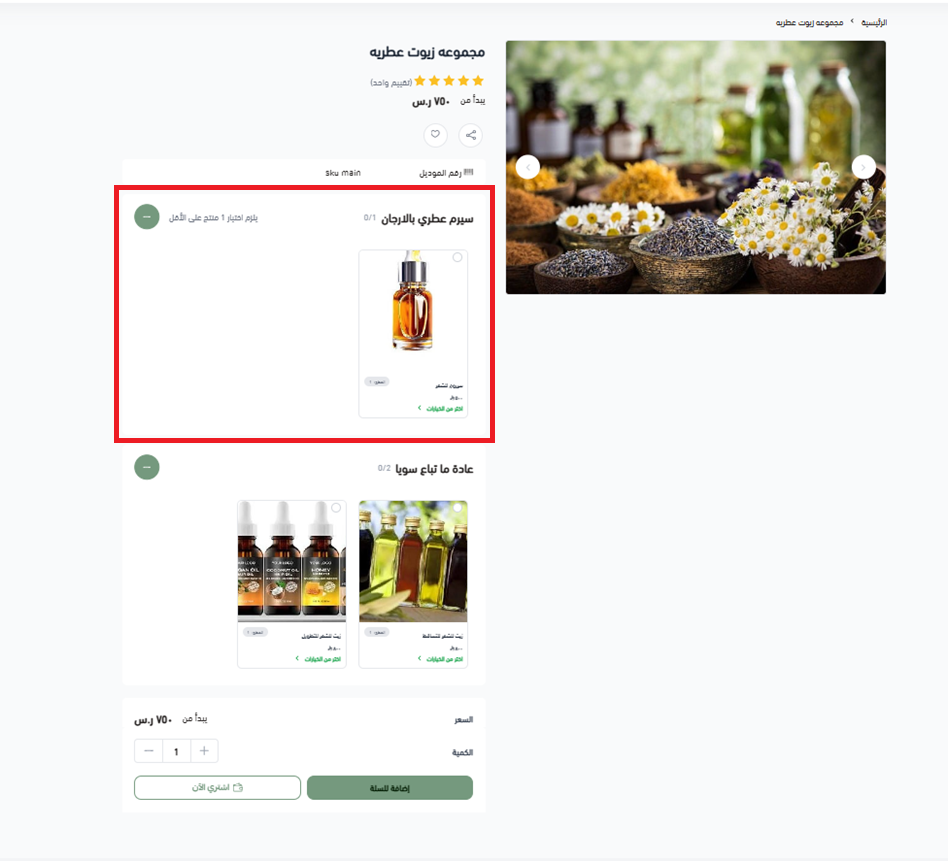
2️⃣ "Frequently bought together" (optional, merchant picks)
Add an optional section with a clear name such as "Frequently bought together" or "Complete your set".
It holds products that are not required, chosen by you to round out the experience.
Examples:
- A screen protector and a phone case.
- A hand cream alongside a skincare group.
- Something sweet next to a coffee box.
🎯 The goal: raise the average order value without pressuring anyone.
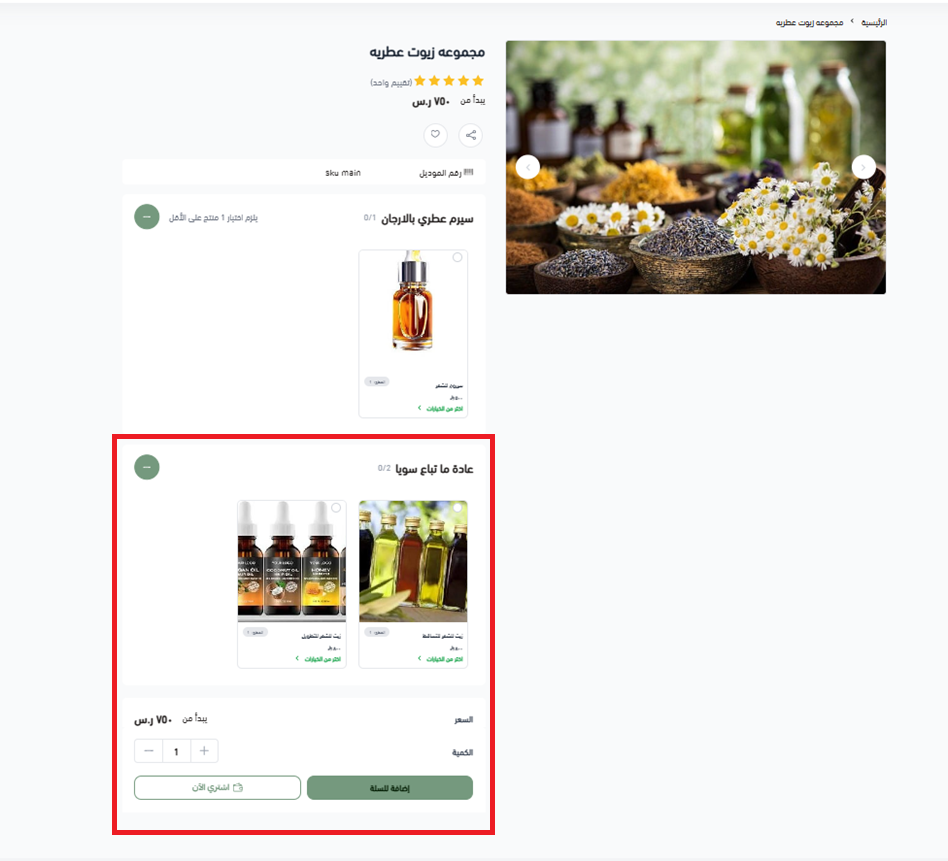
3️⃣ "You may also like" (smart add-ons)
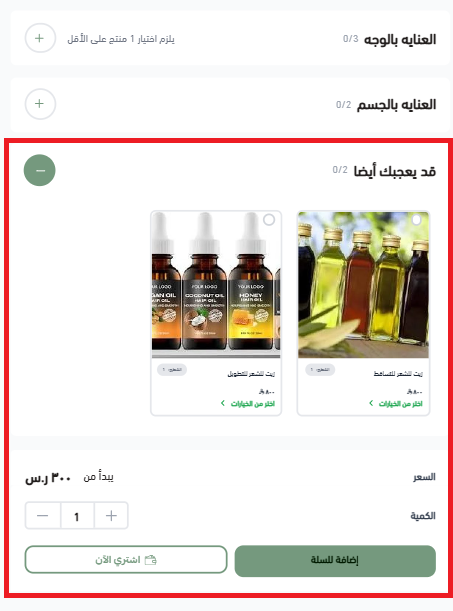
Add a "You may also like" section to surface standalone products that may interest the customer once they have made their choices.
Examples:
- A lens cleaning device after the customer picks their glasses.
- A coffee grinder after the customer builds a coffee box.
- A gift card or premium wrapping.
🎯 The difference: these products are not part of the group. They complement it, and they are shown intelligently rather than forced on the customer.
Why this split works
1. It keeps the customer's experience flexible.
2. It stops the product from getting complicated.
3. It raises the average order value gradually.
4. It reads as expertise rather than sales pressure.
📝 Important notes
Name every section in plain language the customer understands. "Choose your frame" works better than "Section 1".
Keep the number of sections manageable. Four or five is usually enough before the page starts to feel like a form.
Mark only the genuinely essential sections as required. Everything else should be optional.
❓ Frequently asked questions
What is a product group?
It is a single product built from several sections, where each section offers options the customer chooses from. The customer assembles their own version and adds it to the cart as one product.
Can I make some sections required and others optional?
Yes. Required sections hold the components the product cannot work without, such as the frame in a pair of glasses or the main dish in a meal. Optional sections hold suggestions the customer can skip.
How many sections should a product group have?
Enough to cover the choices that matter, and no more. Most of the examples above use three to five sections, which keeps the page quick to complete.
What is the difference between "Frequently bought together" and "You may also like"?
"Frequently bought together" holds optional items you have chosen as part of the group. "You may also like" shows standalone products that sit outside the group but complement it.
Which types of stores benefit most from product groups?
Any store where products are naturally combined: beauty and personal care, optical, coffee and specialty food, restaurants, electronics, and gifting.
Product groups reward stores that think in terms of outcomes rather than items. Start with one group built around a scenario your customers already have in mind, watch how they configure it, and let what they choose tell you which group to build next.