Do you know which customers return to purchase from your store repeatedly?
Without a clear view of these customers, it becomes difficult to measure their loyalty and understand their impact on your revenue. Focusing only on acquiring new customers can also be costly and inefficient.
The Returning Customers Report shows data about customers who have placed more than one order. This helps you understand repeat purchasing behavior and analyze customer loyalty.
With this report, you can identify customers who return to buy again, measure the effectiveness of marketing campaigns and loyalty programs, and improve the customer experience to increase retention.
📌 Article overview
- Returning customers report
- Steps to view the report
- Uses of the returning customers report
- Frequently asked questions
Returning customers report
With this report, you can:
- Track the number of orders and total spending for each customer during the selected period.
- Design follow-up campaigns and rewards to encourage loyal customers to purchase again.
- Use the data to develop retargeting strategies and increase the Customer Lifetime Value (LTV).
Important notes
The report is based on:
- Recorded order data, filtering customers who have placed more than one order.
- It only shows customers who had at least one previous order and placed another order within the selected reporting period.
Steps to view the returning customers report
- From the main menu, go to Reports, then click Reports.
- From the report categories list, select Customers, then choose the report type Returning customers, and set the desired time period.
The report displays live data in a table with columns including:
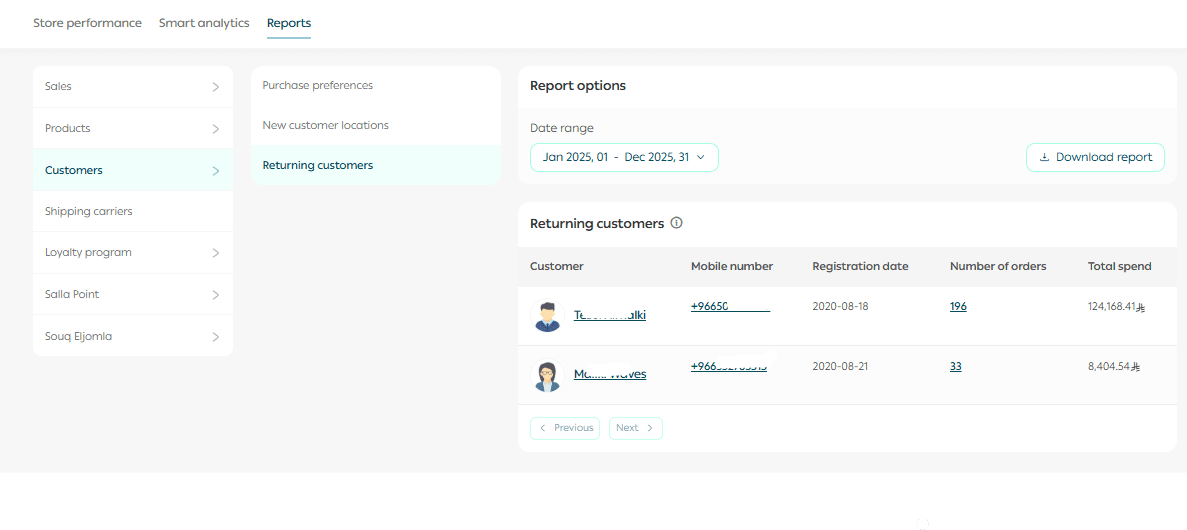
Clicking the number of orders in the report will take you to the Orders page, filtered to show only the related orders.
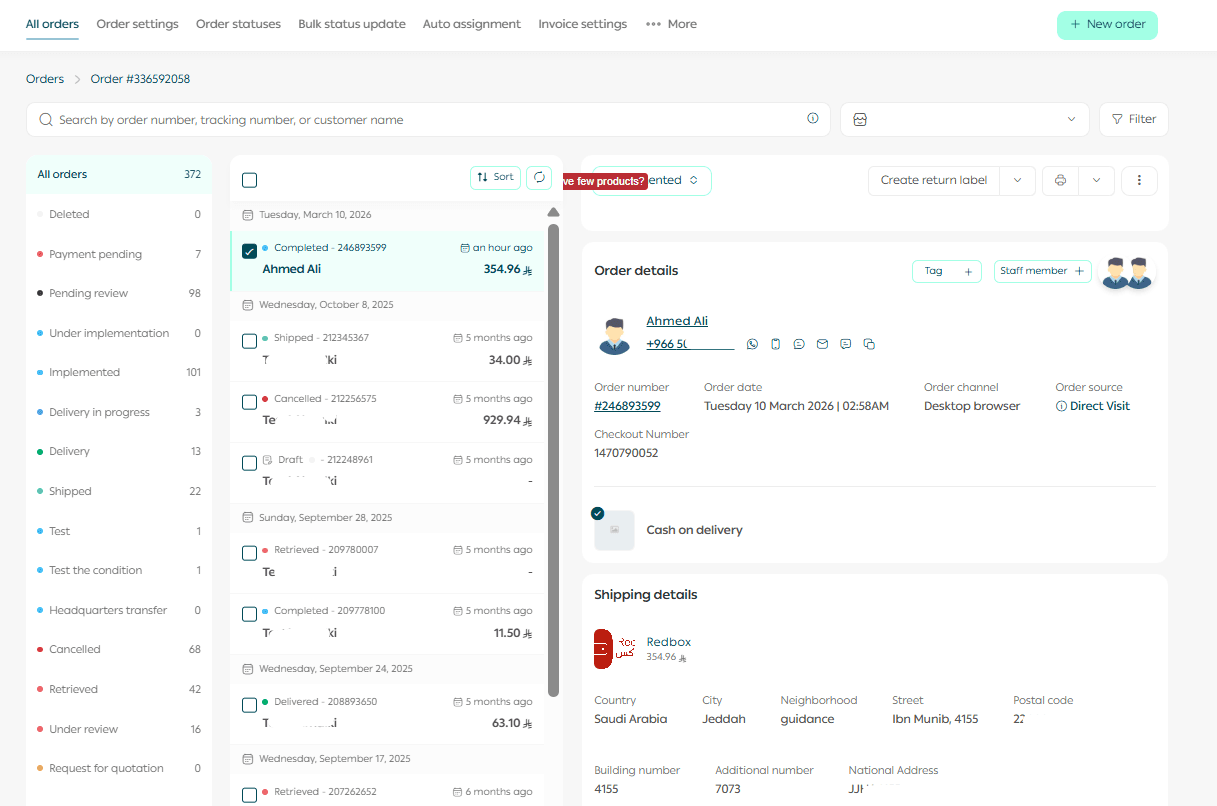
You can also:
- Export the data in CSV or Excel format
- Use filters to refine the report by date range or customer segment
Uses of the returning customers report
Reward loyal customers
Offer special rewards or discounts to customers who frequently return to purchase.
Example: Send a 10% discount to customers who placed three orders in the past month to encourage a fourth purchase.
Retarget inactive customers
Identify customers who have not purchased for a while and send them personalized offers to encourage them to return.
Example: Send an email to customers who haven’t purchased in 60 days, offering free shipping on their next order.
Analyze purchasing value
Measure total spending and average order value per customer or region.
Example: If the average order value in Jeddah is higher than in Cairo, you can create targeted promotions to increase sales in Cairo or increase order value in Jeddah.
Identify cross-selling and upselling opportunities
Discover frequently purchased products to create bundles or complementary offers.
Example: If a customer purchases an electronic device, you can recommend related accessories during checkout as an additional purchase suggestion.
Evaluate marketing campaigns and loyalty programs
Track how many returning customers came back after specific campaigns to measure their effectiveness.
Example: If 30% of returning customers made purchases after an Eid discount campaign, you may replicate similar campaigns in the future.
Improve the customer experience
Analyze purchasing habits to provide offers and services at the right time.
Example: Send reminders about new offers to customers who typically purchase certain products every month.
Support inventory and sales planning
Use repeat purchase data to forecast future demand and improve inventory management.
Example: If returning customers consistently buy a specific product, you can increase its inventory before peak seasons to avoid stock shortages.
Summary
This report does more than display numbers; it provides insights that help transform customer behavior data into smart marketing strategies that increase loyalty and maximize the value of each customer.
Frequently asked questions
Who can access the report?
The report is available only for paid plans and can be accessed from:
Merchant Dashboard → Customers → Returning Customers Report
Does the report include all orders?
Yes, the report includes all orders.
How can I use the report to improve my sales?
You can use it to:
- Design personalized follow-up campaigns
- Reward loyal customers
- Analyze geographic markets
- Identify customers who respond best to marketing campaigns
Does the report display real-time data?
Yes. The report updates automatically with every new purchase.
Start using the Returning Customers Report from your dashboard today and turn your store data into real growth opportunities that increase customer loyalty and repeat sales.