Give your customers more flexibility at checkout with Tabby. Eligible customers can buy now and pay later or split their purchase into installments, while your store receives payment according to your agreement with Tabby.
In this guide, you’ll learn what you need before activation, how to connect Tabby to your Salla store, and how the payment method works after it is enabled.
What is Tabby?
Tabby is a Buy Now, Pay Later (BNPL) payment method that lets eligible customers complete a purchase without paying the full order amount upfront. Offering flexible payment options can help increase purchasing power, improve checkout conversion, and increase average order value.
Payment and settlement: Payments made through Tabby are collected through Tabby rather than Salla Payments. Your settlement terms and merchant fees follow your agreement with Tabby.
Before you start
Prepare the following before you connect Tabby to your store:
How to activate Tabby on your store
To connect your Tabby account to Salla:
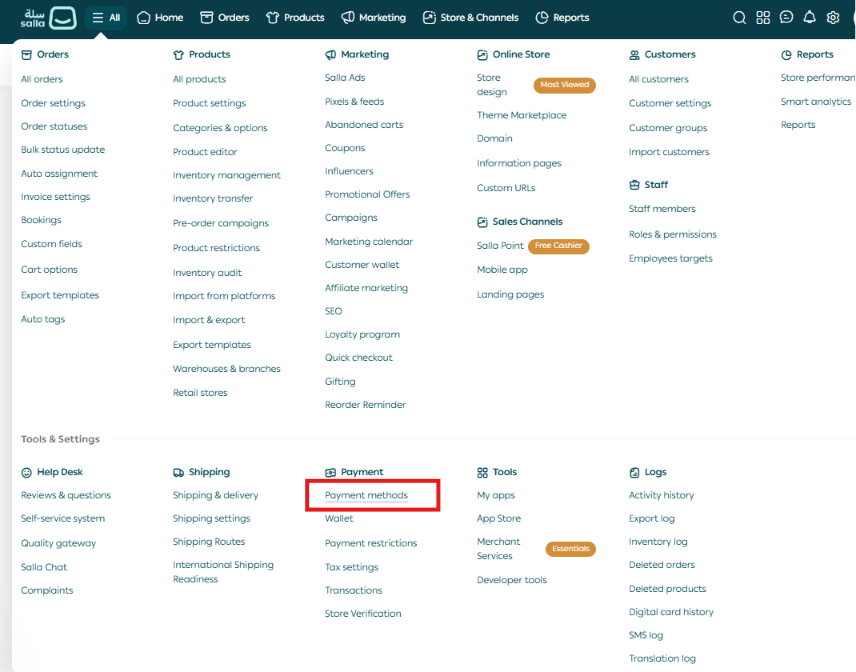
- From the main menu in your Salla dashboard, select All.
- Under Settings & Tools, select Payment Methods.
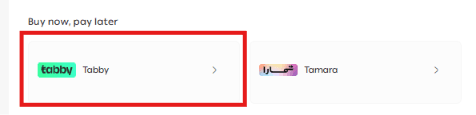
- Go to the Buy now, pay later section and select Tabby.
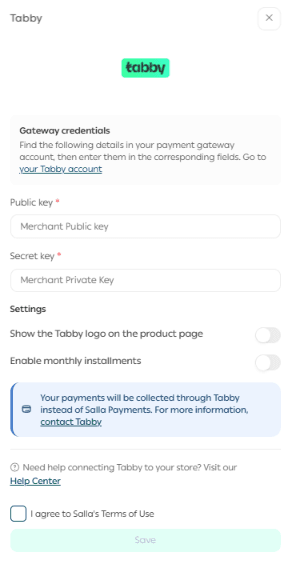
- Enter the Merchant Public Key and Merchant Private Key associated with your Tabby account.
- Review the available Tabby settings for your store.
- Select I agree to Salla’s Terms of Use, then select Save.
Important: If your store is located outside Saudi Arabia, contact Tabby directly to complete the merchant account setup and activation process before connecting the account to Salla.
What happens after activation?
Once Tabby is activated, it can appear as an available payment option for eligible customers at checkout. Availability for a specific customer or order is determined by Tabby.

How Tabby works
- Shop: The customer selects Tabby at checkout and provides the information required by Tabby.
- Pay over time: The customer chooses an available payment option offered by Tabby.
- Fulfill the order: You process and ship the order as usual. Tabby handles the customer payment according to its terms, and your store is paid according to your merchant agreement with Tabby.
Frequently asked questions
What are the benefits of adding Tabby to my store?
Tabby gives eligible customers more flexible ways to pay. This can increase purchasing power, support higher average order values, and help improve checkout conversion. Tabby also handles collection from the customer according to its own terms.
Which currencies does Tabby support for this integration?
The supplied setup supports Saudi riyal (SAR), UAE dirham (AED), and Kuwaiti dinar (KWD). Enable the required currencies from your Tabby dashboard. For currency eligibility or account-specific questions, contact Tabby directly.
Are there any interest charges or hidden fees for customers?
Tabby does not charge customers interest for its standard payment plans. Late-payment fees may apply according to Tabby’s applicable terms and policies.
How much does Tabby cost for merchants?
Merchant fees are agreed directly between Tabby and each merchant. Pricing can vary based on factors such as the products sold, transaction value, and other commercial considerations.
How many installments can customers use?
Eligible purchases can be split into up to four payments, depending on the options Tabby makes available to the customer.
Does my Salla store need to be verified before I can connect Tabby?
Yes. Your Salla store must be verified before you can connect and activate Tabby.
Which Salla plans support Tabby?
Tabby is available on Plus, Pro, and Special.