• Salla - E-commerce Platform
  • Create your store for free
  • Home
    • Help Center

      A comprehensive library for everything you need to start your business with Salla

    • Salla Community

      Share experiences and get inspired by unique ways to succeed

    • Salla Blog

      Expand your knowledge with many interesting topics

    • Developer Platform

      Join the Salla developer community

    • Salla Academy

      Professional courses to help you succeed in business

    • App Store

      Many tools for your store's success

    • App Maker

      Build a custom app for your store

    • Salla Special

      Advanced tech solutions for large merchants

    • Payments

      Diverse and secure payment methods for your customers

    • Marketing Tools

      Multiple marketing solutions to increase your sales

    • Mahally

      A platform connecting local merchants with local consumers

    • Abayas & Fashion

      Elegant commerce without complexity

    • Digital Products

      Digital products without technical difficulties

    • Health & Fitness

      Present your products convincingly to your customers

    • Electronics

      The easiest experience for selling electronics

    • Jewelry

      Multiple features to showcase your jewelry

    • Beauty & Care

      With Salla, understand your beauty-seeking customers

    • Restaurants & Cafes

      Endless solutions for consumer products

    • Home Supplies

      A comfortable experience for you and your customers

    • Design Services

      Instant delivery for your products

    • Salla Stores in Sectors
  • Pricing
  • Sign In
  • Create your store for free
Salla
Download Salla app from Google PlayDownload Salla app from App Store

About Salla

  • Join the Salla team
  • Terms of Service
  • Affiliate Marketing Agreement
  • Privacy Policy
  • Complaints Platform

Salla Partners

  • Join as a partner
  • Partner Programs
  • Partners Community
  • Partner Resources
  • Join as an affiliate marketer

Resources

  • Help Center
  • Salla Academy
  • Salla Community
  • Salla Blog
  • Updates Center

Solutions

  • App Store
  • App Maker
  • Ready Stores
  • Marketing Tools
  • Mahally
  • Payments
  • Salla Special
  • Salla 4.0
  • Themes Store

Sectors

  • Abayas & Fashion
  • Digital Products
  • Health & Fitness
  • Electronics
  • Jewelry
  • Beauty & Care
  • Restaurants & Cafes
  • Home Supplies
  • Design Services
All rights reserved by Salla Holding © 2026
920031659
Mecca, Kingdom of Saudi Arabia
info@salla.sa
VAT Certificate
ع
  • Home
    • Help Center

      A comprehensive library for everything you need to start your business with Salla

    • Salla Community

      Share experiences and get inspired by unique ways to succeed

    • Salla Blog

      Expand your knowledge with many interesting topics

    • Developer Platform

      Join the Salla developer community

    • Salla Academy

      Professional courses to help you succeed in business

    • App Store

      Many tools for your store's success

    • App Maker

      Build a custom app for your store

    • Salla Special

      Advanced tech solutions for large merchants

    • Payments

      Diverse and secure payment methods for your customers

    • Marketing Tools

      Multiple marketing solutions to increase your sales

    • Mahally

      A platform connecting local merchants with local consumers

    • Abayas & Fashion

      Elegant commerce without complexity

    • Digital Products

      Digital products without technical difficulties

    • Health & Fitness

      Present your products convincingly to your customers

    • Electronics

      The easiest experience for selling electronics

    • Jewelry

      Multiple features to showcase your jewelry

    • Beauty & Care

      With Salla, understand your beauty-seeking customers

    • Restaurants & Cafes

      Endless solutions for consumer products

    • Home Supplies

      A comfortable experience for you and your customers

    • Design Services

      Instant delivery for your products

    • Salla Stores in Sectors
  • Pricing
Sign In

Help Center

Instant product purchase

Instant product purchase

Last updated: Friday 17 April 2026.

Are you looking for a way to turn your advertising campaigns into completed purchases faster?

With the Instant Purchase feature, your targeted customers can move directly from the advertisement to the checkout page using an instant purchase link or button, without going through extra steps or lengthy login processes. This helps you convert advertising traffic into completed orders more easily.

This guide will walk you through how to enable the feature and create instant purchase links or buttons to get the most value from your campaign traffic.

📌 Article overview

  • About Instant Purchase
  • Steps to create an instant purchase link or button
  • Customer journey with instant purchase
     

About Instant Purchase

Instant Purchase is a feature that accelerates the customer journey compared to the traditional buying process. Customers can purchase a product directly without passing through the cart page or going through lengthy login steps.

Benefits of Instant Purchase

  • Reduces customer drop-off from ads or social media due to login requirements.
  • Speeds up conversions for customers already ready to buy.
  • Reduces checkout abandonment.
  • Increases conversion rates and shortens checkout time.
  • Allows merchants to promote specific products directly.

Types of Instant Purchase

1. Purchase Link

A direct link that can be copied or shared in advertisements and social media posts, allowing customers to complete their purchase quickly.

2. Purchase Button

A button added to a product page or advertisement that enables customers to complete the purchase directly when clicked.

Use cases for Instant Purchase links or buttons

  • Advertising campaigns (direct conversion without browsing the store)
  • Influencer campaigns (one direct purchase link)
  • QR codes on posters, packaging, exhibitions, or printed materials
     

Steps to create an Instant Purchase link or button

  1. From the main menu, under products, click product management.
    image.png
  2. Click the product for which you want to create an instant purchase option, then click Instant Purchase Link.
    image.png
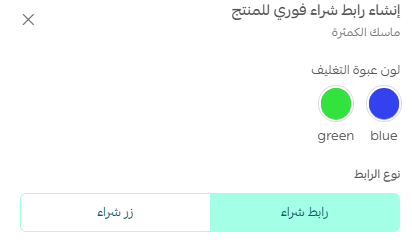
  3. Select the product details you want to enable instant purchase for, then choose the type.
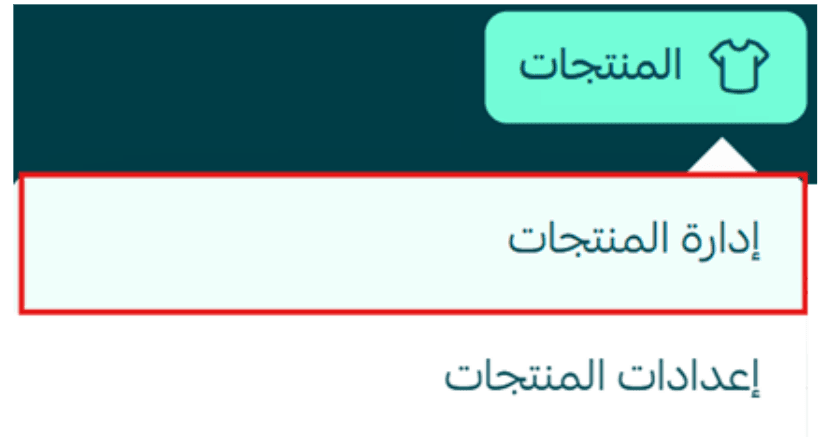
    image.png

Create a purchase link

The system will generate a direct purchase link that you can copy and share.
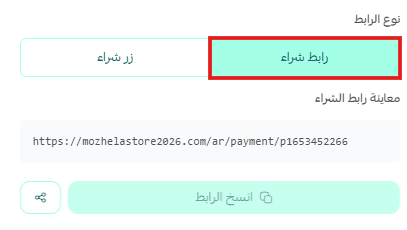
Note: Make sure the guest checkout feature is enabled to create an instant purchase link.

Create a quick purchase button

Enter the desired button text, such as “Buy now”.

The system will generate the embedded HTML button code that can be used directly in advertisements or landing pages.
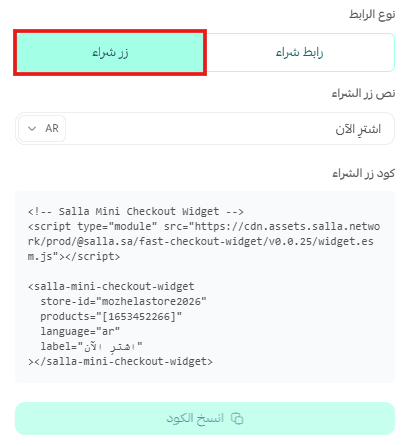
Customer journey with quick purchase

Using a purchase link

  1. The customer clicks the instant purchase link from an advertisement.
    image.png
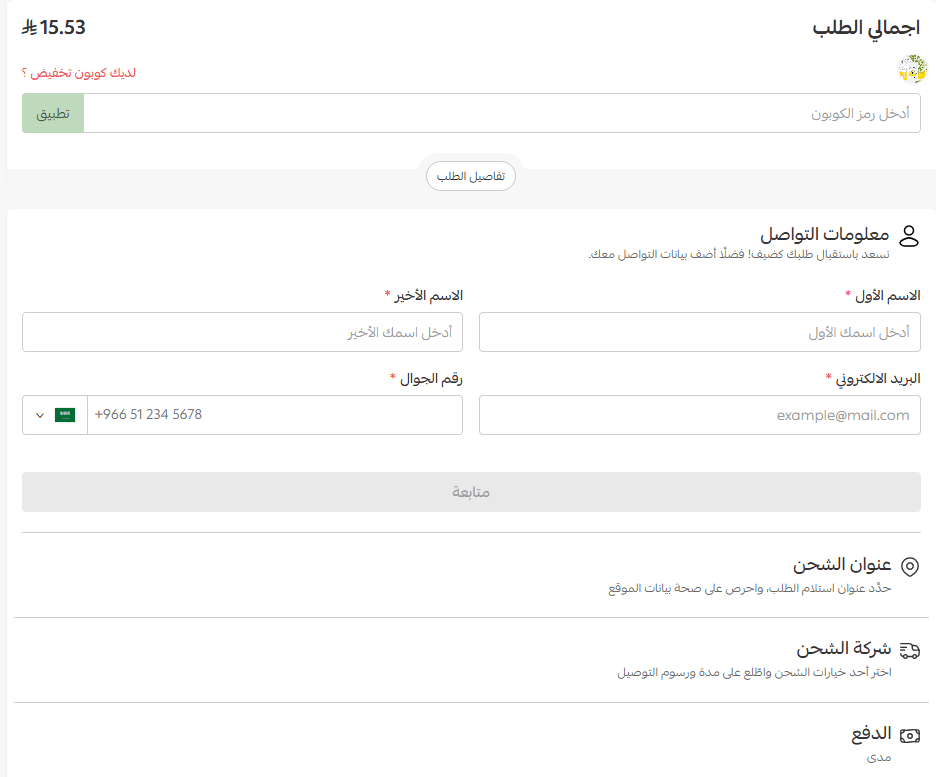
  2. The product is automatically added to the cart, and the customer is taken directly to the checkout page to complete the order.
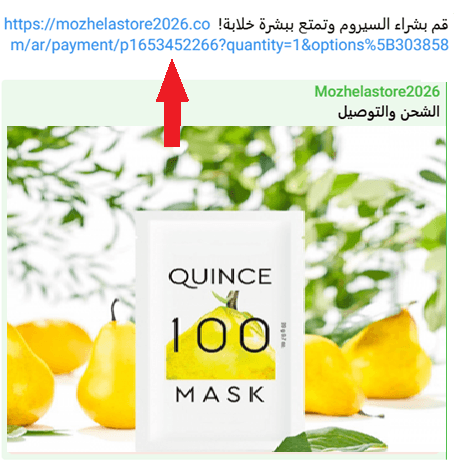
    image.png

Using a purchase button

  1. The customer clicks the purchase button in the advertisement.
  2. A login window appears.
    image.png
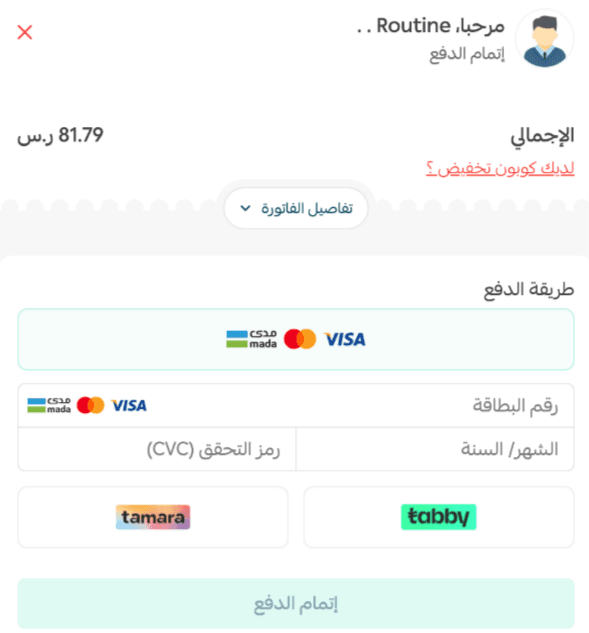
  3. After logging in, the order details window appears, allowing the customer to complete the payment.
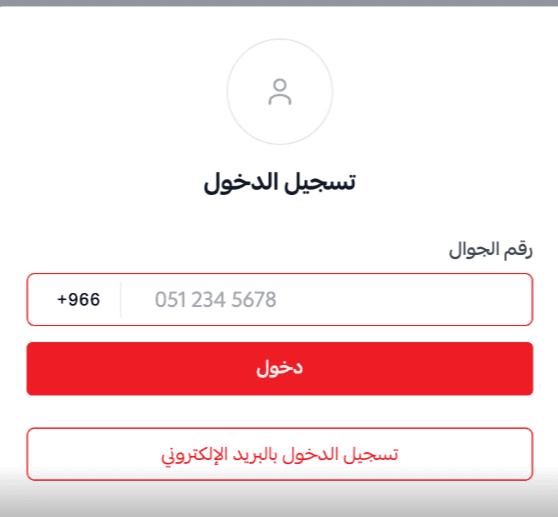
    image.png

Frequently asked questions

Can the instant purchase button be embedded outside Salla?

Yes. The instant purchase button can be embedded anywhere that supports HTML, such as:

  • Landing pages
  • External websites
  • Blogs
  • Advertising campaign pages
     

Is the feature available on all plans?

The feature is available on all paid plans.

Ask and request support from merchants and the Salla team.

Avatars
Previous
Next

Own a professional store on Salla

Create your store now with flexible tools and integrated solutions to help you at every step towards growing your sales

Create your store for free