How many customers filled a cart in your store and left without paying?
Every abandoned cart is a sale that almost happened. With Salla's temporary discount feature, you can nudge those hesitant shoppers back by sending a time-limited discount on their abandoned carts — a proven way to turn "almost" into a completed order. In this guide, you'll learn how to send a temporary discount to a single abandoned cart or to a group of them, and how to set the discount details, expiry, and send time.
To activate a temporary discount on abandoned carts in Salla, open (Marketing tools) from the dashboard's side menu, click (Abandoned carts), then send the discount to one customer via the more (...) menu or to several customers at once. Set the discount type, expiry date, and send time, then click (Send offer).
📌 Article overview
- What is a temporary discount?
- How to activate a temporary discount
- Frequently asked questions
🎯 What is a temporary discount?
It is a discount offered to a customer to encourage them to complete their purchase, and it stays valid only for a set period.
🚀 How to activate a temporary discount
You can send a temporary discount on a single abandoned cart:
1. From the side menu of your dashboard, click (Marketing tools).

2. From the marketing tools page, click (Abandoned carts).

From the abandoned carts page, go to the customer whose abandoned cart you want to send a temporary discount to, click the more (...) icon, then click (Send temporary discount).

Or send a temporary discount to a group of abandoned carts:
1. From the side menu of your dashboard, click (Marketing tools).
2. From the marketing tools page, click (Abandoned carts).
From the abandoned carts page, select the customers you want to activate a temporary discount for, then click (Send temporary discount to a group).
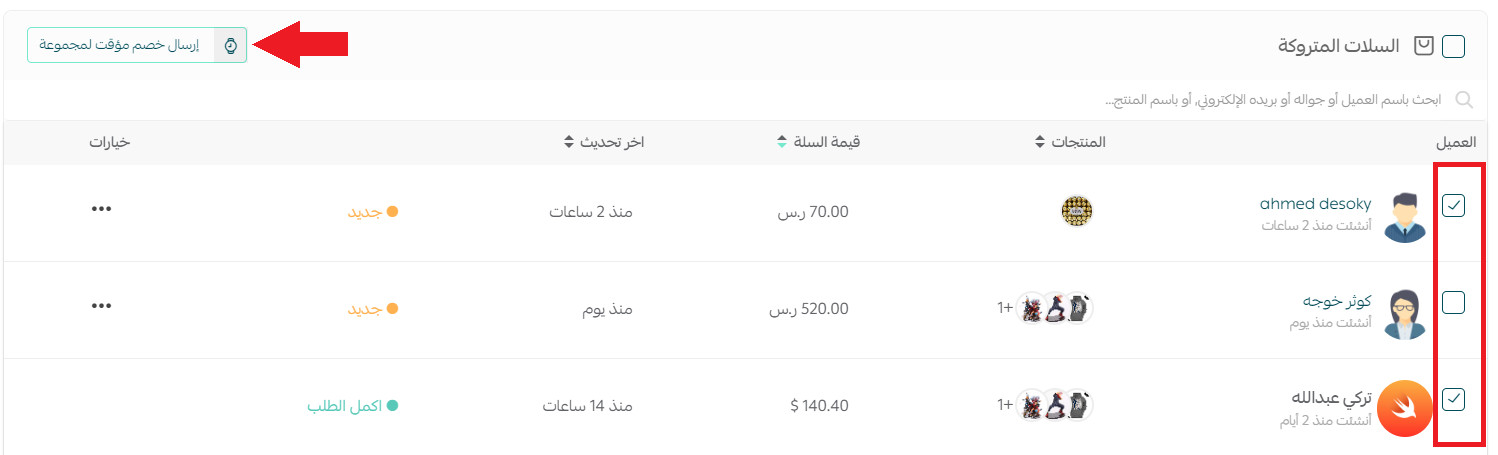
Then:
3. Enter the discount details, then click (Send offer).
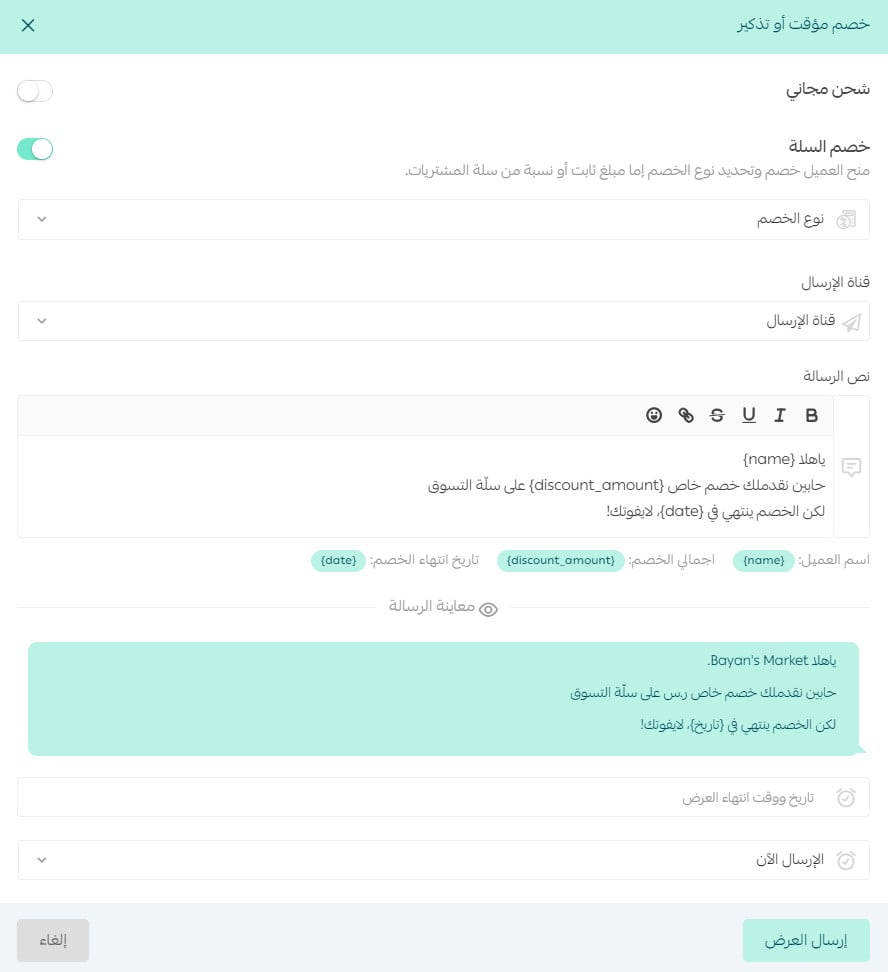
Choose the discount type (a percentage of the abandoned cart's value, or a fixed amount), then the sending channel and the text of the reminder message the customer will receive.
Enter the discount's expiry date and time — click the clock to set the exact time the discount stops being valid.
Also choose when to send it: (Send now) or (Schedule send time).
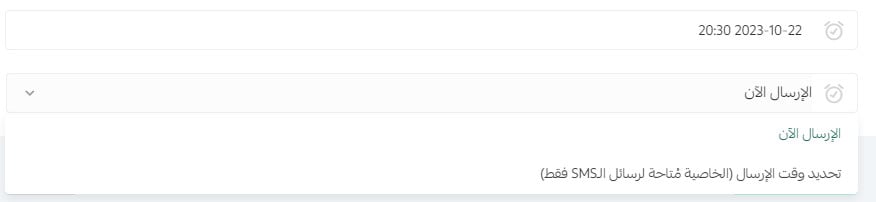
If you choose (Schedule send time), you'll need to enter the send date and time, as shown here:

For more details, see abandoned cart reminders with a discount.
❓ Frequently asked questions
Why can't I send discount messages at any time of day?
This follows the service terms and conditions set by the Saudi Communications and Information Technology Commission (CITC).
Why do I need to reserve an SMS sender name?
This is required by the Saudi Communications and Information Technology Commission (CITC), which made reserving a sender name mandatory as part of its effort to fight spam text messages.
You can review the service terms and conditions at this link:
https://portalservices.citc.gov.sa/E-Services/License/LicenseLandingScreen.aspx
I see the alert "a sender name must be reserved from the sending settings" — how do I fix it?
Make sure you reserve a sender name before setting up sending, so this message no longer appears:

I don't have a sender name — can I remind customers about their abandoned carts by email?
Yes. You can send abandoned cart reminders by email or SMS by configuring your abandoned cart reminder messages.
Can I see the discount status from the abandoned carts page?
Yes, as shown here:
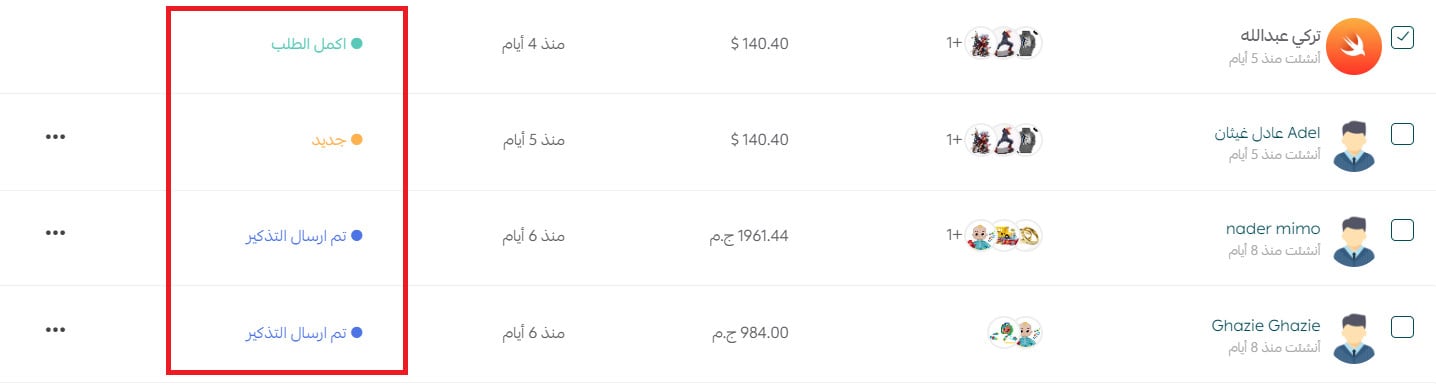
Finally...
Every abandoned cart carries a missed opportunity. Start turning those opportunities into wins with the abandoned carts course, which shows you how to recover those sales before they slip away.
Register for the making the most of abandoned carts course.