Do your customers get an answer fast enough to keep them from leaving?
Shoppers arrive with high expectations. When they contact a store, they expect a quick and capable response, and they judge the whole business on it. Strong customer service is not something you bolt on after the sale; it runs through every part of how you deal with people, and it is what turns a first order into a lasting relationship. Salla gives you the tools to build it. In this guide, you'll learn how to set up your support channels, keep your contact details current, get ahead of problems before customers report them, and measure how your team is doing.
Outstanding customer service comes from being reachable, being proactive, and measuring what happens. Give customers clear support channels and live chat, keep your contact numbers current, use customer groups and order tags to spot problems before they are reported, and review your team's performance against agreed quality standards.
"The best marketing strategy of all is caring."
📌 Article overview
- Offering technical support
- Updating your contact information in Salla
- Offering proactive customer service
- Tracking and evaluating customer service performance
- Tips for great customer service
- Frequently asked questions
🚀 Offering technical support
Technical support is the help a store offers so customers get the most out of its products and services: repairs, improvements, explaining how something works, installation problems, login errors, and any other technical difficulty that can spoil the customer's experience.
Excellent service costs you time and money, but it pays you back by letting you:
- Stand apart from competitors by making the customer feel valued and respected.
- Keep a good reputation among customers for the long term.
- Encourage existing customers to buy from your store again.
Remember that winning a new customer costs six times more than keeping an existing one.
You can offer technical support in your Salla store through several channels.
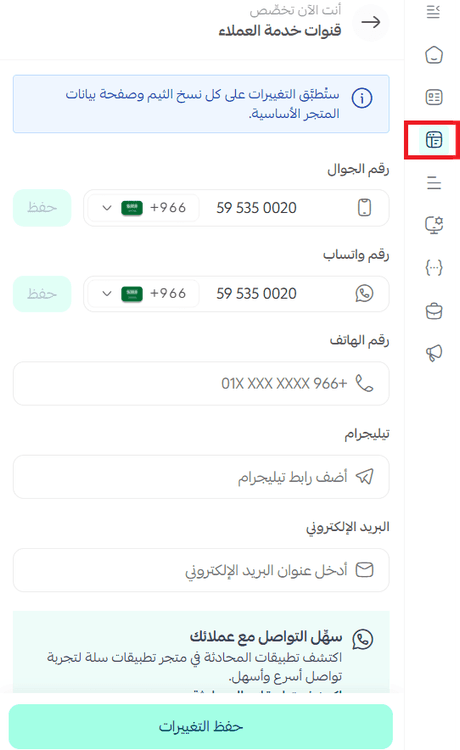
Customer support channels
Give customers the contact methods they need to reach your support team freely. These appear at the bottom of your store's pages, like this:

You add them by customizing your store's design:
Connecting a live chat service
Live chat is one of the best ways to give customers exceptional service, because it answers their questions quickly. It lifts your conversion rate, increases your store's revenue, and adds a human touch to an online transaction.

Salla supports a number of live chat services, and you can activate one of them:
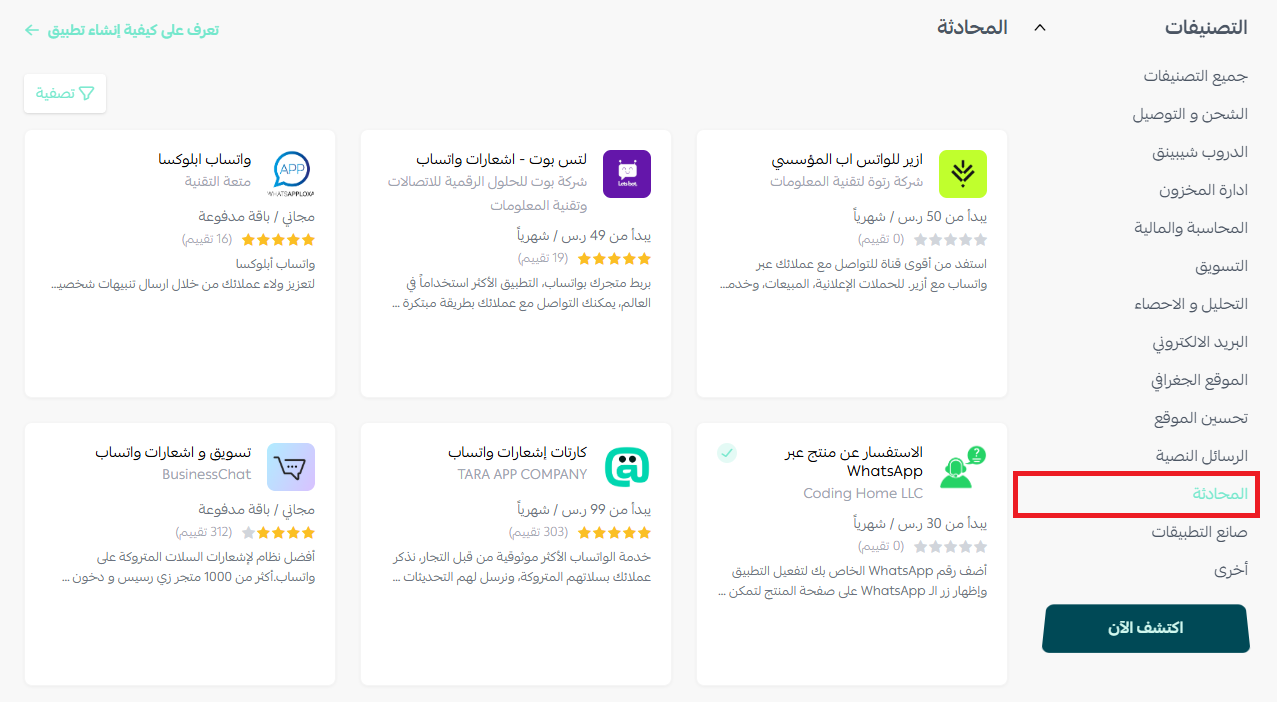
You'll find setup instructions for each available chat service in the app integrations section of the Help Center. Some examples:
👣 Updating your contact information in Salla
Changing the mobile number on your profile
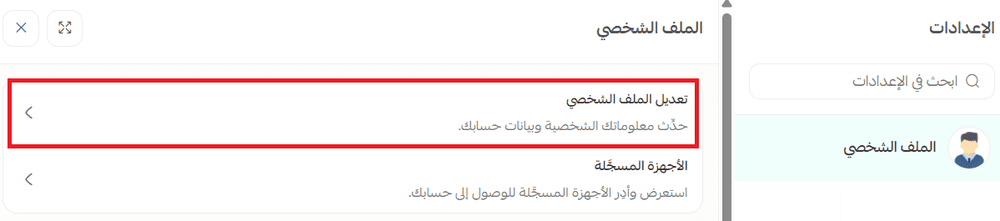
To change your mobile number in Salla, follow these steps:
1. From the main menu, click the store settings icon.

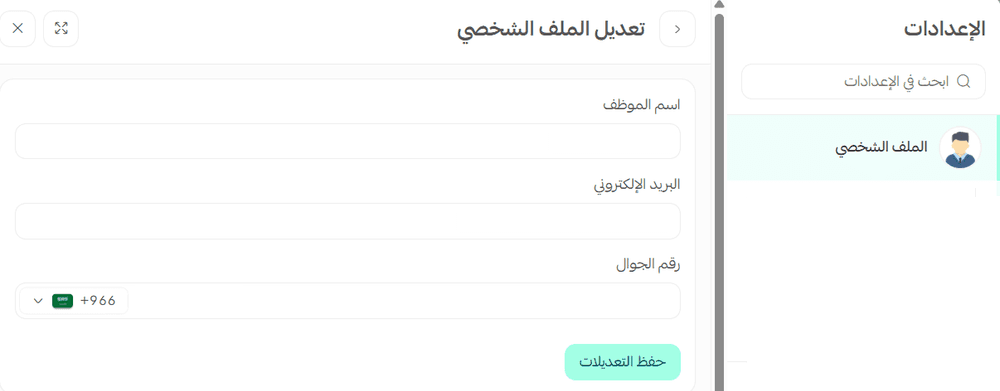
2. In the (Profile) section, choose (Edit profile).
3. Enter the new mobile number, then click (Save changes).
📝 Important note
If you cannot sign in because the verification code is going to a different mobile number, complete the request letter and attach the required documents. If the account holder is an establishment or a company, the letter must also be certified by the Chamber of Commerce. Send the request to mc@salla.sa to finish updating your contact number. [Verify: the Arabic refers to an "attached letter" template, but no attachment or download link is provided in the article.]
Changing the contact number customers see in your store
1. In the (General) section, choose (Store data).
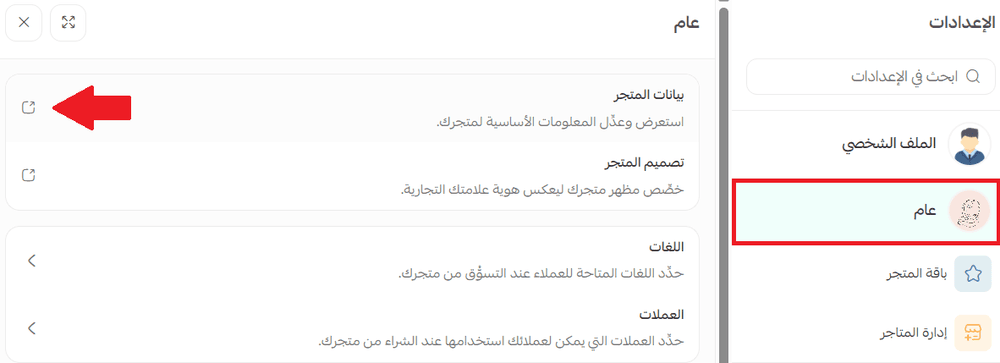
2. Choose your main store data.

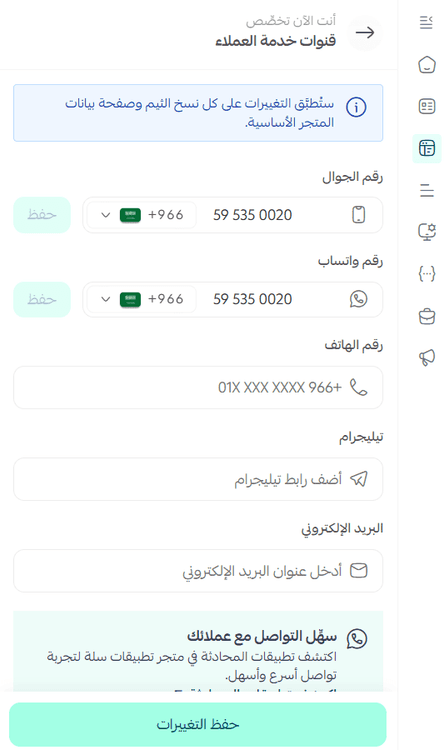
3. In the (Customer service channels) section, add your contact details, then click (Save changes).
🎯 Offering proactive customer service
70% of customers think more highly of a brand that takes the initiative and reaches out to them first. That is what proactive customer service is about.
Proactive support means taking steps to help customers solve problems before those problems happen. You deal with the customer's issue before they even run into it, by spotting or anticipating it in advance and offering a way through.
💡 Example: If you expect questions about delivery dates, rather than waiting for customers to write in about a late delivery, tell them about it yourself and offer free shipping on their next order to make up for the delay.
Here are ways to identify the customers who care about an upcoming feature, or who you expect will hit a problem.
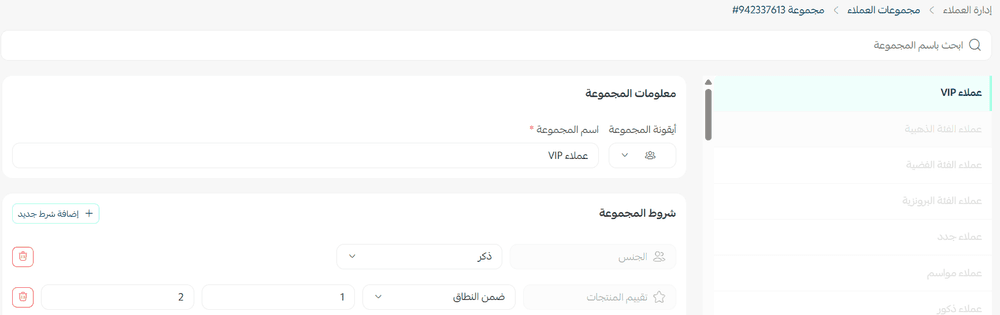
1. Use customer groups to segment customers
Group customers by what they need. You could create a group for customers who have not placed an order yet, for example.
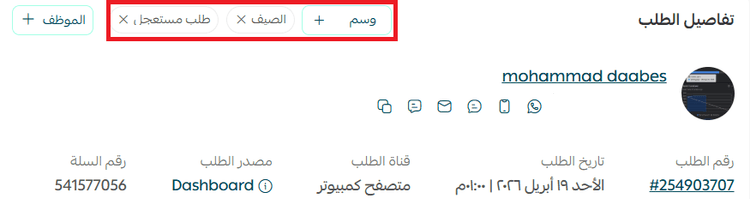
2. Use order tags
You could use a compensation tag, for instance, to flag customers who ran into a problem with a product or a service and who you want to make it up to in some way.
3. Collect customer feedback
Staying close to what customers are saying lets you catch problems as they surface and respond by building the right resources.
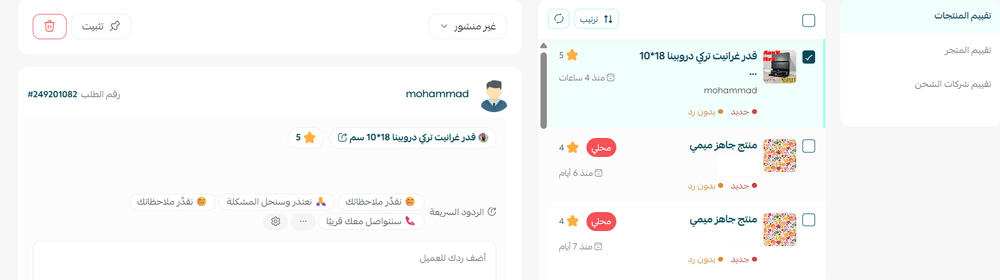
You can also learn a great deal about what motivates your visitors, what they expect, and how their experience with you turned out, using surveys on Hotjar.
4. Send surveys
The simplest way to get inside your customers' heads is to ask them. The biggest mistake businesses make is assuming they already know what their customers want and need.
Customer feedback is essential to improving proactive service. You can ask questions such as:
- What do you wish we did more of?
- How could we improve your shopping experience with us?
Hotjar's polls also let you ask visitors why they did, or did not, take a specific action, such as filling in a form or clicking the "Buy" button.
Read more about using Hotjar heatmaps.
5. Monitor customer activity
Watch your customers' orders, the reasons they contact customer service, the tickets they open, and the problems they run into.
Hotjar's analytics tools, heatmaps, and conversion funnels help you track and analyze user behavior properly.
Read more about recording user sessions with Hotjar.
This approach can work better than a sales pitch, because customers feel their needs have been met in full.
✅ Tracking and evaluating customer service performance
Why evaluate your customer service calls?
Reviewing calls is one of the most useful ways to improve how a business performs and to see clearly where it is strong and where it is weak. It also improves the performance of your customer service staff, your technical support team, and your sales team, because you are assessing both the service itself and the people who delivered it once the call ends.
These methods help you understand your customers' problems properly, so you can give them the best service you can and meet what they actually need.
Performance standards for customer service and support staff
Service quality standards
Customer satisfaction rests on four core measures:
1. Response speed
2. Clarity of the answers and information given
3. How customers are dealt with
4. Customer happiness
Service volume standards
1. Number of solved tickets
2. Number of ticket replies
Service expectations
Decide what you want your customers' experience to feel like, then assess every part of your service model from the customer's point of view. Look at wait times, how staff interact with customers, your return policy, and your refund and exchange rules.
Training your customer service staff
For your team to deliver exceptional service, they need solid working knowledge of your policies and procedures for dealing with customers. That may mean building a training program, or coaching on the job, to establish a firm grasp of customer service best practice.
Empowering your staff
Giving staff room to use their own judgment in delivering high-quality service is priceless. Employees should be able to step outside the rules in certain situations. Be specific with them about how to handle customer concerns in ways that serve the store and keep the relationship with the customer intact.
📝 Important notes
These standards may not be sensitive enough to tell a strong employee apart from one who is coasting. For example:
- The size of the problem varies from one ticket to the next, and the time needed to solve each one depends on how complex it is.
- A support agent may be unable to resolve an issue at all, such as refusing a request that breaches the store's terms, which can earn a negative rating from an angry customer.
💡 Tips for great customer service
- Train your customer service staff to use positive language and avoid negative wording.
- Send a free product to a customer who asked about it, or send a personalized discount code to a customer who asked about discount codes.
- Involve customers in solving problems. It brings them closer to your brand.
- Spot problems that need fixing, where you can, by monitoring your social media pages.
- Empower your staff to impress your customers. You could set aside a monthly budget, or specific products, that customer service can give to unhappy or valued customers when the situation calls for it or the agent judges it necessary.
- Include a handwritten thank-you card with the order to show you appreciate the purchase. Writing to a customer by hand personalizes the service for that individual and shows them you value them.
- Turn an out-of-stock situation into a positive one with the right service, by suggesting alternatives to the items you do not have.
- Give customers choices from the first moment they interact with your brand. Whether that means interactive quizzes, demos or free trials, or sending spare products, give people a chance to try what you sell and learn more about you.
Further learning resources
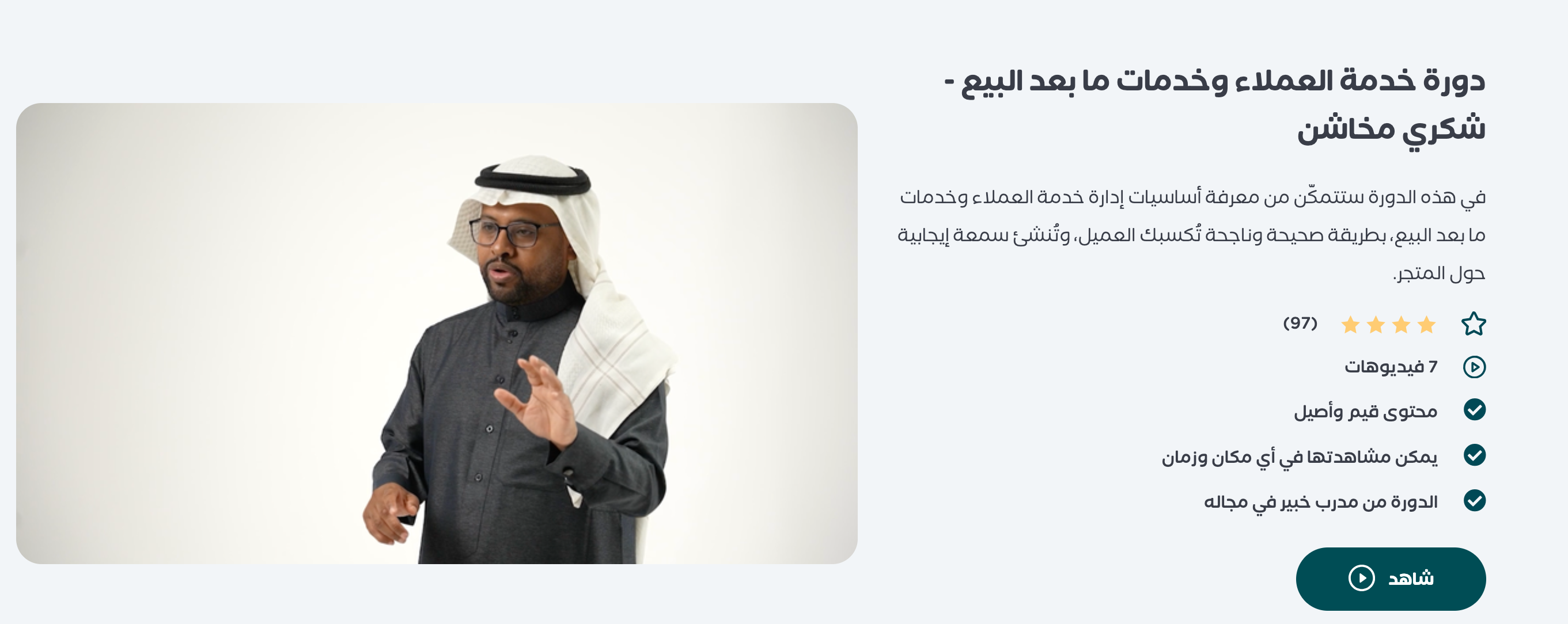
Managing customer service and after-sales support is one of the key factors in an online store's success. Enroll in the customer service and after-sales course from Salla Academy, taught by Shukri Makhashen, to learn how to improve the customer experience and raise satisfaction after the purchase. The course is delivered in Arabic.
❓ Frequently asked questions
Where do my support contact details appear to customers?
At the bottom of your store's pages. You add and edit them by customizing your store's design, and through the (Customer service channels) section of your main store data.
What is proactive customer service?
Helping customers with a problem before they run into it. You anticipate the issue, contact them first, and offer a solution, instead of waiting for the complaint to arrive.
How do I change the mobile number customers see?
From the (General) section, open (Store data), choose your main store data, add the contact details under (Customer service channels), and click (Save changes). That is separate from the mobile number on your own profile.
What should I measure to judge customer service quality?
Response speed, how clear the answers are, how customers are handled, and how happy they end up. Track the number of solved tickets and ticket replies alongside those, but read them with judgment, since ticket complexity varies.
Why is keeping a customer worth more than winning a new one?
Acquiring a new customer costs six times more than retaining an existing one, which is why good service is a growth strategy rather than an expense.
Trust is not given, it is earned in the details. The stores that win repeat business are the ones that answer quickly, speak plainly, and reach out before the customer has to.