Thinking about listing on Mahally but not sure what it takes, or what it costs?
The Mahally platform is a sales channel from Salla that lets merchants show and market their products free of charge to thousands of new customers in one place, where shoppers browse tens of thousands of local stores and millions of products, and search by product name, category, and city. In this guide, you'll learn the answers to the questions merchants ask most about Mahally: who can join, why a product might not appear, how categories work, and what changes on your side once you are live.
Mahally is a free Salla sales channel where merchants list products for shoppers browsing tens of thousands of local stores. You need a Salla store on a paid plan such as Plus or Pro, a verified store, and each product needs a price, stock, and a last-level Mahally category.
📌 Article overview
- What the Mahally platform is
- The conditions for listing your products
- Frequently asked questions about Mahally
🎯 What is the Mahally platform?
Mahally from Salla is a complete sales channel that lets Salla merchants show and market their products free of charge to thousands of new customers in one place. Shoppers browse tens of thousands of local stores on the Salla platform and millions of products, and can search by product name, category, and city.
✅ What are the conditions for listing my products on Mahally?
1. You have a store on Salla.
2. You are subscribed to one of the paid plans, such as Plus or Pro.
3. Your store is verified.
4. You accept the Mahally privacy and usage terms.
❓ Frequently asked questions
Why don't some of my products appear on Mahally?
A product may not appear on Mahally if its price is SAR 0, because Mahally only shows products that can actually be bought.
Products that have sold out stay visible on Mahally, with a notify me when available option for customers. [Verify: a later answer in the same article says a product with a quantity of 0 is not shown until stock is added, which contradicts this.]
To make sure your products show up correctly, give every product a proper price and keep its details complete.
How do I leave the platform after joining?
Once you join Mahally, you cannot cancel or leave the platform, and your listed products stay visible as long as they are active.
If anything goes wrong, get in touch with your merchant success manager.
Does the (Mahally category) option appear for every product type?
The Mahally category appears for every product except the following types:
- Booking
- Donating
- Financial Support
These product types are not listed within the Mahally categories.
When can a customer rate an order in the store?
Customers can rate an order straight after it is completed only for digital products and digital cards.
Will my products appear on Mahally while maintenance mode is on?
No. Your products do not appear on Mahally while maintenance mode is active in your store. As soon as you turn maintenance mode off, they show on Mahally again as normal.
What does the shopper get out of Mahally?
1. Search across more than 60,000 Salla stores.
2. A range of payment methods and fast shipping options.
3. A view of all their previous Salla purchases.
4. Shipment tracking.
Is Mahally available on the web?
Yes. You can visit Mahally through this link for a comfortable browsing experience.
Can my existing customers sign in to Mahally with their Salla account?
Yes. If you already have customers in your store, they can sign in to Mahally with the same account details and start browsing right away.
Which payment methods are available?
Customers who shop your products on Mahally can pay with the same payment methods you offer in your store.
Which shipping methods are available?
Customers who shop your products on Mahally can ship their orders with the same shipping companies you offer in your store.
Do I need to register on a new platform to use Mahally?
No. You can start using Mahally from your Salla dashboard.
Are there any fees for selling on Mahally?
No. There are no fees.
Is receiving orders from Mahally different from my own store?
No. Orders reach you the same way as always, with nothing extra to do, and you manage Mahally orders exactly as you manage the orders that come from your store directly.
Can I link a product to more than one Mahally category?
No. Each product can be linked to one Mahally category only.
What are the stages for earning supporter badges?
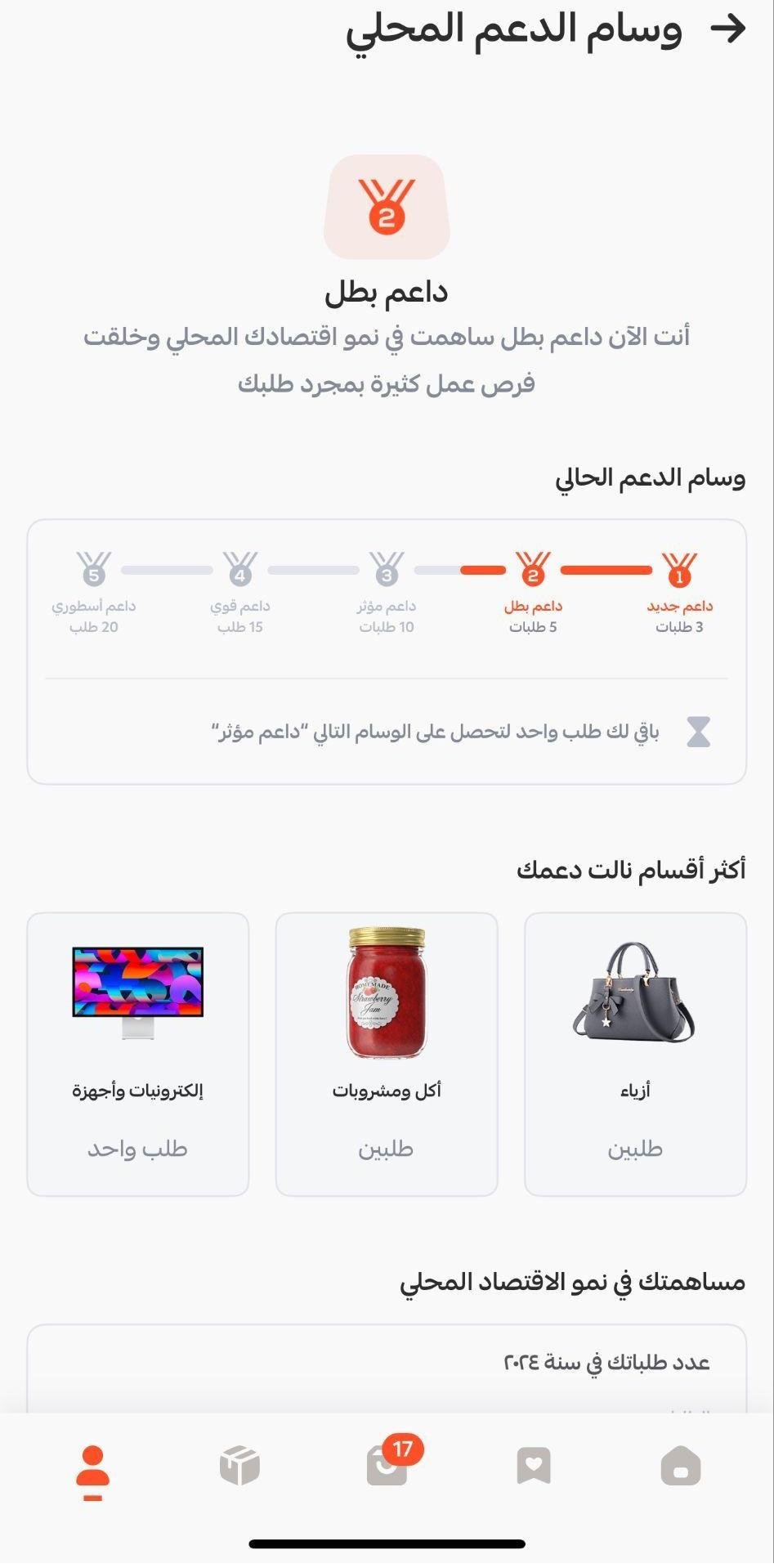
Stage one: new supporter badge
- The user earns the new supporter badge after completing their first 3 orders.
- This badge encourages new users to keep using the app and to order more often.
Stage two: champion supporter badge
- After 5 completed orders, the user earns the champion supporter badge.
- This badge shows the user is starting to build a habit of buying through the app.
Stage three: influential supporter badge
- The user earns the influential supporter badge when they reach 10 orders.
- This badge reflects how committed the user is to using the app for what they need.
Stage four: strong supporter badge
- Once 15 orders are complete, the user is given the strong supporter badge.
- This badge marks the user as one of the most active and engaged members, and adds to their sense of achievement.
Stage five: legendary supporter badge
- The user earns the legendary supporter badge on reaching 20 orders.
- This is the highest badge. It reflects the user's loyalty and steady engagement with the app, and motivates them to keep that level of activity up.
Can I link a product to any category I want?
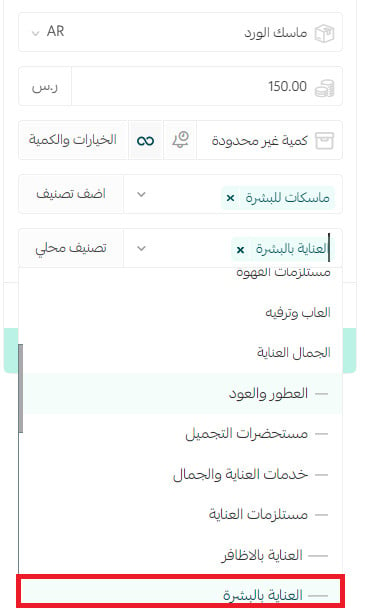
Yes, you can link your product to any category you find suitable on Mahally, as long as it is a last-level category.
💡 Example: There is a main category (Beauty and care) with several sub-categories, one of which is (Care essentials), which itself has several categories, one of which is (Skin care).
You cannot link your product to the main category (Beauty and care), or to its first sub-category (Care essentials), but you can link it to (Skin care).
In other words, you link your product to the deepest level of the category tree.
What do I do if there is no category that fits my product?
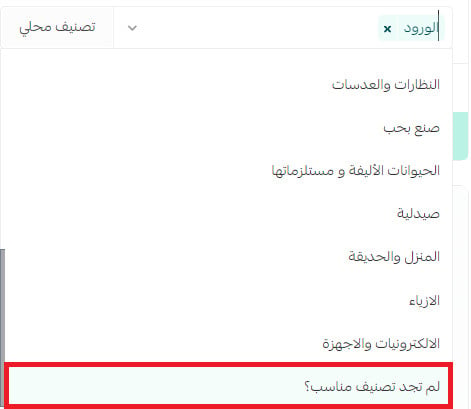
You can suggest the category you want:
1. On the product card, open the (Mahally categories) list and click (Can't find a suitable category?).
2. Type the name of the category you want added, then click (Send).
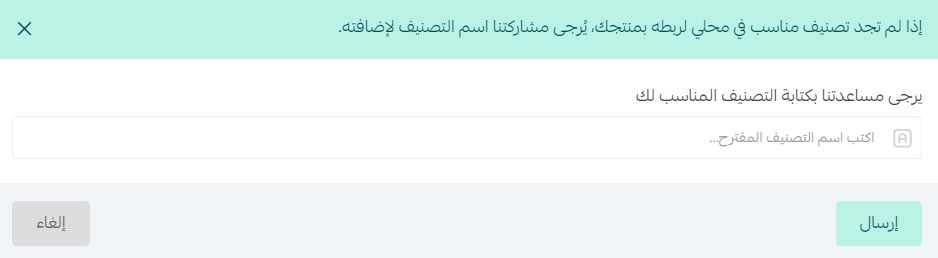
Your suggestion goes to the Mahally team, who review it and take it from there.
Can I see which products are not linked to Mahally yet?
Yes, in three ways.
Method one: from the Mahally page
When you start connecting to Mahally, a notice shows how many products are not linked yet. Click the notice to go to the products page and set their Mahally category.

Method two: from the products page
A notice bar appears for products, covering whether they have been added to Mahally and whether they are visible there. Click any of these notices to carry on managing your products on Mahally.

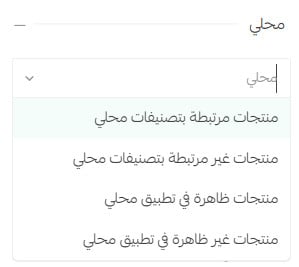
Method three: from the product filters
On the products page, click (Filter), then use the Mahally section to filter products by whether they are linked to Mahally or visible on it.
Why don't some of my products appear on Mahally?
Products may not appear on Mahally for these reasons:
- If the product price is SAR 0, it will not appear on Mahally.
- If the product is out of stock (quantity = 0), it is not shown until stock is added. [Verify: an earlier answer in the same article says sold-out products stay visible with a notify me option.]
To make sure your products appear, check that every product has both a price and a quantity.
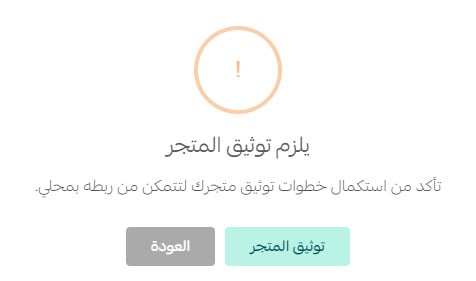
Does my store need to be verified before launching on Mahally?
Yes. You need to verify your store before going live on Mahally.
Most of what decides how well you do on Mahally happens before you list: a real price, real stock, and the most specific category you can find. Get those right and the channel does the rest of the work for you.