What would it take to turn an abandoned cart into a completed order? Sometimes, just the right discount at the right moment.
A reminder alone recovers some carts — a reminder with an incentive recovers more. With an abandoned cart reminder with a discount, Salla contacts customers who left items behind and offers them a percentage or fixed-amount discount to come back and complete the purchase. In this guide, you'll learn how to create the reminder, set the discount, and choose how it reaches your customers.
To send an abandoned cart reminder with a discount, go to (Marketing tools) then (Abandoned carts) in your Salla dashboard, open (Reminder settings), and click (+ Create new reminder). Set the abandonment duration, cart total, market, discount type and value, validity period, and sending channel, then click (Save).
📌 Article overview
- How to create an abandoned cart reminder with a discount
- The reminder settings explained
- Frequently asked questions
👣 How to create an abandoned cart reminder with a discount
1. From the side menu of your dashboard, click (Marketing tools).

2. From the marketing tools page, click (Abandoned carts).

3. From the abandoned carts page, click (Reminder settings).

4. Click (+ Create new reminder).
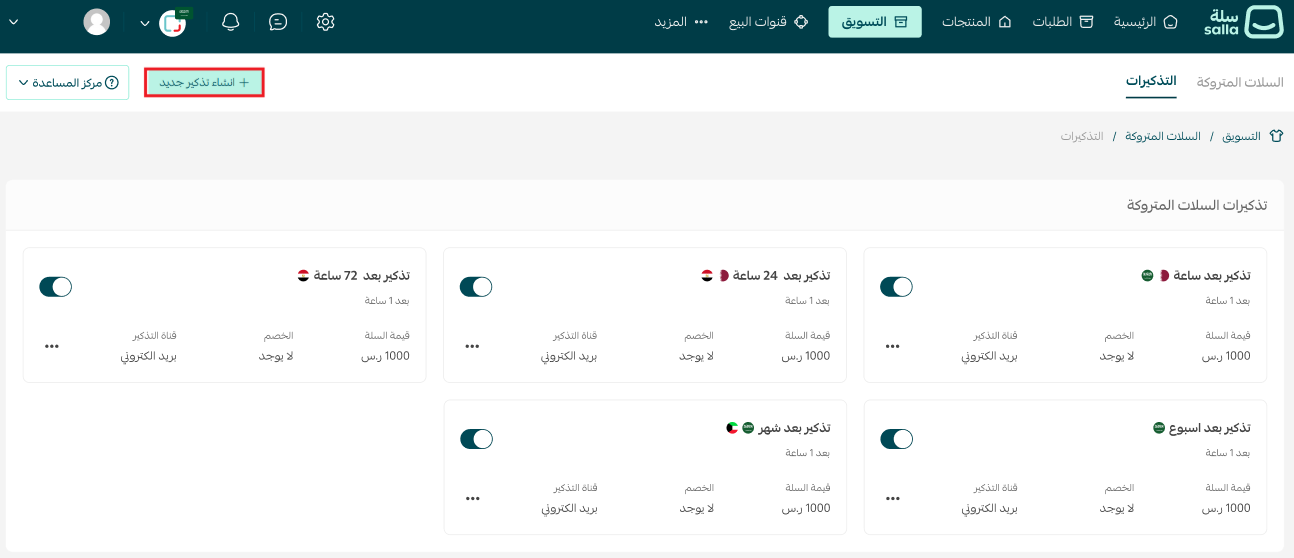
5. Enter the new reminder's details, then click (Save).
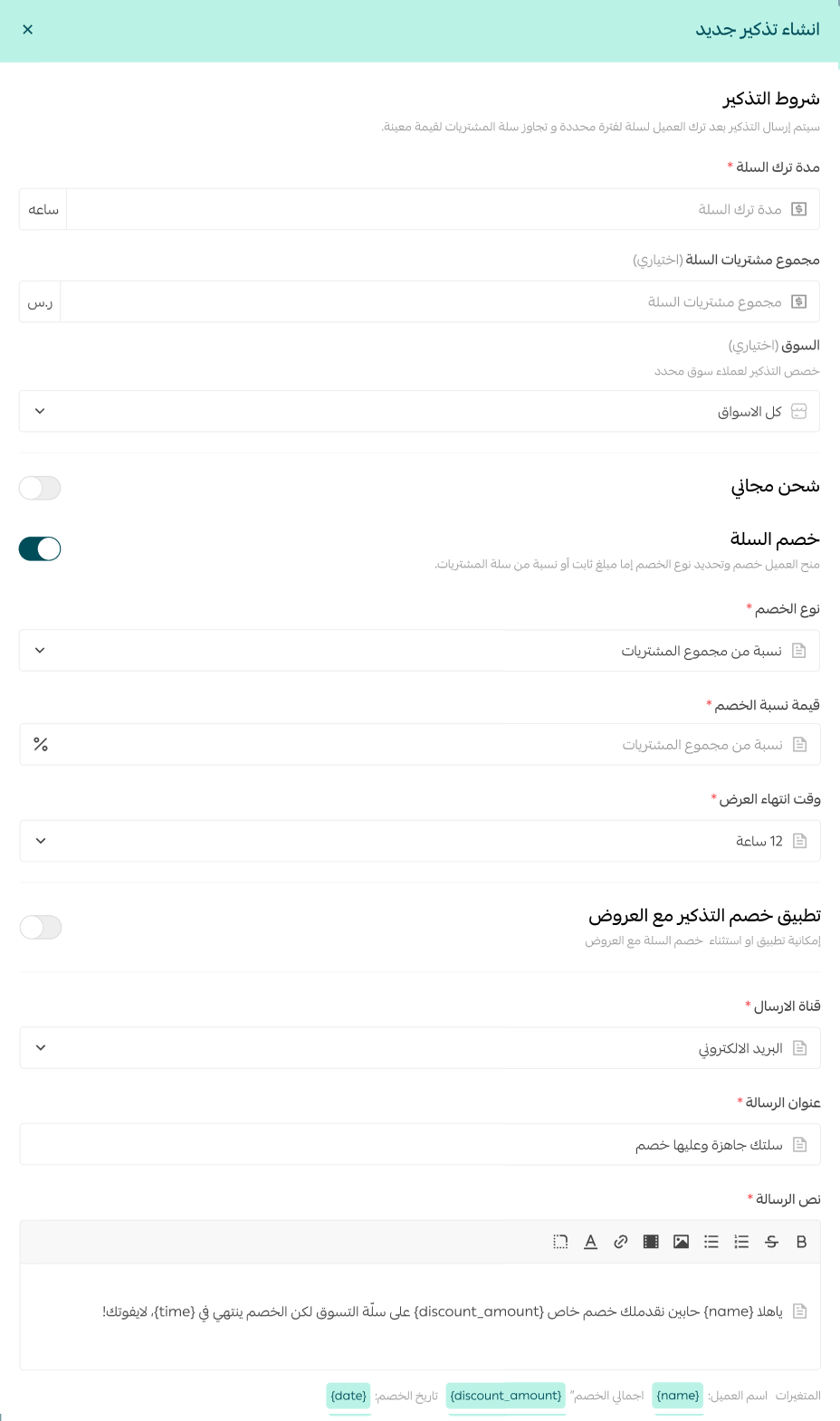
🚀 The reminder settings explained
1. Cart abandonment duration — how long (in hours) after the customer leaves the cart before the reminder is sent.
Cart total — when you set a cart value here, reminders go only to customers whose abandoned cart exceeds that amount.
2. Market — if your store operates in more than one market, use this option to choose where the reminder applies. Pick a specific market, or choose all markets to cover every market your store serves.
3. Discount type — a percentage or a fixed amount, as shown below.
Discount value — for example, 10 if you chose a percentage, or 120 if you chose a fixed amount.
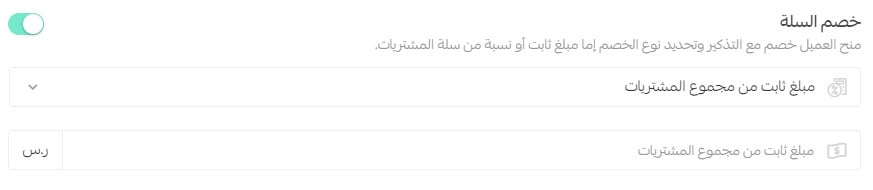
4. Enter the discount value (percentage or amount) off the cart total.
5. Discount validity — how long the discount stays valid after the customer opens the discount link.
6. Choose the sending channel:
- Text message (SMS)
- Mobile push notifications (for App Builder subscribers)
- WhatsApp notifications (for Salla WhatsApp subscribers)

7. Enter a promotional title for the message.
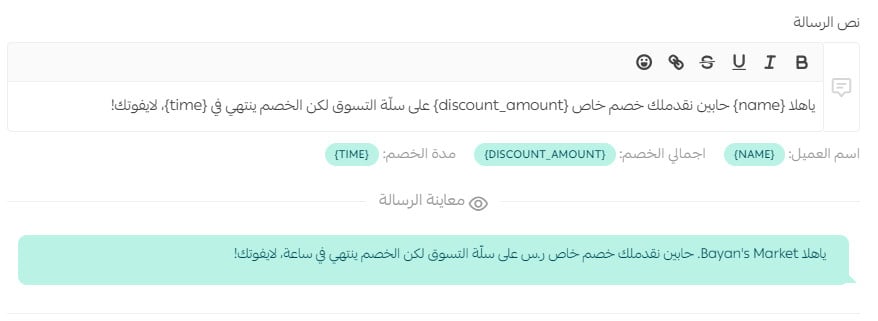
8. Write the reminder message text. Insert the merge fields (customer name, discount total, discount duration) to make the reminder more personal and clear.
📝 Important notes
Preview the reminder message before saving to make sure it says exactly what you want.
Frequently asked questions
❓ Can I limit the reminder to high-value carts only?
Yes. Set a cart total in the reminder settings — reminders will then go only to customers whose abandoned cart exceeds that value.
❓ Should I choose a percentage or a fixed amount?
Both work. A percentage (for example, 10%) scales with the cart value, while a fixed amount (for example, SAR 120 off) is easier for customers to grasp at a glance. Choose the option that fits your pricing.
❓ How long does the discount stay valid?
You decide. The validity period you set starts counting from the moment the customer opens the discount link.
❓ Does the reminder apply to all my markets?
That's up to you. If your store operates in more than one market, choose a specific market for the reminder or apply it to all markets at once.
Finally
Every abandoned cart is a missed opportunity. Start turning those opportunities into sales — the abandoned carts course shows you how to win them back before they're gone for good.
Enroll in the making the most of abandoned carts course from Salla Academy.