Do you face delays or coordination issues with traditional courier pickups that slow down order fulfillment?
With merchant drop-off shipping from RedBox, you can deposit your shipments at any time into the nearest RedBox smart locker. Orders are collected within 24 hours and delivered quickly to the customer’s selected locker; giving you more flexibility and faster delivery without waiting for a courier.
This article explains how Merchant Drop-Off works and answers the most common questions to help you ship confidently and efficiently.
📌 Article overview
- What is merchant drop-off shipping?
- How to deposit a shipment using merchant drop-off
- Frequently asked questions
Note: Drop-off shipping with RedBox is currently available only for stores in Saudi Arabia.
What is merchant drop-off shipping?
Merchant drop-off shipping is a service that allows merchants to deliver customer orders directly to the nearest RedBox smart locker at any time that suits them.
Once the shipment is deposited:
- A RedBox courier automatically collects it within less than 24 hours
- The shipment is delivered to the locker selected by the customer
- The customer receives a pickup code once the shipment arrives
This service removes the need to wait for courier pickups and helps speed up order fulfillment.
How to deposit a shipment using merchant drop-off
Follow these steps to deposit your shipment successfully:
- Receive your merchant drop-off card
After activating the service, you’ll receive a message containing your merchant drop-off card.
- Go to a RedBox smart locker
Visit the nearest RedBox locker location at any time.
- Log in as a merchant or courier
On the locker screen, select Merchant or Courier Login.
- Enter your merchant code
Enter the code shown on your Merchant Drop-Off Card and follow the on-screen instructions to deposit the shipment.
Once the shipment is deposited, a pickup request is generated automatically.
Frequently Asked Questions
What does the merchant drop-off card look like?
It’s a digital card that includes your merchant code, for example: BGUOWVWT
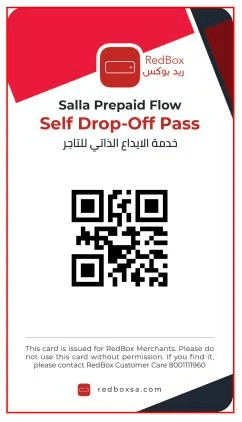
This code is used to log in at RedBox lockers.
How do I hand over shipments to RedBox?
You simply deposit the shipment into the nearest RedBox smart locker.
RedBox couriers will collect shipments from lockers and deliver them to the customer’s selected locker.
Does my merchant code change with every shipment?
No. Your merchant code is fixed and does not change.
How is the pickup request created?
A pickup request is created automatically as soon as you deposit the shipment into the locker.
What are the pickup hours?
RedBox collects shipments:
- Daily from 12:00 PM to 4:00 PM
- Friday is excluded
Any shipment deposited after 4:00 PM will be collected on the next business day.
What are the available locker sizes?
- Small: 8 × 37 × 47 cm
- Medium: 19.5 × 37 × 47 cm
- Large: 35 × 37 × 47 cm
What if my shipment is larger than the locker?
If the package does not fit in a locker, it cannot be split into multiple boxes
If the product is larger than all locker sizes and cannot be divided, it cannot be shipped using RedBox
When is the shipment sent to the courier?
As soon as the order status in Salla changes to Fulfilled, the shipment is automatically sent to RedBox for collection.
Is compensation provided if the shipment is damaged?
Yes. The maximum compensation provided by RedBox is USD 100 per shipment.
Can I deposit shipments at any time?
Yes. You can deposit shipments any time, but collection follows the official pickup schedule.
Summary
Merchant Drop-Off Shipping with RedBox gives you:
- Full flexibility to deposit shipments anytime
- Faster fulfillment without waiting for couriers
- Automatic pickup within 24 hours
- Seamless delivery to customer-selected lockers
It’s an ideal solution for merchants looking to streamline logistics and improve delivery speed.