Do you know which products your customers want but have not bought yet?
Every product a shopper saves for later is a signal. It tells you the product caught their attention, the price or the timing was not right, and a small nudge could turn that interest into an order. The customer wishlist reports in your Salla dashboard turn those saved products into numbers you can act on. In this guide, you'll learn how to open the customer wishlist report, what each metric means, and how to read the results.
The customer wishlist report shows how many products customers added to their wishlists, the total value of those products, how many orders came from wishlists, and which products are saved most often. Together these metrics tell you how much unconverted interest your store is holding and where to focus offers.
📌 Article overview
- How to open the customer wishlist report
- What each wishlist metric means
- Practical examples for reading your wishlist reports
- Frequently asked questions
👣 How to open the customer wishlist report
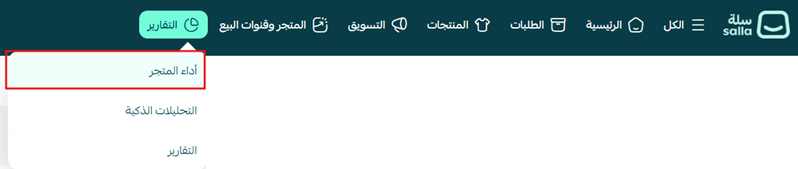
1. From your store's main menu, click (Reports), then click (Store performance).
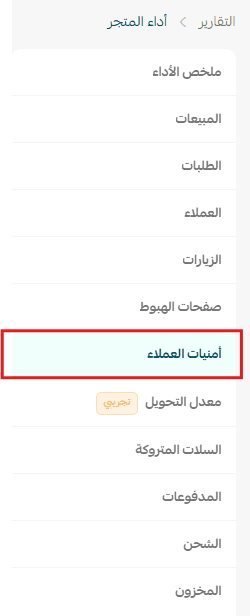
2. Choose the report type (Customer wishlists).
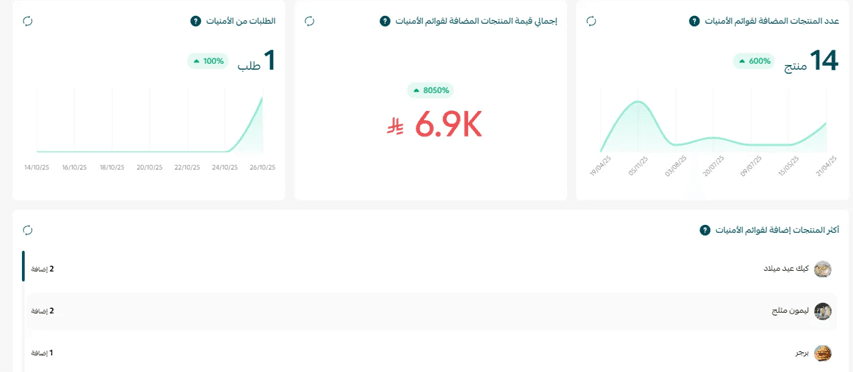
🎯 The wishlists dashboard shows the key indicators tied to customer interest: the number of products added to wishlists, their total value, the number of orders that moved from a wishlist to a purchase, and the products added to wishlists most often. Together they help you measure how interested customers are in your products, spot opportunities to increase sales, and make sharper marketing decisions.
🎯 What each wishlist metric means
Number of products added to wishlists
What is it?
The total number of distinct products customers added to their wishlists during the selected date range.
Why it matters
It tells you how interested customers are in your products, even when the purchase has not happened yet.
Total value of products in wishlists
What is it?
The total value of the products currently sitting in your customers' wishlists. It is an indicator of potential order value that has not turned into sales yet.
Why it matters
It helps you estimate the size of the sales you could still capture, and decide which products deserve a place in your marketing campaigns or offers.
Orders from wishlists
What is it?
The number of orders in which the customer bought a product they had previously added to their wishlist.
How is it calculated?
Orders from wishlists = the number of orders whose source is Wishlist.
Why it matters
It measures how well wishlists convert customer interest into actual purchases.
Most-added products to wishlists
What is it?
Your products, ranked by how many times they were added to wishlists.
Why it matters
A product added to wishlists many times is a product customers clearly want, even if they have not bought it yet. That makes it a strong candidate for a promotion or a restock.
💡 Practical examples for reading your wishlist reports
Example 1: products added to wishlists went up
Example:
Last month: 180 products.
This month: 320 products.
What does it mean?
More customers are interested in your products, but part of that interest has not turned into purchases.
What can you do?
- Send customers reminders about the products sitting in their wishlists.
- Run limited-time offers on the most-added products.
- Make sure those products are still in stock.
Example 2: the value of wishlisted products went up
Example:
Last month: SAR 35,000.
This month: SAR 82,000.
What does it mean?
A large amount of value is tied up in products customers want but have not bought.
What can you do?
- Build a marketing campaign aimed at customers who have wishlists.
- Offer coupons or limited-time deals on those products.
- Keep an eye on competitor pricing for the same products.
Example 3: orders coming from wishlists went down
Example:
Last month: 60 orders.
This month: 28 orders.
What does it mean?
Fewer customers are converting wishlist products into purchases.
What can you do?
- Send notifications when the price of a product drops.
- Remind customers about the products they saved.
- Confirm those products are still available in stock.
Example 4: one product keeps topping the wishlists
Example:
A product has been the most-added to wishlists for several weeks, but its sales are low.
What does it mean?
The product attracts customers, but something is stopping them from buying, such as the price or stock availability.
What can you do?
- Compare the product's price against competitors.
- Offer a limited-time discount.
- Improve the product description and images so they convince customers to buy.
Example 5: orders from wishlists went up
Example:
Last month: 25 orders.
This month: 70 orders.
What does it mean?
More customers came back to buy the products they had saved to their wishlists.
What can you do?
- Keep using alerts and targeted offers for customers with wishlists.
- Look at which products converted best, and repeat the same approach with similar products.
💡 Tip: Do not read the number of products added to wishlists on its own. Interest can be high without ever turning into sales. Track it alongside the total value of products in wishlists and the number of orders from wishlists to get a clearer picture of how well your store converts interest into purchases.
❓ Frequently asked questions
Where do I find the customer wishlist report?
From your store's main menu, click (Reports), then click (Store performance), and choose the report type (Customer wishlists).
Does the number of products added to wishlists count the same product twice?
No. The metric counts distinct products added to wishlists during the selected date range.
How does Salla decide that an order came from a wishlist?
An order is counted when its source is Wishlist, meaning the customer bought a product they had previously added to their wishlist.
What does a high total wishlist value tell me?
It is potential revenue you have not captured yet. Customers have chosen the products; the purchase is what is missing. Reminders, coupons, and stock availability are usually what close the gap.
My wishlist numbers are high but sales are flat. What should I check first?
Check price against competitors, stock availability, and the quality of your product descriptions and images. Those are the three things that most often stop a saved product from becoming an order.
🔥 Review your wishlist reports regularly to find the products your customers care about most, then turn that interest into sales with the right offers, timely reminders, and efficient stock management. 🚀