Deleted a product or an order by mistake? You have 30 days to get it back.
Accidents happen — a product gets removed during a cleanup, or an order is deleted in a busy moment. With Salla's restore deleted data feature, you can recover deleted orders and products directly from your dashboard, as long as they were deleted within the last 30 days. In this guide, you'll learn how to restore deleted products and orders step by step.
To restore deleted orders and products on Salla, open (Store settings) from the dashboard's side menu, click (Restore deleted data), then choose (Products) or (Orders). Select the deleted items you want back and click (Restore). Recovery is available for items deleted within the last 30 days.
📌 Article overview
- How to restore deleted products and orders
- Support services
- Frequently asked questions
🚀 How to restore deleted products and orders
You can recover products and orders deleted within the last 30 days by following these steps:
1. From the side menu of your dashboard, click (Store settings).

2. Click (Restore deleted data).

3. To restore products deleted within the last 30 days, click (Products).
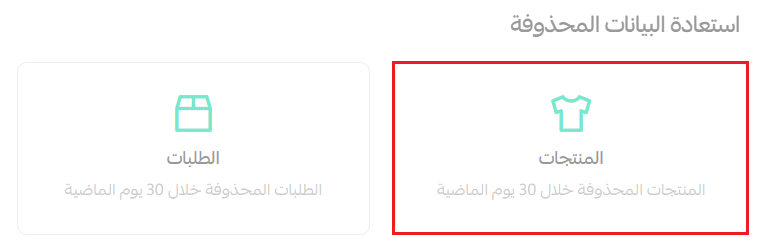
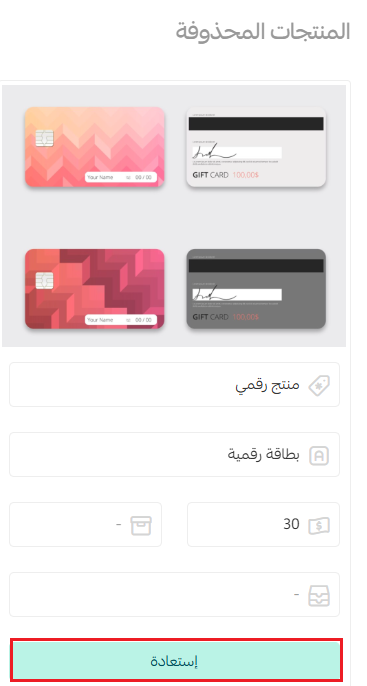
Then, from the deleted product's page, click (Restore).
To restore orders deleted within the last 30 days, click (Orders).
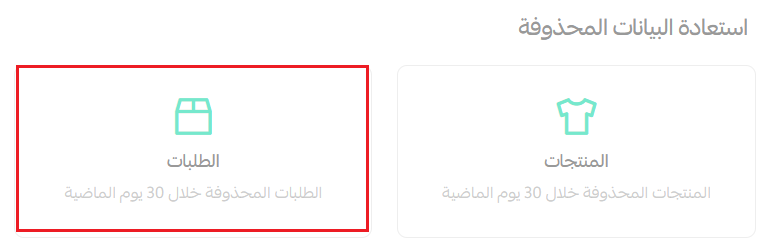
Select the deleted orders you want to recover, then click (Restore).

✅ Support services
You can take advantage of merchant services to make running your online store easier. Several services are available, such as adding products — don't hesitate to request assistance to get the right support.

❓ Frequently asked questions
How long do deleted products and orders stay recoverable?
You can restore products and orders deleted within the last 30 days. After that period, they can no longer be recovered from the dashboard.
Where do I find deleted items in my dashboard?
From the side menu, open (Store settings), then click (Restore deleted data). You'll find separate pages for deleted products and deleted orders.
Can I restore several deleted orders at once?
Yes. On the deleted orders page, select all the orders you want to recover, then click (Restore).
Restoring deleted data takes seconds when you know where to look — a quick safety net that keeps an accidental delete from turning into lost sales records.