There are times when you need to communicate with a specific segment of customers or update their data. Performing these actions manually, one customer at a time, can be time-consuming and prone to errors.
With bulk actions, you can manage customer groups faster and more accurately. This feature allows you to select multiple customers at once and apply actions to all of them in a single step, saving time and improving customer relationship management.
What can you do with bulk actions?
You can select any number of customers from the Customer Management page and perform multiple actions simultaneously, including:
- Filtering customers using advanced criteria before taking action
- Adding customers to a group or removing them from one
- Adjusting loyalty points (increase, decrease, or reset)
- Sending bulk messages via email, app notifications, or SMS
- Permanently deleting selected customers
All of this can be done in just a few steps, without repeating the process for each individual customer.
📌 Article overview
- Finding specific customers
- How to use bulk actions
- Available bulk actions:
- Add customers to a group
- Remove customers from a group
- Edit loyalty points
- Send order review requests
- Delete customers
- How customers experience these actions
How to use bulk actions
Finding specific customers
Method 1: Using search
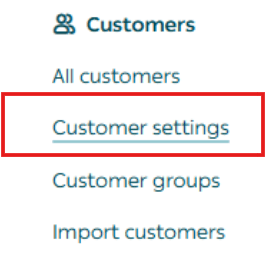
- From the main menu, click All, then under Customers select All customers.
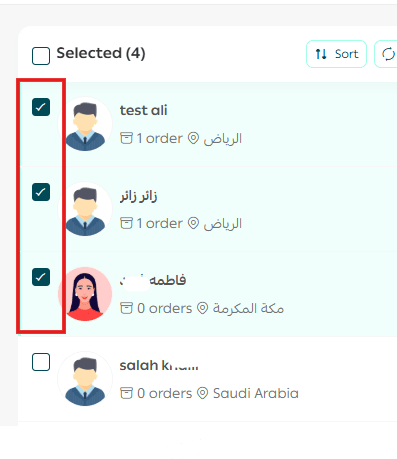
2. Select the customers by checking the boxes next to their names.
Method 2: Using filters
- From the Customers page, click Filter.

2. Enter the filtering conditions and click Show Results.
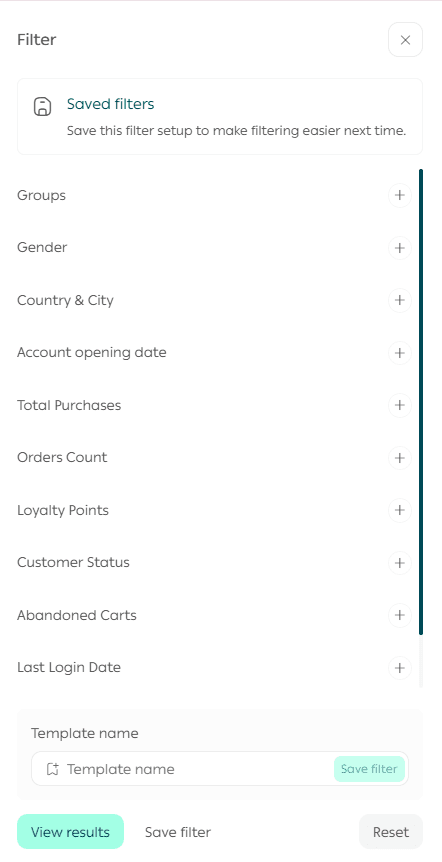
📌 Using filters allows you to target the most relevant customers, strengthen loyalty, and increase sales efficiently and securely.
Performing actions on selected customers
Once customers are selected, open the Actions menu and choose the required action.
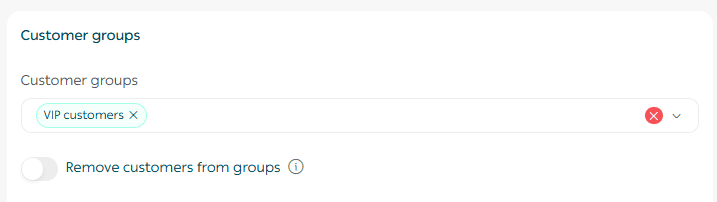
Add customers to a group
Select the target group and click Execute action.
Practical use case
Goal: Segment customers based on activity to personalize offers.
Example: An electronics store added all customers who made purchases during the current month to an “Active Customers” group to send exclusive promotions.
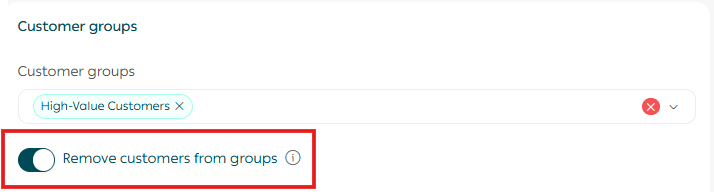
Remove customers from a group
Choose the group you want to remove them from, then click Execute Action.
Practical use case
Goal: Reorganize customer groups based on activity.
Example: A grocery store removed customers who hadn’t purchased in the last 6 months from the “Active Customers” group and added them to “Inactive Customers” to run re-engagement campaigns.
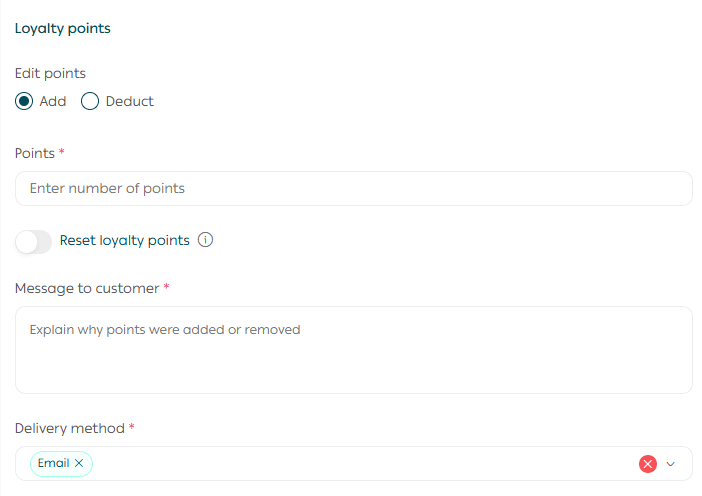
Edit loyalty points
Choose the adjustment type:
- Increase
- Decrease
- Reset
Then enter the required value.
Practical use case
Goal: Measure engagement and encourage loyalty.
Applications:
- Reward high-point customers with perks and upgrades
- Motivate low- or mid-point customers to increase purchases
- Classify customers into tiers (Bronze, Silver, Gold)
Example: A home supplies store awarded 100 loyalty points to customers who completed more than 3 orders during the month as part of a “Buy More, Earn More” campaign.
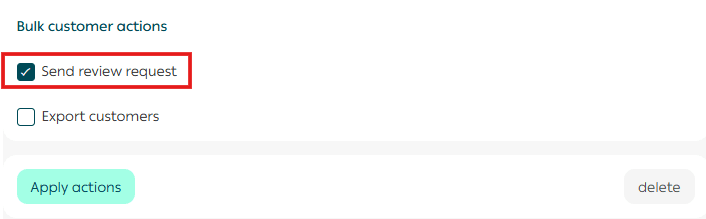
Send order review requests to a customer group
From the Customers page, select the target customers, then from Customer Actions, click Send Review Request.
Practical use case
Goal: Collect customer feedback and improve product experience.
Example: During Black Friday, an electronics store sent bulk review requests to customers who completed orders, increasing positive product reviews.
Delete customers
Confirm the action to permanently remove the selected customers from the customer database.

Practical use case
Goal: Maintain a clean and accurate customer database.
Example: A fashion store identified duplicate customer accounts with identical data and removed duplicates after merging orders and loyalty points into the primary account.
Smart targeting to boost loyalty and sales
You can combine bulk actions with smart targeting based on:
- Number of orders: Identify highly active customers or new buyers
- Total purchases: Target high-value customers and measure campaign ROI
- Last purchase date: Re-engage inactive customers with automated messages
- Abandoned carts: Send reminders and incentives to complete purchases
How does this appear to customers?
Group assignment
Customers will see exclusive offers or discounts tied to the group they were added to.
Loyalty points update
Any change to loyalty points appears instantly in the customer’s account upon login.
Messages
Messages are delivered through the selected channel (email, app notification, or SMS) with the campaign content or link.
Results you can expect
- Significant time savings in customer management
- More organized, responsive customer communication
- Higher efficiency in loyalty and group management
🚀 Save time and effort by managing hundreds of customers with a single click, keep your data organized and strengthen customer loyalty with confidence.