Kushof
Keeping stock counts aligned between your accounting software and your store is the kind of task that quietly consumes hours and still ends up wrong. The Kushof app connects the Kushof program to Salla to unify and manage your items and all their variants, updating quantities automatically from Kushof to your store. It also imports orders into Kushof as sales orders or invoices, and syncs invoices in line with ZATCA requirements. In this guide, you'll learn how to connect the Kushof app and manage its options.
To connect Kushof on Salla, click All in the main menu, open the App Store from the helper tools section, and search for the app. Click Install on the Kushof app page, complete your payment details, and click Confirm payment. The Kushof team then contacts you to finish the connection setup.
📌 Article overview
- How to connect the Kushof app
- Managing Kushof app options
- Frequently asked questions
🚀 How to connect the Kushof app
1. From the main menu, click (All), then from the helper tools section click (App Store).

2. Search for the app using the search field.

3. From the Kushof app page, click (Install).

4. Complete your payment details and click (Confirm payment) to finish the upgrade.
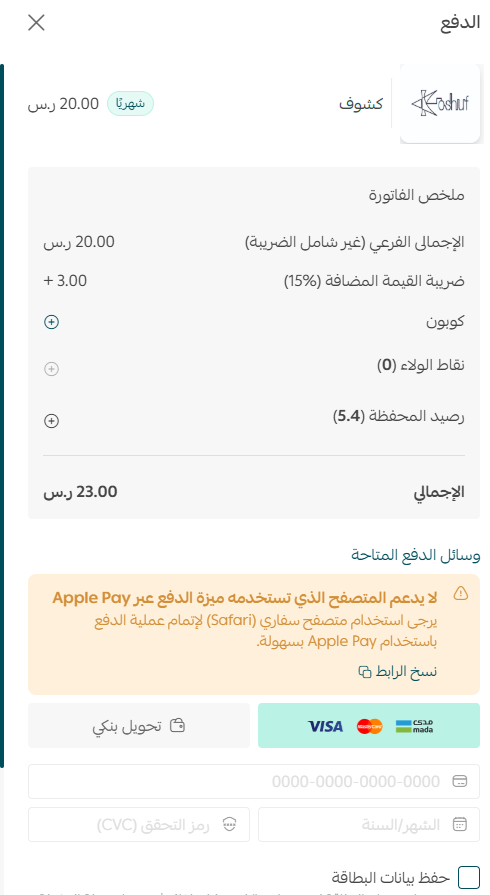
The Kushof app is now installed on your store.
🚀 Managing Kushof app options
Connection settings
The Kushof team will contact you to complete the connection setup.

Removing the app
From the (App actions) section, choose (Delete app).

Frequently asked questions
❓ What does the Kushof app sync?
It unifies your items and all their variants, updates quantities automatically from Kushof to your store, imports orders into Kushof as sales orders or invoices, and syncs invoices in line with ZATCA requirements.
❓ Do I set up the connection myself?
No. After installation, the Kushof team contacts you to complete the connection settings.
❓ How do I remove the app?
Open the App actions section and choose Delete app.
For more detail, see the Kushof app site.
Once stock counts sync automatically, the value isn't only the time saved — it's that you stop selling things you don't have. That mistake costs a customer, not just an hour.