Has a customer ever asked you to cancel an order minutes after placing it, leaving you to undo it manually?
With Salla, you can let customers cancel an order themselves before you start processing it. Enabling order cancellation before fulfillment saves you back-and-forth messages, reduces refund disputes, and gives shoppers the confidence to buy knowing they can change their mind within the window you define. In this guide, you'll learn how to turn this option on and how customers use it.
To let customers cancel orders before fulfillment, go to Store settings, open Store options, then click (Set) next to the option that allows customers to cancel an order before it enters processing. Choose how many hours the cancellation window stays open, then save your changes.
📌 Article overview
- How to let customers cancel an order before fulfillment
- Frequently asked questions
👣 How to let customers cancel an order before fulfillment
1. From the main menu of your dashboard, click (Store settings).

2. From the store settings page, click (Store options).

3. Click (Set) next to "Allow the customer to cancel the order before it starts processing".
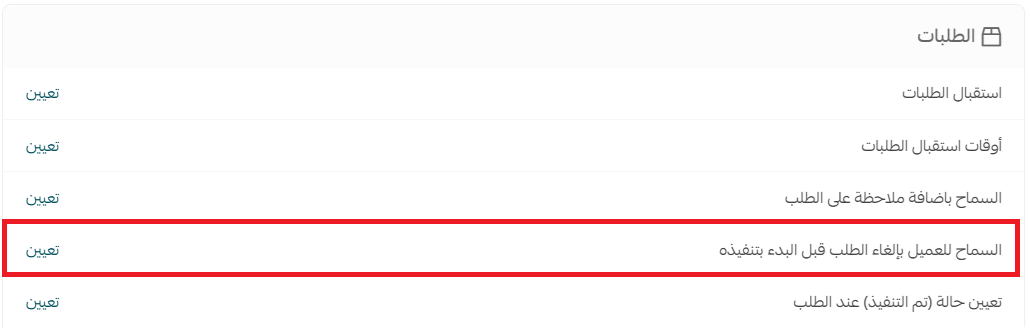
4. Turn on the option, set the number of hours during which the order can be canceled, then click (Save).

❓ Frequently asked questions
How does the customer cancel an order before fulfillment?
The customer follows these steps:
1. Click the account icon at the top of the store, then click (Orders list).
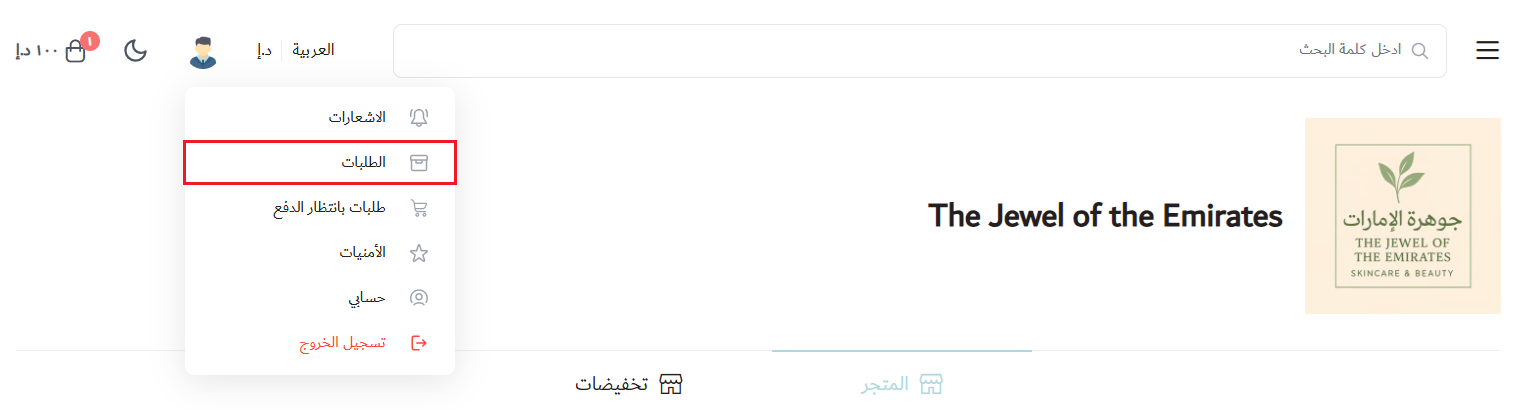
2. At the bottom of the order details page, click (Cancel order). The order is canceled before it enters the processing stage.

Can the customer cancel after the order starts processing?
No. Self-service cancellation is only available before the order enters the processing stage and within the hours you set. After that, the customer needs to contact you directly.
Can I control how long customers have to cancel?
Yes. When you enable the option, you choose the number of hours during which cancellation stays available, and you can change it at any time from the same setting.
Letting customers cancel early is a small setting with a big payoff: fewer support requests, fewer forced refunds, and a checkout that feels safer to buy from.