Ready to start accepting online donations and payments, but not sure where your Moyasar keys live?
Moyasar is one of the payment gateways charitable organizations and stores use most on Salla, and the setup itself is short. The only part that trips people up is finding the right key. To connect Moyasar payment gateway to your Salla store, you need the Secret Key from your Moyasar merchant account. In this guide, you'll learn where to find that key and how to add it to your store.
To connect Moyasar to your Salla store, sign in to your Moyasar merchant dashboard, open Settings, then select the API Keys tab. Copy the Secret Key that starts with sk_live_, then paste it into the Moyasar settings on your Salla payment methods page. Keep the key private; it grants full API access.
📌 Article overview
- What Moyasar payment gateway is
- What you need before you connect
- How to connect your store to your Moyasar account
- Frequently asked questions
🎯 What is Moyasar payment gateway?
Moyasar is an online payment gateway that lets stores and charitable organizations collect payments over the internet, including mada, Apple Pay, and credit cards. It connects to Salla easily and provides fast, secure payment handling.
✅ What you need before you connect
- A web browser: Chrome, Firefox, Safari, or Edge.
- An active Moyasar merchant account.
🚀 How to connect your store to your Moyasar account
Step 1: Sign in to your Moyasar dashboard
Sign in to your Moyasar merchant account at the following link:
https://dashboard.moyasar.com/login/new
Step 2: Open the API Keys settings
1. Once you are signed in, click Settings in the side menu.
2. Open the API Keys tab on the settings page.
3. You will see two sections: Test API Keys and Live API Keys.
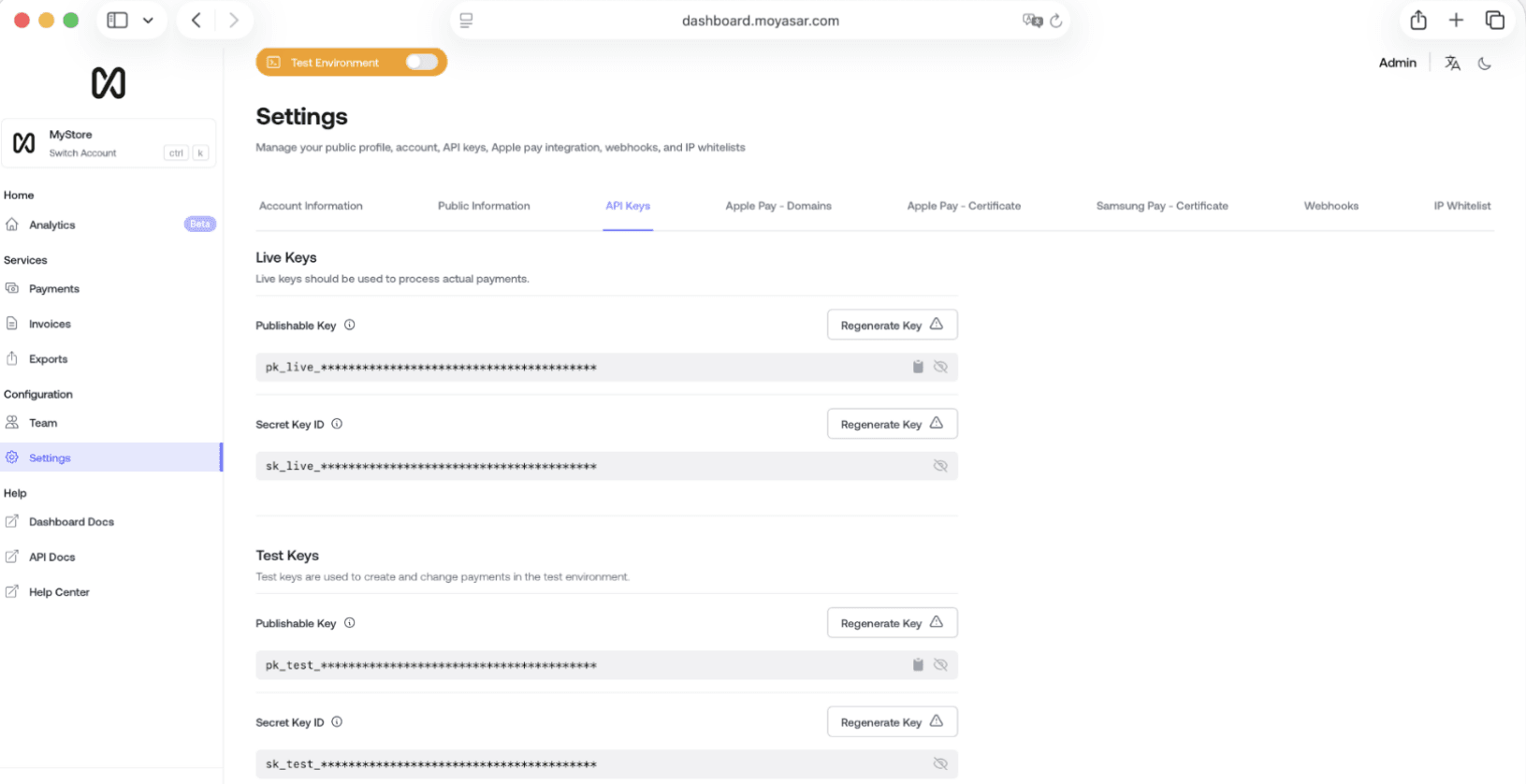
Step 3: Copy your Secret Key and add it to your store
1. Find the Secret Key field. The live key begins with the prefix sk_live_.
2. Copy the key.
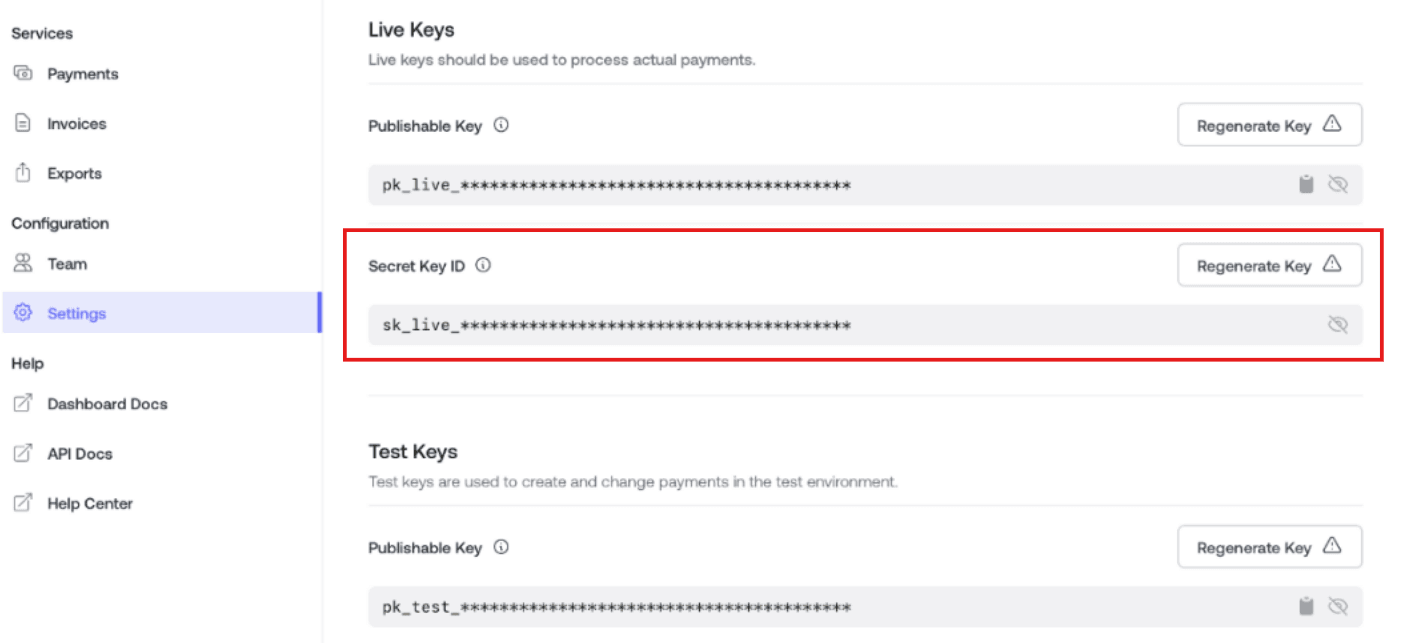
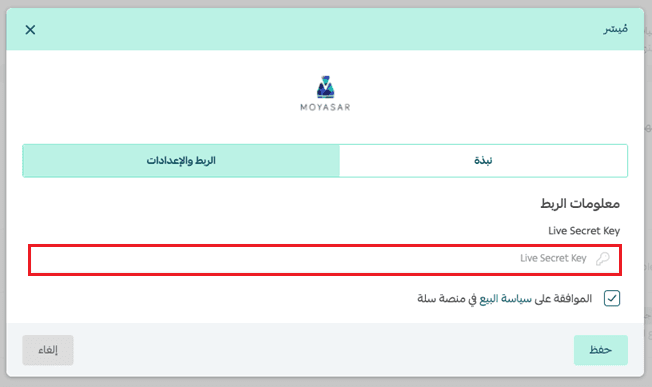
3. Paste it into the Moyasar settings on the payment methods page of your Salla store.
📝 Important notes
- Use the key from the Live API Keys section for real payments. The Test API Keys section is for testing only.
- Store the Secret Key somewhere safe and never share it publicly.
Frequently asked questions
❓ How should I handle the Secret Key after I copy it?
Save it somewhere secure. The Secret Key grants full access to the API operations on your Moyasar account, so keep it completely private and never put it in public files or in code that anyone can read.
❓ How do I get support if something goes wrong while I retrieve the Secret Key?
Contact the Moyasar support team by email at care@moyasar.com, or call 8001111848 for help.
❓ What is the difference between the test key and the live key?
Live API Keys process real payments from your customers and donors. Test API Keys are for trying the connection without moving real money. The live Secret Key is the one that starts with sk_live_.
❓ Where do I paste the Secret Key in Salla?
Open the payment methods page in your Salla dashboard, choose Moyasar, and paste the key into its connection settings.
Getting paid should be the simplest part of running a store or a charitable organization. Once your Moyasar Secret Key is in place, payments flow straight through to your account, and the only thing left to do is keep that key private.