Are your discounts eating into your margin without earning you a second order?
Most stores want the same three things: more sales, fewer abandoned carts, and customers who keep coming back. Straight discounts buy some of that, but they lose their shine quickly and take a bite out of your margin every time. Cashback offers work the other way around: the customer earns part of what they spent back as credit in their store wallet, and that credit is only worth something if they return and spend again. In this guide, you'll learn what cashback offers do, the goals they serve, three setups you can copy today, and how to pair cashback with your other marketing tools.
A cashback offer returns part of an order's value to the customer as credit in their store wallet, which they can spend on a later purchase. You set the type (fixed amount or percentage), a minimum order value, a maximum payout, the start and end dates, and the platform the offer runs on.
📌 Article overview
- What cashback offers are
- The goals cashback offers serve
- Three practical cashback setups you can copy
- Pairing cashback with your other marketing tools
- Frequently asked questions
❓ What are cashback offers?
A cashback offer gives the customer back part of what they paid, as credit in the store wallet. That credit can be spent directly on a later order, which adds real value to every purchase and gives shoppers a reason to buy again.
💡 Example:
If you create a 10% cashback offer, a customer who spends SAR 500 gets SAR 50 as wallet credit. That balance sits there as an incentive to come back and buy again.
🎯 The goals cashback offers serve
✅ Building loyalty to your brand: recurring offers, such as a monthly 10% cashback, give customers a standing reason to return.
✅ Attracting new customers: promoting a cashback offer makes a first purchase feel rewarding and encourages the customer to stay with the store.
✅ Driving more sales: tying cashback to a condition such as a minimum order of SAR 500 pushes basket value up.
✅ Reducing abandoned carts: a credit the customer is about to earn is a reason to finish checkout instead of hesitating and leaving.
✅ Raising average order value: a fixed or percentage cashback that unlocks at a threshold, such as SAR 50 back on orders over SAR 1,000, encourages customers to spend more.
✅ Getting a clear read on behavior: tracking how many customers used their cashback, how many came back to buy with it, and how long they took to spend it tells you how your customers shop and sharpens your next campaign.
🚀 Three practical cashback setups you can copy
The cashback offers page gives you a dashboard for managing offers in detail, so you can build a complete, customized offer around whatever you are trying to achieve. Here are three that work.
1. Lift the value of the basket
Cashback type: fixed amount (SAR 50)
Minimum order: SAR 1,000
Maximum: SAR 50, so the payout stays fixed
Result: customers add more to the cart to clear the minimum, which pulls your average basket value up.
2. Run a short seasonal offer
Cashback type: 10%
Start and end dates: 3 days, over a holiday or an occasion
Publishing: both platforms, for the widest reach
Result: a sense of urgency, and full use of the season's buying peak.
3. Push customers to your app
Cashback type: fixed amount (SAR 15)
Platform: store app only
Description: "Buy from our app and get SAR 15 back as credit."
Result: more app installs, and the app becomes a main sales channel.
🔔 Pairing cashback with your other marketing tools
Cashback settings in Salla currently apply to the order as a whole, not to specific products or categories. You can still reach the same goal with the tools you already have.
1. Use coupons targeted at products or categories
Coupons are the bridge. Instead of attaching cashback to specific products, which isn't available today, use a coupon to steer customers toward the products you want to move, and let the store-wide cashback offer reward the order.
The core idea
Create a discount coupon targeted at particular products or categories.
Say clearly in the coupon description or the campaign that the coupon points customers to those products, while cashback is calculated from the store-wide offer on the full basket once the order is complete.
Customers get pushed toward the products you want to sell, with cashback as the extra pull.
How to set it up
1. Create the coupon
Add a new coupon and fill in its details:
- The coupon name, for example Cashback10.
- The code the customer enters at checkout.
- The discount percentage or amount. This is optional, and can be small if you want the cashback to be the real draw.
In the targeting settings, choose specific products or specific categories.
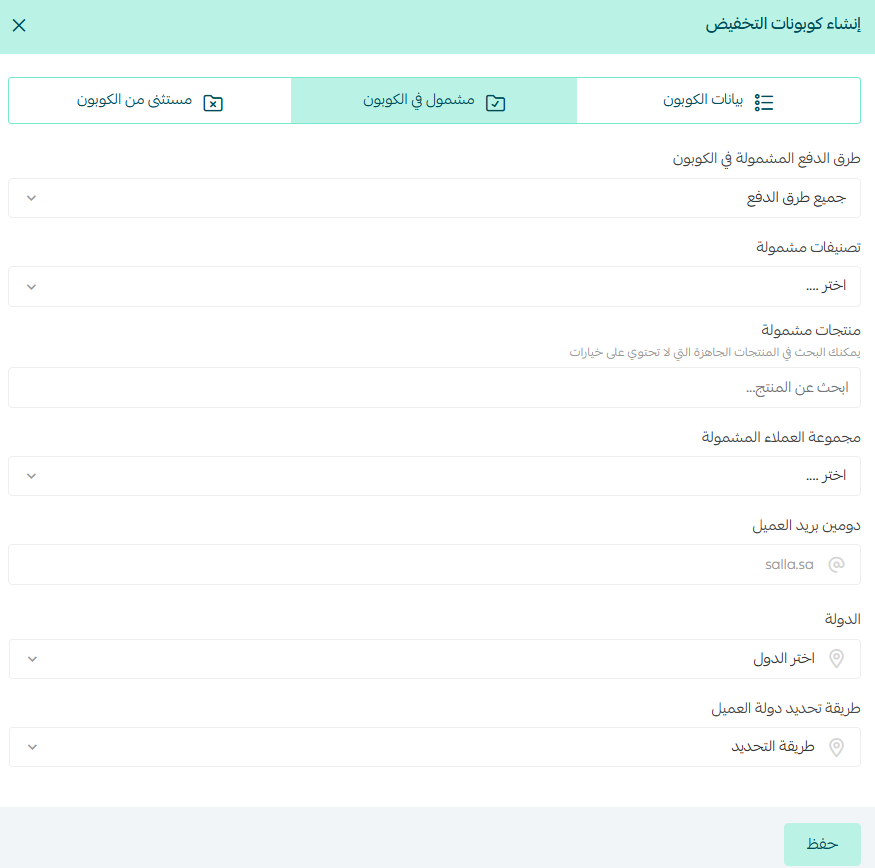
📖 Read this article to see how coupons encourage purchases, build loyalty, and keep your promotions organized so every campaign earns its keep.
2. Spell out the link between the coupon and the cashback
In your campaign, make the reward explicit:
"Buy with this coupon and get 10% cashback added straight to your wallet."
📖 Want tighter control over what your ad campaigns return? Read this article to learn how to run campaigns properly, read the performance data, and make decisions that lift your return on ad spend.
3. Turn on a store-wide cashback offer
Create a cashback offer, 10% for example, that applies to every order for as long as the coupon runs.
That way the customer knows using the coupon on the targeted products earns them cashback too.
📖 Read this article to see how cashback offers keep customers engaged, raise average order value, and turn each purchase into a long-term investment in your store.
2. Build a dedicated page or product list
Group the products you want to push into a custom page or list and promote it with a line like: "Shop this list and earn 10% cashback, added to your wallet on the full basket once your order is complete."
The core idea
Create a page or list in your store that collects the products you want to move, such as new arrivals or slow sellers.
Then make clear in the description or the campaign that shopping from that list earns cashback, credited to the customer's wallet on the full basket total after the order is complete.
Frequently asked questions
❓ When does cashback work best?
- When you launch a new product.
- During holidays and seasonal occasions.
- To revive sales in a slow period.
- To get customers buying again and coming back to the store.
❓ When should I stop an offer?
- When your margin drops to an uncomfortable level.
- When the offer isn't delivering the results you wanted.
- When it's attracting customers who aren't serious.
- Once the marketing goal has been met.
❓ What tells me a cashback offer is working?
- Sales and order count go up.
- Repeat purchase rate rises.
- Average basket value grows.
- Customer loyalty holds even after the offer ends.
- Your promotional campaigns get a warmer response.
❓ Can I apply cashback to specific products or categories?
Not at the moment. Cashback settings apply to the order as a whole. Use a coupon targeted at those products, or a dedicated page or list, and run the cashback offer store-wide alongside it.
❓ How is cashback different from a discount?
A discount cuts the price of the order in front of you and is gone. Cashback goes into the customer's wallet, so its value is only realized on the next order, which is what makes it a repeat-purchase tool rather than a one-off price cut.
Cashback isn't a temporary promotion, it's a way of building a relationship that lasts. Used well, every purchase becomes an opening for the next one, and that's what steady growth looks like.