In a highly competitive environment, typography becomes one of the most powerful tools for visual brand differentiation. The custom font upload feature in the Store Customization page allows you to showcase your brand identity in a professional, simple, and seamless way, without any technical complexity.
📌 Article overview
- Requirements for adding a new font
- Steps to add a custom font
- Removing a custom font from the store
Requirements for adding a new font
- Your store must be on the Pro or Special plan
- A custom domain must be connected to your store
(for more details, refer to the guide on registering a custom domain) - Access to store design permissions (for store staff)
Steps to add a custom font
You can add a custom font to your store to reflect your brand identity with a unique design. Simply upload the font file in a supported format (TTF or WOFF/WOFF2) and apply it to your store interface by following these steps:
- From the main menu, click (Store & Channels), then select (Store Design)

2. To customize your theme design, go to the Store Design page and click (Customize Theme)

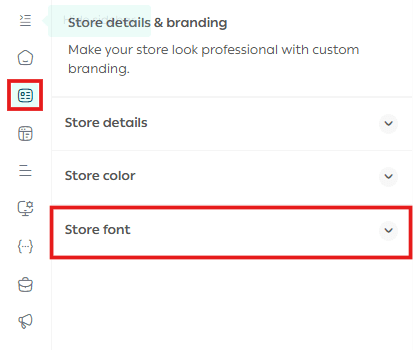
3. From the customization page, click (Store Identity & Information), then choose (Store Font)
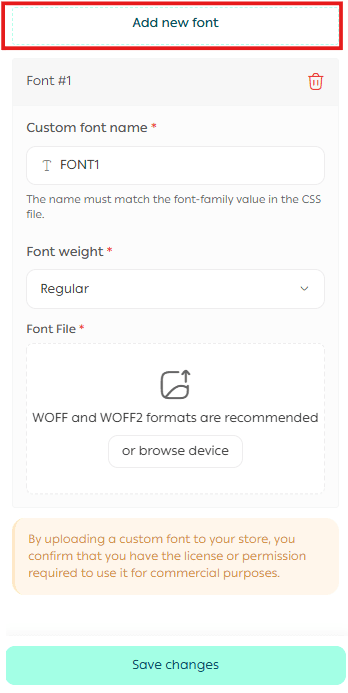
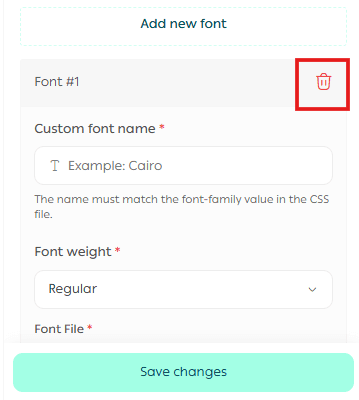
4. Click (Add New Font), then enter the font name, select the font weight, and upload the file
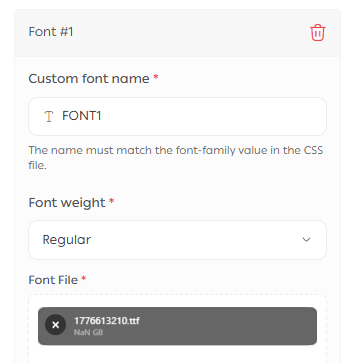
5. After uploading, click (Save Changes)
After saving, the font will appear in your store’s custom font list.
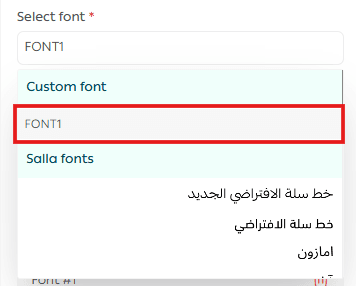
When selected, the new font will be applied to your store immediately.

Removing a custom font from the store
To remove a font, simply click the delete icon next to the font.
Frequently asked questions
❓Can I upload any font file format?
Only supported formats can be uploaded: TTF, WOFF, or WOFF2.
❓Is this feature available on all plans?
No, this feature is only available on Pro and Special plans.
❓Do I need a custom domain to use this feature?
Yes, a custom domain is required.
❓Will the font appear immediately after uploading?
Yes, once you save the changes, the font will appear in the font list and can be applied immediately.
❓Can I upload multiple fonts?
Yes, you can upload multiple fonts, and they will be saved in the custom fonts list for you to choose from.