Still printing a preparation slip for every order, one at a time?
When orders pile up, preparing each one for shipping shouldn't mean opening and printing them individually. With Salla, you can print order preparation lists for a whole batch of orders in one go — a real time-saver for stores with warehouses and barcode-based product organization. In this guide, you'll learn what the feature does and how to use it.
To print order preparation lists on Salla, open (Orders) from the side menu, select the orders you want to prepare, click the (Quick edit) menu, choose (Print preparation lists), then confirm with (Yes). Salla prints the preparation lists for every selected order at once.
📌 Article overview
- What the print preparation lists feature does
- How to print an order preparation list
- Frequently asked questions
🎯 What the print preparation lists feature does
It lets you print a selected batch of orders in one go so you can prepare them for shipping — cutting out the time and effort of printing each order's preparation slip separately.
👣 How to print an order preparation list
1. From the side menu, click (Orders).

2. Select the orders you want to print for preparation.
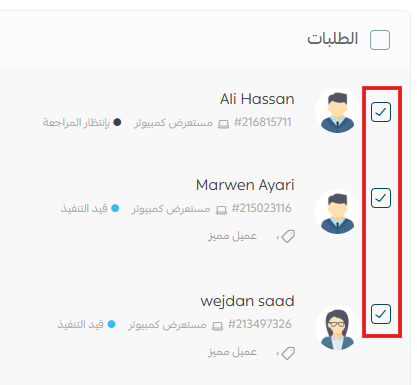
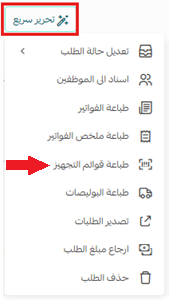
3. Click the (Quick edit) menu, then (Print preparation lists).
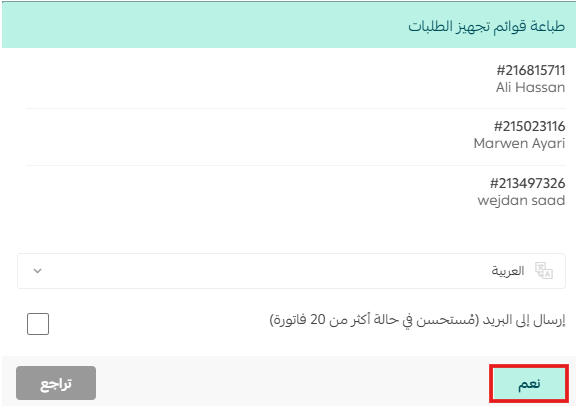
4. Click the (Yes) button to print all the selected preparation lists.
❓ Frequently asked questions
When do I need this feature?
Whenever you have multiple orders and want to print their preparation slips in one batch to save time and effort. It's especially valuable for stores that run warehouses and rely on barcodes to organize their products.
Do I have to print orders one by one instead?
No. That's exactly what this feature replaces — select as many orders as you need and print all their preparation lists together.
Where do I find the print option?
On the orders page, after selecting your orders, open the (Quick edit) menu and choose (Print preparation lists).
Batch-printing your preparation lists turns a repetitive chore into a single click — so your team spends its time packing orders, not printing them.