Facebook and Instagram campaigns no longer need complicated settings or code you have to install yourself.
With Salla Ads, everything happens automatically from the moment you connect your account — the pixel, CAPI and your product catalog — and your store is ready to advertise within minutes. The result is a marketing setup built on your store's real data, giving you sharper targeting and higher conversions with no technical work. In this guide, you'll learn what the Meta ads integration does, how it compares to Meta Ads Manager, why it produces better results, and how to connect your account step by step.
The Meta integration in Salla Ads lets you build and run Facebook and Instagram campaigns from your dashboard. Connecting your account sets up the pixel, the Conversions API and your product catalog automatically, so campaigns are built on real store data instead of manual configuration.
📌 Article overview
- What the Meta integration in Salla Ads is
- What the integration can do
- Meta Ads Manager vs Meta inside Salla
- Why merchants get better results
- How to connect your Meta account
- Frequently asked questions
🧩 What is the Meta integration in Salla Ads?
It is a complete advertising integration inside Salla Ads that lets you create and manage your Facebook and Instagram campaigns directly from your dashboard.
The tool builds those campaigns from your own store data — products, customers and sales — so you get precise campaigns without complicated settings or external tools. Meta inside Salla shortens the distance between your store and your potential customers through one connected, simplified marketing experience.
🚀 What the Meta integration can do
1. Technical setup that is 100% automatic
No code to install and no connection errors to debug. Salla connects the pixel, CAPI and your catalog intelligently and securely.
2. A catalog that syncs 24/7
Your catalog is created automatically and syncs daily, with no file uploads and no manual updates.
3. Smart targeting built on store data
Campaigns target the people most likely to buy, based on:
- How they interact with your products.
- How they behave inside your store.
- What they have bought before.
4. A campaign ready in four steps
Less time, less complexity, faster results. The platform was designed to reduce setup to a short set of clear, direct steps.
5. An immediate explanation when an ad is rejected
Meta Ads Manager often shows a rejection reason that is general and imprecise. Salla shows you the real reason your ad was rejected and gives you the fix directly.
6. Better ad quality
The Optimize Your Ad feature helps you raise the quality of your content, improve your copy, and choose stronger elements that lift ad performance.
7. Specialized local support
The Salla team understands the Saudi market and the problems merchants actually run into, and gives precise answers quickly.
💡 Meta Ads Manager vs Meta inside Salla
Aspect | Meta Ads Manager | Meta inside Salla |
Technical setup | Complex, and needs experience. | Handled automatically. |
Pixel connection | Manual and error-prone. | Fully connected, with no intervention. |
Catalog | Needs uploads and manual work. | Syncs automatically, 24/7. |
Understanding a rejection | General and unclear. | A precise explanation, plus a suggested fix. |
Number of settings | Large and complicated. | A limited, well-ordered set of steps. |
Targeting | Broad, and can be scattered. | The integration feeds your campaigns with your store data directly. |
Meta inside Salla means faster results, easier setup and fewer mistakes.
💪 Why merchants get better results with Meta inside Salla
1. Data that helps the algorithms make accurate decisions
Because the data comes straight from your store, your campaigns are built on real information about your visitors and how they buy. That raises the chance of reaching the people closest to a purchase decision.
2. Fewer technical errors than an external connection
Plenty of merchants end up with an inactive Facebook pixel, an out-of-sync catalog, or event problems. In Salla these errors are close to non-existent, because the connection is entirely automatic.
3. A faster start, with accurate data from day one
Instead of settings that take hours, you have a complete integration within minutes — and the data behind it helps your campaign start at a better level than usual.
4. Performance that improves with every visit and every purchase
Every interaction is recorded and feeds the system deeper knowledge of your audience. That shows up directly in your next campaigns as sharper targeting at a lower cost.
5. A complete view from one place
Tracking, analytics, performance and results all appear clearly in your Salla dashboard, with no jumping between platforms.
6. Local support that knows what the market needs
This matters most for new merchants: clear guidance whenever an ad has a problem or performance dips, with suggestions you can apply immediately.
🧩 How to connect your Meta account
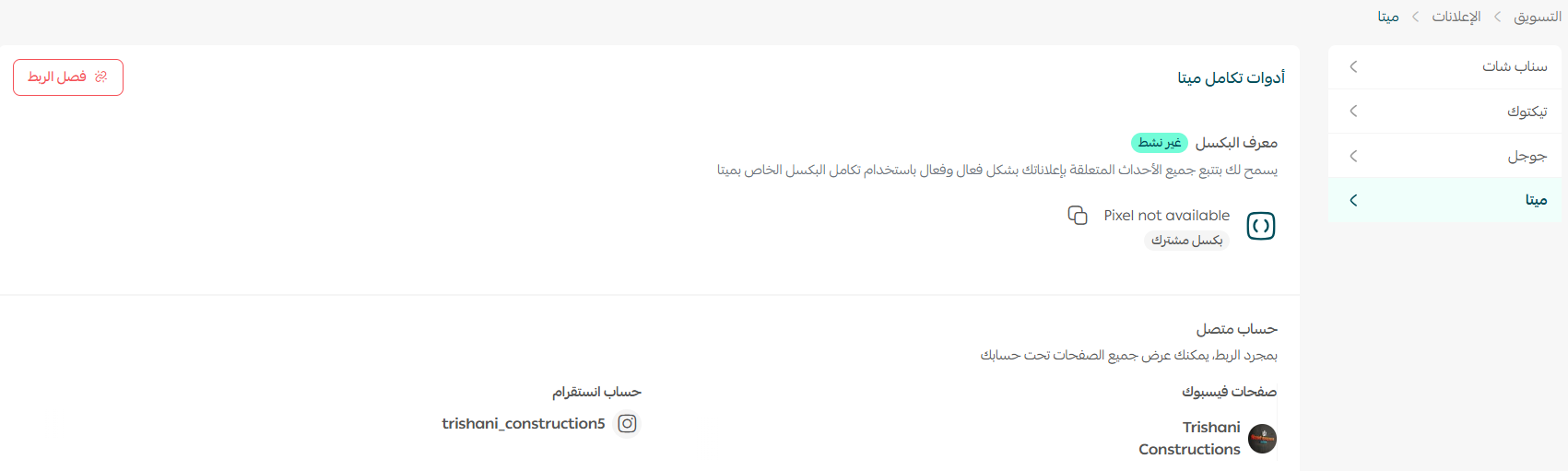
1. From the Salla Ads page, click the (Connection tools) tab.

2. Click (Connect your account).

3. Choose the business manager account you want, then click (Continue).
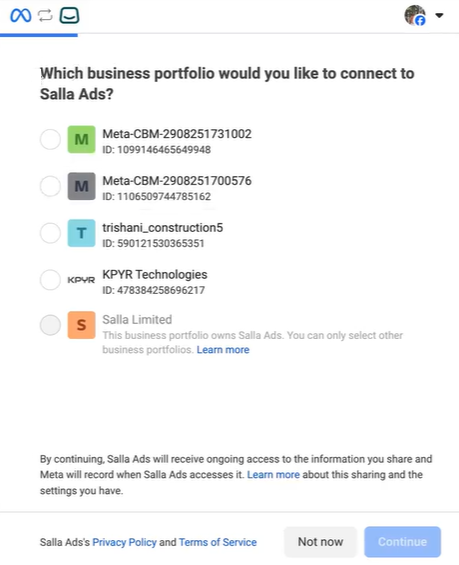
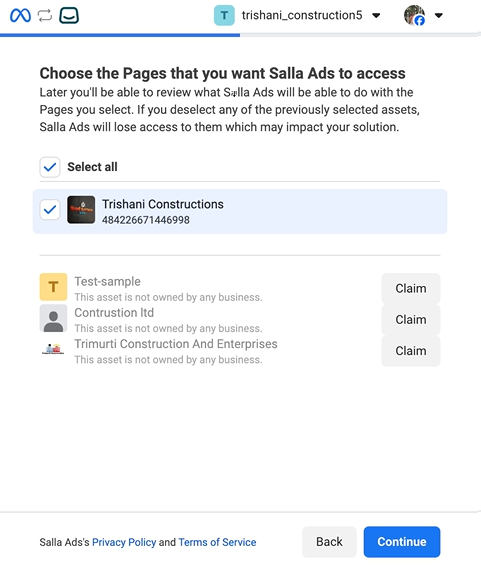
4. Choose the ad account you want, then click (Continue).
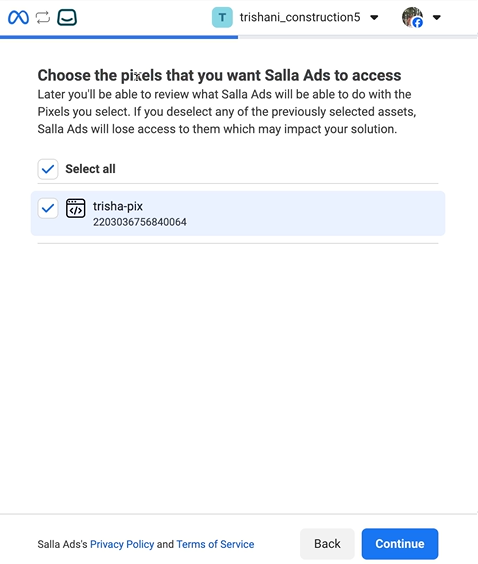
5. Choose the pixel you want, then click (Continue).
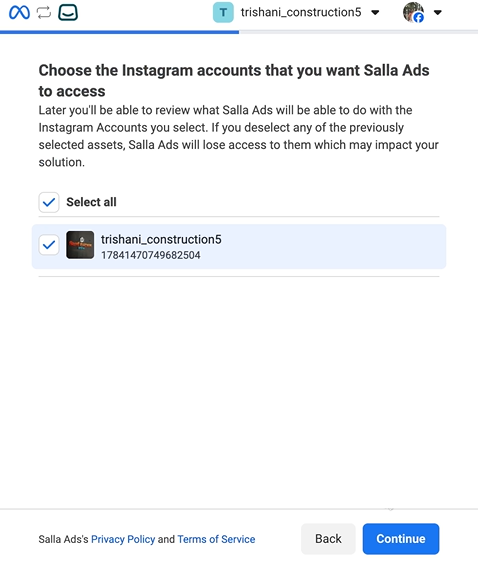
6. Choose the Instagram account you want, then click (Continue).
7. Review the permissions the connection needs, then click (Save).
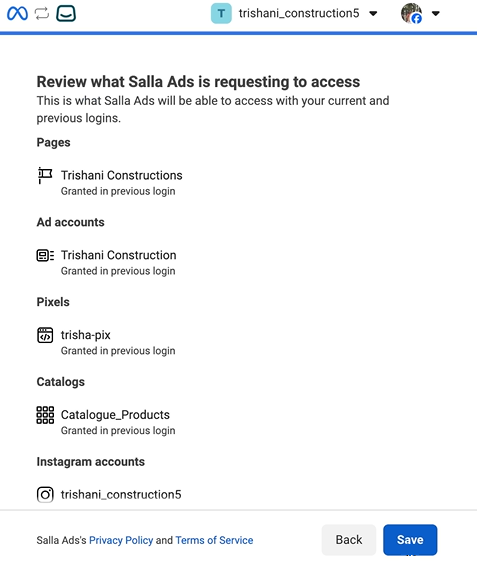
Congratulations — your Meta ad account is connected.
❓ Frequently asked questions
Do I need to install the Meta pixel myself?
No. The pixel, the Conversions API and your product catalog are all connected automatically when you link your account.
How often does my product catalog sync?
It is created automatically and syncs daily, around the clock, with no file uploads.
Which platforms do these campaigns run on?
Facebook and Instagram, both managed from inside your Salla dashboard.
What happens if my ad is rejected?
Salla shows you the real reason for the rejection along with a suggested fix, rather than the general message Meta Ads Manager usually returns.
Do I need an Instagram account to connect?
Choosing an Instagram account is part of the connection steps, so have the account you want to advertise from ready before you start.
Learn how to create an ad campaign on Meta that reaches your customers at exactly the right moment.