Turn your charitable organization into a seamless giving platform. Donation products allow you to collect Zakat, Sadaqah, and other charitable contributions in a simple and transparent way, making it easy for donors to take part in doing good.
This guide explains how to add and manage donation products professionally, helping you build trust, increase participation, and make giving effortless.
📌 Article overview
Adding and managing a donation product:
- Basic product information
- Advanced settings
- Adding and managing donation options
- Custom fields
🔔 Important note: Donation products are currently available only for stores in Saudi Arabia.
Add and Manage a Donation Product
1. Go to Products
From the main menu, click Products.

2. Create a New Donation Product
From + Create New Product, click Add, then select Donation.

1. Basic Product Information
Enter the basic product details, then click Save.

Required fields
- Donation image
Upload a representative image for the donation product.
For more details, see Upload Product Images and Videos.
2. Donation product name
The name that will appear to donors in your store.
3. Donation amount
This represents the donation value.
You can also enter a cost value for internal tracking and reporting.
4. Product category
Helps organize donation products, manage reporting, and control display.
5. Product description
Add a detailed description explaining the purpose of the donation, who it supports, and how contributions are used.
You can format text and add images, videos, and links to increase clarity and trust.
2. Advanced Settings
1. Product subtitle

Appears as a highlighted detail under the donation product name.

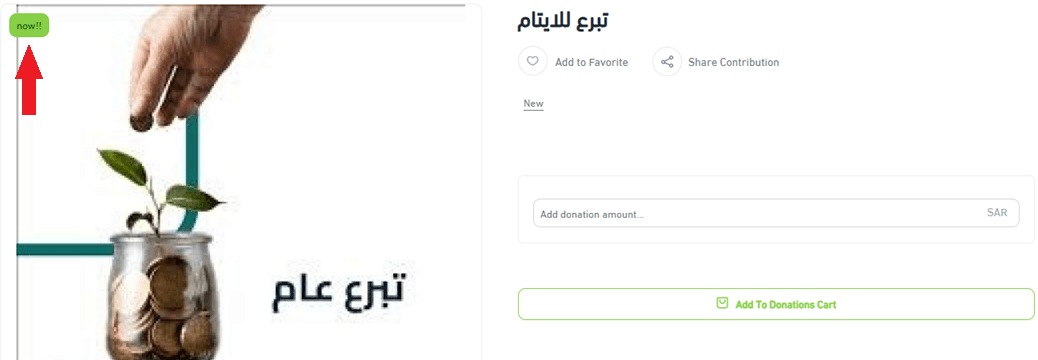
2. Promotional title

Displayed on the product image to draw attention to a cause, campaign, or special initiative.
3. Sales channels

Control whether the donation product appears on:
- Store website
- Store mobile app
4. Product requirements

- File upload on donation
Allow donors to upload a file when donating, if required for specific campaigns.
- Order notes
Enable donors to leave notes or messages with their donation.
5. Product tags
Add multiple tags to help donors discover related causes.

Tags appear on the product card and link to other donation products with the same tag.

6. SEO optimization
Optimizing donation pages improves visibility and helps reach more donors through search engines. Salla provides built in SEO tools:
- Product page title
Include the donation name and campaign type.
- Custom product URL
Create a clear and meaningful URL using the donation name and category.
- Meta description
Write a concise description explaining the cause and encouraging donations.

Benefits of adding SKU to the product URL
- Improved search engine indexing
- Easier differentiation between donation campaigns
- Faster access when managing or sharing donation links
SEO reminder: Clear URLs and descriptions improve trust, discoverability, and donation conversion rates.
3. Add and Manage Donation Options
Click + Add Donation Option to create donation values and settings.

Custom donation amounts
If you want donors to choose their own donation amount, enter the minimum and maximum donation values.

Note: Leaving one of these fields empty means the donor will not be restricted by that value.
Donation campaign goal
You can define a campaign goal by entering:
- Target donation amount
- Amount already collected
- Target date to reach the goal, optional
This helps donors visualize impact and encourages participation.

4. Custom Fields
Custom fields allow you to add additional donation related information and choose whether it appears on the donation page.
Example
You can use custom fields to explain how funds are distributed, eligibility criteria, or campaign details, separate from the main description.
Steps
- From the Custom Fields section, click Add New Section.
- Select the field type you want to add.

3. Enter the required field data and save.

Frequently Asked Questions
Is quick donation available for charities?
Yes. Quick donation allows donors to contribute instantly without entering personal details such as name or email address.

Is there a dedicated theme for charities?
Yes. The Ata’a theme is designed specifically for charitable organizations and includes features tailored to nonprofit websites.
For more details, see the Ata’a Theme article.
For additional guidance, refer to the Product Card FAQs.