Have you ever wished you could launch Snapchat campaigns without the setup headaches or jumping between platforms?
Now you can.
With Snap Business Extension on Salla, tracking and analysis happen inside your dashboard — automatically, and with no technical setup on your side. In this guide, you'll learn what Snap Business Extension does, how it compares to installing Snap Pixel by hand, how to activate it in your store, and how to use the data it collects.
Snap Business Extension is an official Snapchat tool for Salla merchants. It connects your store to your Snapchat ad account, then turns on Snap Pixel, the Conversions API and a daily product catalog automatically. You create campaigns, track events and review performance without leaving your Salla dashboard.
📌 Article overview
- What Snap Business Extension is
- What you get once it is active
- Manual Snap Pixel vs Snap Business Extension
- How to activate the extension
- Data-backed marketing strategies
- Frequently asked questions
💡 What is Snap Business Extension?
It is an official Snapchat tool built for online store owners on Salla, and it lets you connect your store to your Snapchat ad account.
In practice, it links your Salla store and Snapchat intelligently, giving you full control over your campaigns and precise analysis of how they perform — all from inside Salla itself.
🎯 What do you get once it is active?
The moment Snap Business Extension is switched on, your store becomes a marketing system that runs on its own, with no complicated configuration. Here is what you get.
🚀 1. A direct, seamless link to your ad account
No more complexity. Connect an existing Snapchat ad account or create a new one in moments. Salla recognizes your store and your ad account automatically through the official link, with no manual entry and no technical settings.
🎯 2. Tracking tools that switch themselves on
As soon as the extension is active, the analytics tools start working and give you an accurate picture of how your store is performing:
- Snap Pixel: tracks every movement inside the store, from page views to add-to-cart and completed purchases.
- Conversions API (CAPI): keeps event tracking accurate even when the browser blocks data.
- Product catalog: built automatically from your store and refreshed daily in Snapchat, with no manual uploads.
⏱️ 3. It runs around the clock
- Snap Business Extension never stops, even during periods when no campaign is running.
- Visitor data — views, add-to-cart, purchases — is sent to Snapchat continuously, so your advertising data stays current minute by minute.
🔁 4. Automatic catalog and audience updates
- Every new product, price change or image update syncs to Snapchat daily.
- At the same time, your target audience is rebuilt continuously from how visitors behave in your store, which makes each following campaign sharper and more effective.
💡 5. Marketing intelligence that keeps working with no live ad
Every visit to your store — even without spending a single riyal on ads — feeds a smarter audience database and improves the targeting algorithms.
Your next campaigns therefore start from a stronger position, thanks to the accumulated data collected during ordinary daily activity in your store.
🎨 6. Full control from one place
Everything, from creating campaigns and designing ads through to analyzing performance and following results, happens directly inside your Salla dashboard. No external tools, no other platforms.
⚙️ Manual Snap Pixel vs Snap Business Extension
Comparison | Manual Snap Pixel | Snap Business Extension |
Setup | Manual, and needs technical experience. | Fully automatic from Salla. |
Accuracy | Limited, and affected by tracking blockers. | Comprehensive, using CAPI and Pixel together. |
Product integration | Partial. | Full and dynamic. |
Campaign management | Outside Salla. | Inside your dashboard. |
Data updates | Need manual editing. | Happen automatically, every day. |
The bottom line: moving to Snap Business Extension means intelligence, speed and tangible results without the technical effort.
🔧 How to activate the extension
Activation happens inside your Salla dashboard. You do not need any code or external tools.
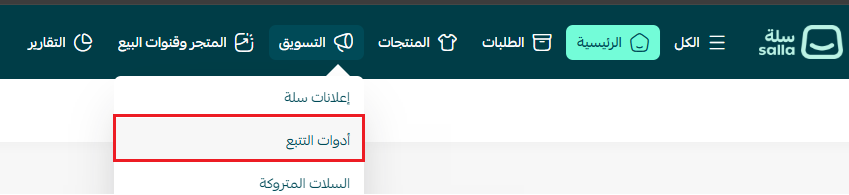
1. From the main menu, click (Marketing), then click (Tracking tools).
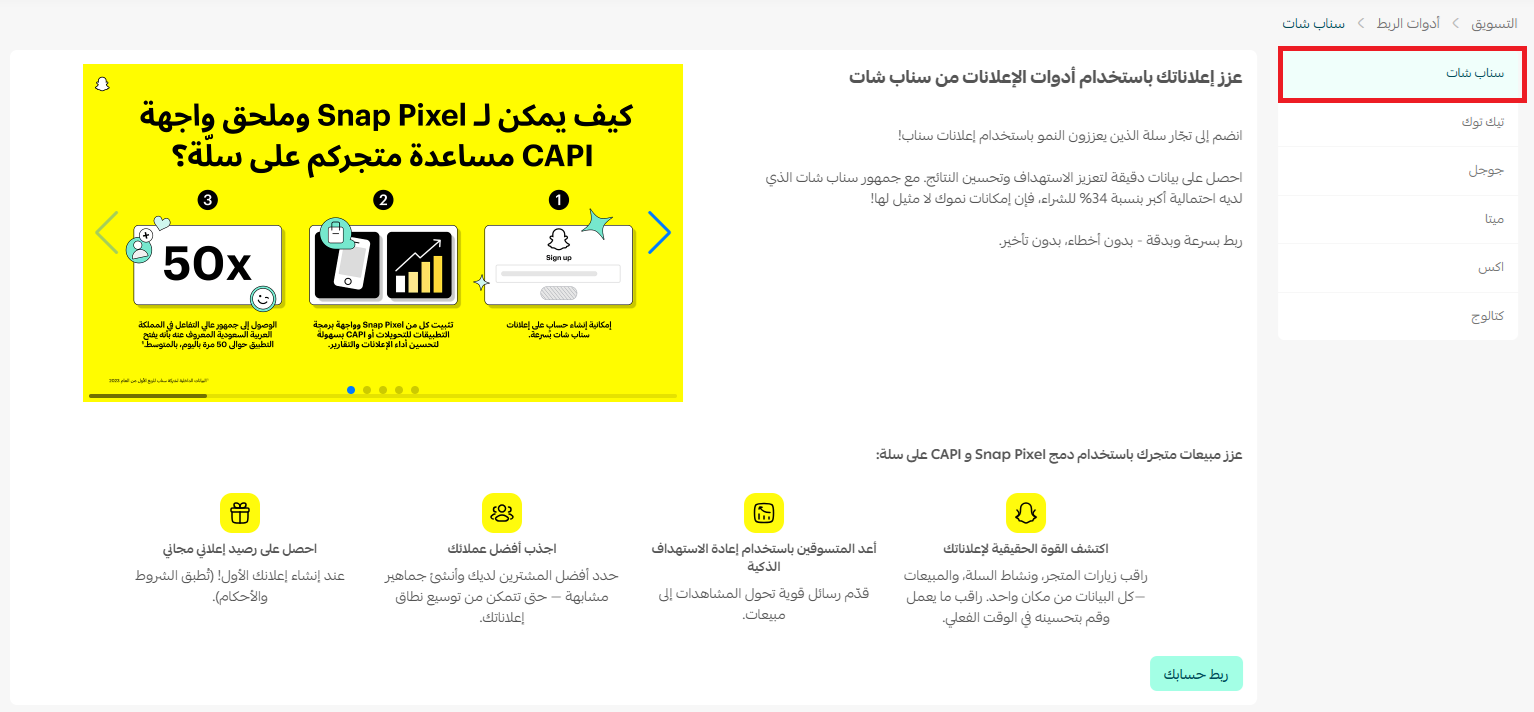
2. From the (Snapchat) tab, click (Connect your account).
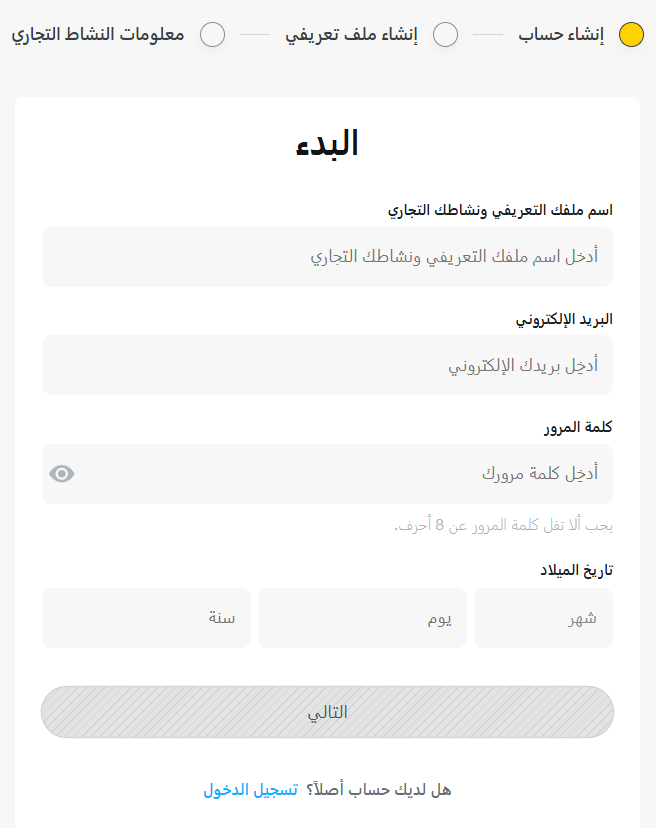
3. Connect your ad account, or create a new one.
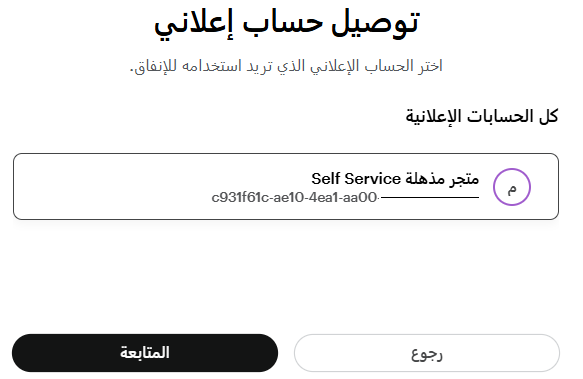
4. Select the ad account you want to connect, then click (Continue).
5. Select the pixel you want to connect, or create a new pixel, then click (Continue).
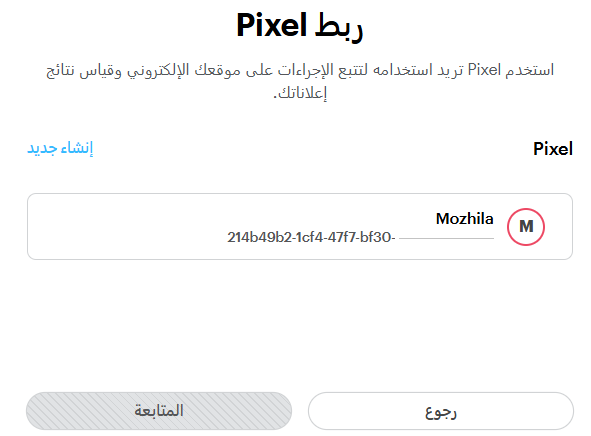
6. Click (Continue).
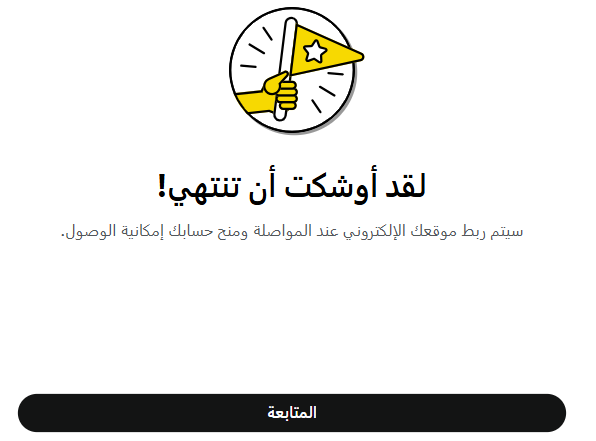
- On the permissions approval page, click (Continue).
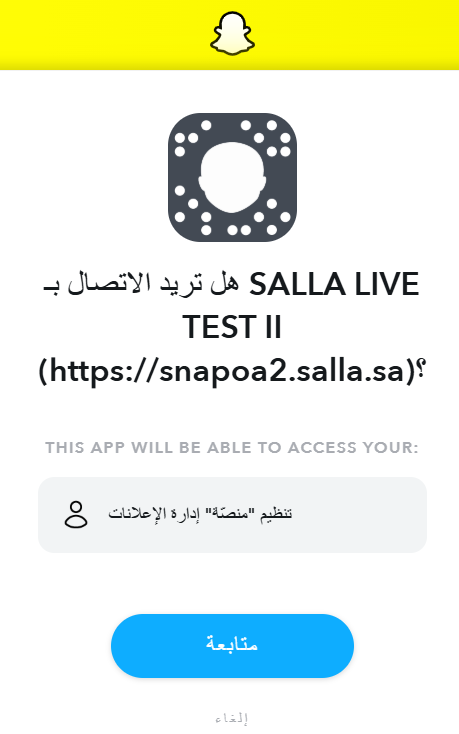
A few steps, and your store is ready to launch smarter campaigns on Snapchat.
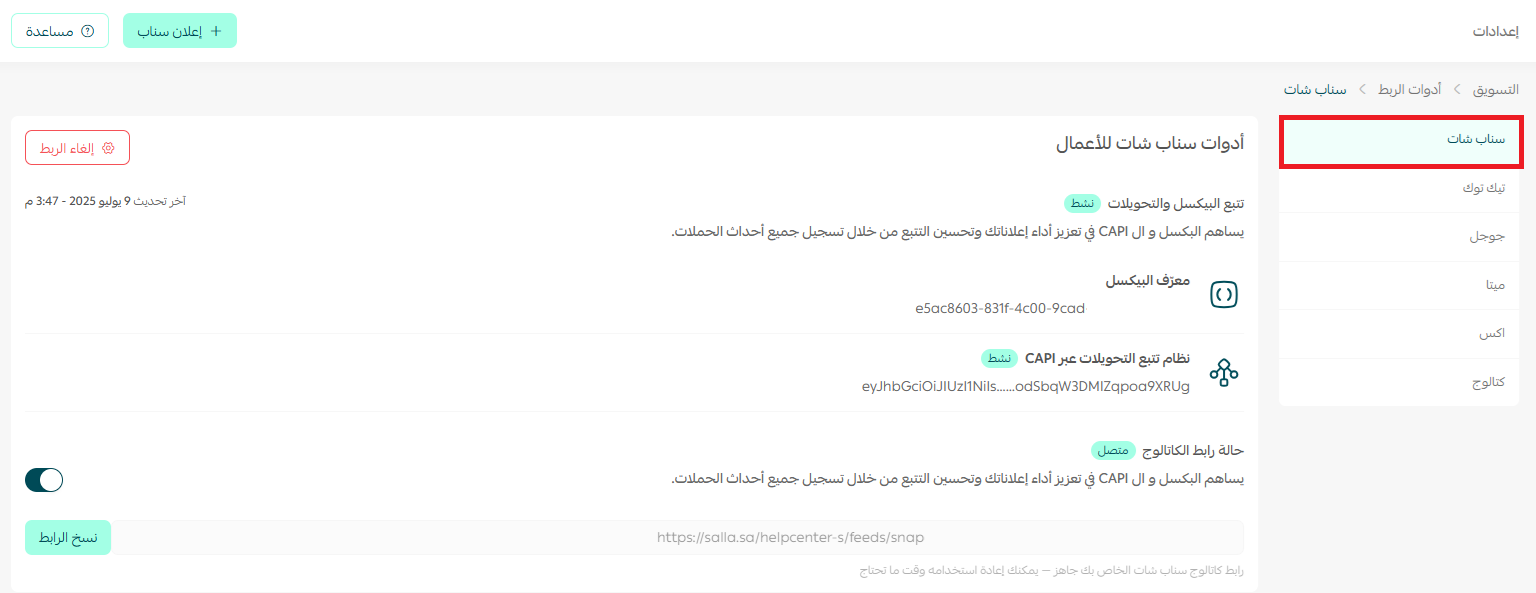
✨ Learn how to connect your store to Snapchat smoothly and build campaigns that multiply your product visibility and grow your sales, in clear and simple steps.
🌟 Why this extension matters for Salla merchants
Because it turns your data into marketing decisions.
Instead of moving between a pile of separate tools, you get one connected marketing system inside Salla:
- Automatic setup
- Precise targeting
- Real-time reports
- Performance that improves every day
And the best part?
You reach Snapchat's active audience, which trusts short content and instant experiences and is one of the groups most likely to buy online.
🚀 Data-backed marketing strategies
1. Targeting that keeps getting smarter
Even with no live campaigns, the tool keeps collecting visitor data to build an interested audience that is ready to engage with your next ads. Every new campaign starts strong, because it targets people who already know your store.
2. Automatic optimization
When you turn on the performance boost option, Snapchat's algorithms work with your Salla store data to identify the best audience and the best times to show your ads.
3. Advanced performance analysis
Your Salla dashboard gives you complete reports showing:
- Return on ad spend (ROAS).
- The products that attract customers most.
- The campaigns with the highest conversions.
❓ Frequently asked questions
Do I need to install Snap Pixel myself?
No. Snap Pixel, the Conversions API and your product catalog are all activated automatically when you connect the extension.
How often does my product catalog update in Snapchat?
Daily. New products, price changes and image updates sync automatically, with no manual uploads.
Does the extension still collect data when no campaign is running?
Yes. It keeps sending visitor events to Snapchat around the clock, so your audience data stays current and your next campaign starts from a stronger position.
Do I need a Snapchat ad account before I start?
No. You can connect an existing ad account or create a new one during the connection steps.
Where do I manage my campaigns after connecting?
Inside your Salla dashboard. Creating campaigns, designing ads and reviewing performance all happen there, with no external platform.
🎬 Helpful resources
📹 Video: connecting the pixel in Salla.
📹 Video: launching your first Snapchat campaign.
📖 Guide: creating successful ad campaigns on Snapchat.
✨ With Snap Business Extension on Salla, your campaigns stop being just ads.
They become a connected marketing system that runs intelligently and learns from every interaction, so results grow with each campaign.
Start today, and let your data speak the language of sales.