You can write a beautifully designed email that nobody opens.
Usually it's one of two things: the subject line didn't earn attention, or the copy inside didn't give anyone a reason to act. Sending isn't the goal — getting read and getting a response is. This guide covers the best practices for writing a persuasive email, and in it you'll learn how to write a subject line that earns the open, body copy that sells the benefit instead of the feature, and a call to action that people actually click.
A persuasive email rests on three things: a subject line that earns the open, body copy written around the benefit rather than the feature, and one clear call to action. Keep the subject line to 30-50 characters, write in the second person, and tell the reader exactly what you want them to do next.
📌 Article overview
- What makes a marketing email persuasive
- Writing a subject line that earns the open
- Writing body copy that sells the benefit
- Writing a call to action that gets clicked
- Frequently asked questions
🎯 What makes a marketing email persuasive
Every email that works is built on the same three pillars:
- A strong subject line that earns attention.
- Copy written around the benefit, not the feature.
- A clear call to action that pushes the reader to respond.
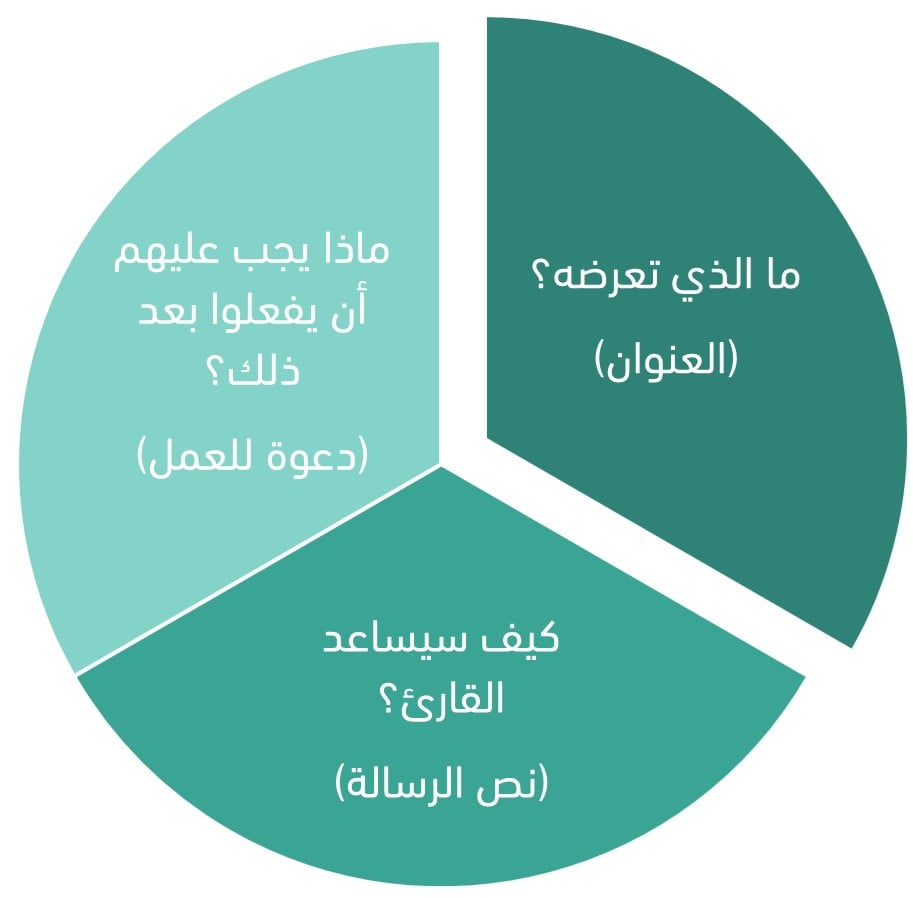
That simple formula keeps your emails focused and effective even when you write them in a hurry.
It's also worth reading how to write direct-response ads that capture your target audience's attention, which goes deeper into how persuasion works on a reader.
🚀 Writing a subject line that earns the open
What is an email subject line?
The subject line is the purpose of your email, compressed into one line in a crowded inbox. More often than not, it's what decides whether the email gets opened or deleted unread — so it's worth optimizing for the specific audience you're writing to.
Aim for 30 to 50 characters, including spaces. Give people a glimpse of what's inside, and enough of a reason to open it.
Why the subject line matters
- It gets your message in front of the right people.
- It helps you stay out of the spam folder.
- It drives the action that generates the most value for your business: the click.
What makes a subject line compelling?
A handful of factors do most of the work in that short line of text:
Content
Your subject line should be informative and personal without giving everything away — sometimes teasing what's inside is exactly what earns the open. Whether it's a regular newsletter or a product update, let subscribers know what they gain by reading it.
Tone
Tone is how you put emotion into the line. Think about which feeling will move a subscriber to act, and which tone produces it. A sales email might use urgency. An email about an upcoming product launch might be informative but deliberately coy, so the reader opens it to find out more.
Style
Like tone, style shapes how your subscriber responds. Credible subject lines match your brand voice and steer clear of spam filters. A youth-focused brand might lean on emoji; a brand writing for a more formal audience might use fewer exclamation marks.
Avoid "no-reply"
A "no-reply" sender address signals that a robot sent the email, and it chips away at the rapport you've built with your audience. Use your company name or a personal name instead, and invite replies — that's how you collect the feedback you actually need.
Subject line examples that earn the open
Write subject lines that tell subscribers what they'll gain — and, as the classic film "Singin' in the Rain" put it, make 'em laugh. Wit and humor are legitimate tools for getting an email opened.
Playful and funny
- "Nothing to see here [shifty eyes emoji]"
- "There aren't enough sticky notes on your desk"
- "70% of the Earth is water and you're thirsty"
Cold outreach
Cold subject lines hand the reader the information directly, with no packaging.
- "Discover the secret to [desired outcome]"
- "Boost your [goal] with [the solution you offer]"
- "Success with [your product or service] starts here"
- "New insights on [relevant topic] inside"
Welcome
Welcome subject lines should start building the relationship between the subscriber and the business.
- "Thanks for joining [company name]! Here's what we have in store for you."
- "Welcome to [company name] — let's do great things together."
- "Hi [name]! Your success story starts here."
- "Unlock endless possibilities with [company name]. Welcome aboard!"
- "Welcome! Here are a few simple things from [company name] to help you get started."
Newsletter
Newsletter subject lines get readers interested in news worth reading or information worth having.
- "Exciting updates from [company or industry]"
- "[Company name] newsletter: packed with insider tips and trends"
- "Get inspired: lessons from [industry expert or customer] success stories"
- "Just released: our ultimate [resource or guide] to [topic]"
- "Your [month] report: the top [industry] insights"
Abandoned cart
Remind subscribers when they "accidentally" forget an item in their cart. Write subject lines that create a fear of missing out, or a light-hearted guilt trip.
- "Forget something? This cart can't fill itself"
- "You left me behind — and we would have looked great on you"
Sales
Sales subject lines are clear and direct. They tell the reader up front that the email is about a product or a service.
- "Limited-time offer: save 50% on our best seller!"
- "Last chance to catch our biggest sale of the year!"
- "Act now and get a free gift with your purchase"
- "Low stock alert: grab your favorite [product] before it's gone!"
- "Just for you: enjoy a personalized [offer]"
Thank you
Thank-you subject lines show gratitude. They remind subscribers that their time, attention, and loyalty matter to the business.
- "A sincere thank you from our team"
- "Your support means the world to us"
- "A special thank you for your continued partnership"
- "In appreciation of your awesomeness, [name]"
- "You're amazing! Thank you!"
Fundraising
Fundraising subject lines ask the subscriber to give time or money to an organization or a cause. Use emotion and values to write lines that generate donations.
- "Help us change lives: donate now"
- "Your gift changes a life"
- "Unleash hope: donate today"
- "Together we can make a difference"
- "Making a difference starts with you"
- "Empower the future: support our cause"
- "Every contribution counts: help our mission"
- "Your generosity can change the world"
- "Be a hero for our cause"
- "Changing lives, one donation at a time"
Events
Event subject lines tell your audience that you're hosting something and encourage them to RSVP.
- "Join us for an unforgettable evening: [event name] is almost here!"
- "Limited seats available. Register now for [event name]"
- "Last chance to secure your place at [event name] — register today"
- "Unlock new possibilities at [event name] — get your tickets now"
- "Sharpen your skills at [event name]: an opportunity you can't miss"
Writing body copy that sells the benefit
Your preview text should run between 40 and 140 characters, including spaces, and work with the subject line rather than repeat it.
Don't skip it. If you leave the preview text empty, email clients build their own from the first few lines of your copy, and that is rarely the impression you want to make.

A few practices matter more than the rest when you write the body:
- Anchor the email to a date or an event so it feels timely and prompts action.
- Segment your audience by preference or past behavior, then write emails that speak to those specific groups.
- Write in the second person. "You" and "your" open a direct line between you and the reader, and make the copy feel personal. Instead of "customers will love this product," write "you'll love this product."
- Sell the benefit, not the feature.
💡 Example: "These shorts come in a range of colors and sizes" describes the product. "They let you lounge at home and then head into town without changing" describes what the customer gets.
Benefit-led copy tells customers what they stand to gain. Features describe what your offer is; benefits show how it improves the reader's life.
- Keep it short.
Anywhere you can break a sentence in two, do it. Your email becomes easier to scan and easier to understand.
- Use a conversational tone.
Instead of the flat "our company is pleased to announce unprecedented discounts," try "guess what? We've got huge discounts — you won't want to miss this." It reads like a friendly conversation rather than generic marketing material, and that's exactly what makes it land.
- Use AI tools for content ideas.
Feed a tool like ChatGPT or Jasper some context about your campaign, and it will come back with a range of creative angles to work from.
- Use bulleted or numbered lists.
Lists break complex information into pieces people can absorb. For example: "our software helps you 1) organize your tasks, 2) manage your time, 3) get more done."
- Add visuals.
A well-chosen image, chart, or even GIF adds a dimension your text alone can't.
Writing a call to action that gets clicked
What is a CTA for?
A call to action exists to trigger one specific, immediate response. It turns passive readers into active participants by removing ambiguity — it states plainly what you want them to do.
Make the CTA unmistakable
Recipients should never have to guess what you want from them. Without a clear CTA, they take the wrong action, take none at all, or — worst case — unsubscribe.
What a clear CTA looks like
- Keep the text short: roughly one to five words.
- Put the value to the reader front and center.
- Use plain, direct language.
- Make the button visible and easy to reach, while still sitting well within your email design.
- Place the primary CTA above the fold, so the reader sees it without scrolling.
CTA examples
Start from your audience: their needs, their preferences, their pain points. Then work out why they would want to take the action you're asking for. What do they get out of it?
- "Start a free trial"
- "Hurry — today only!"
- "Subscribe now"
- "Shop now"
- "Add to cart"
- "Discover more"
- "Watch the video"
- "Share with friends"
- "Unlock your offer"
- "Find your perfect plan"
📝 Important notes
Proofread the email before you press send. A typo, a grammar mistake, or a broken link costs you credibility and pulls attention away from your message.
❓ Frequently asked questions
How long should an email subject line be?
Between 30 and 50 characters, including spaces. That's long enough to hint at the value inside and short enough to survive a mobile inbox.
What is preview text, and do I need to write it?
It's the line of text shown next to the subject line in the inbox. Write it yourself, between 40 and 140 characters, so it complements the subject line. Leave it blank and the email client will pull the first lines of your copy instead.
What's the difference between a feature and a benefit?
A feature describes what your product is. A benefit describes what the customer's life looks like after they have it. Benefit-led copy converts better because it answers "what's in it for me?"
Why shouldn't I send from a no-reply address?
It makes the email feel machine-generated and undermines the relationship you've built. Send from your company name or a personal name, and let people reply — their replies are useful feedback.
Where should the call to action go?
Put the main CTA above the fold, where the reader sees it without scrolling, and keep the button text to about five words.
Apply this to the very next marketing email you write.
The power of email isn't in sending — it's in landing.
✉️ Make every message a chance to build a relationship, not just another ad.
If you'd like help writing a professional marketing email, Merchant Services connects you with vetted external providers who handle this kind of work professionally.