Can your shipping carrier actually reach every customer you sell to?
Jawharat Al Saad is a logistics company that handles storage, shipping, and parcel transport across the whole of Saudi Arabia, using current packing and wrapping methods. Connecting it to your Salla store adds it as a shipping option at checkout, with rates you control city by city. In this guide, you'll learn how to connect your store to Jawharat Al Saad, set your shipping rates, and what the company covers.
Install the Jawharat Al Saad app from the Salla App Store and grant it the permissions it asks for. Your store is then linked to your Jawharat Al Saad account. Open (App settings), then the (Shipping rates) tab, and set a rate for every city and region you deliver to.
📌 Article overview
- What Jawharat Al Saad is
- How to connect your store to Jawharat Al Saad
- Frequently asked questions
- Jawharat Al Saad service details
🎯 What Jawharat Al Saad is
Jawharat Al Saad sets out to give merchants a single partner for storage, shipping, and parcel transport, packed and wrapped to current standards and delivered anywhere in Saudi Arabia.
🚀 How to connect your store to Jawharat Al Saad
1. From the side menu of your dashboard, click (Installed apps).

2. On the Salla App Store banner, click (Browse the Salla App Store).

3. On the Jawharat Al Saad app page, click (Install).

4. Review the permissions the app requests, then click (Grant permission).
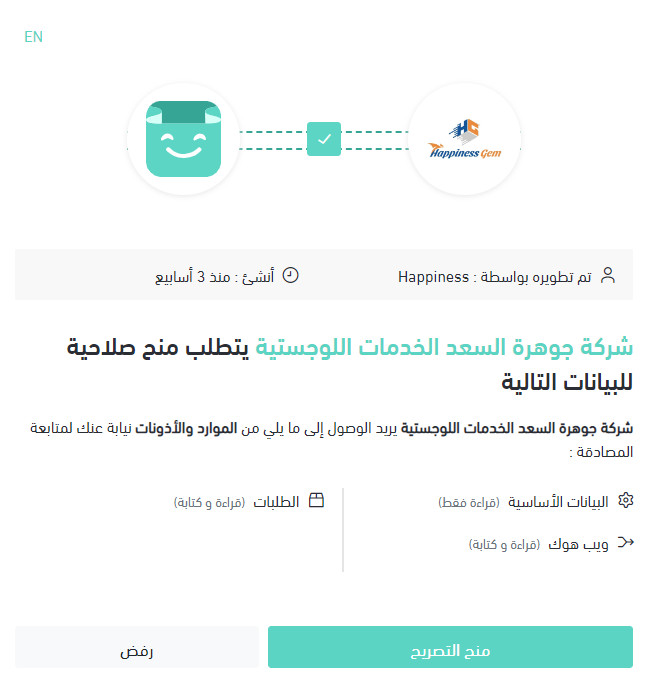
Your Salla store is now linked to your Jawharat Al Saad account.

For more details, see managing your store's apps.
❓ Frequently asked questions
How do I set my shipping rates with Jawharat Al Saad?
1. From the side menu of your dashboard, click (Installed apps).

2. On the all apps page, find the Jawharat Al Saad app and click (App settings).
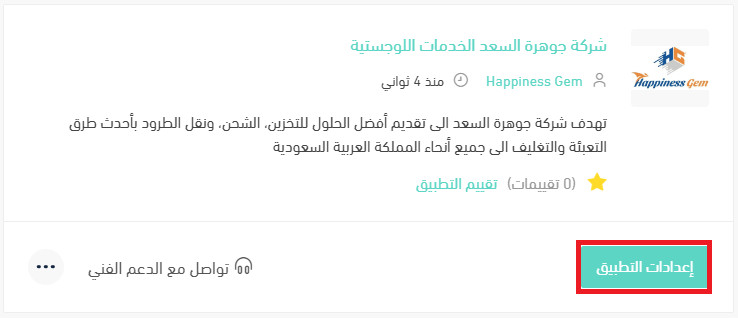
3. Open the (Shipping rates) tab and enter a rate for each city and region you deliver to.
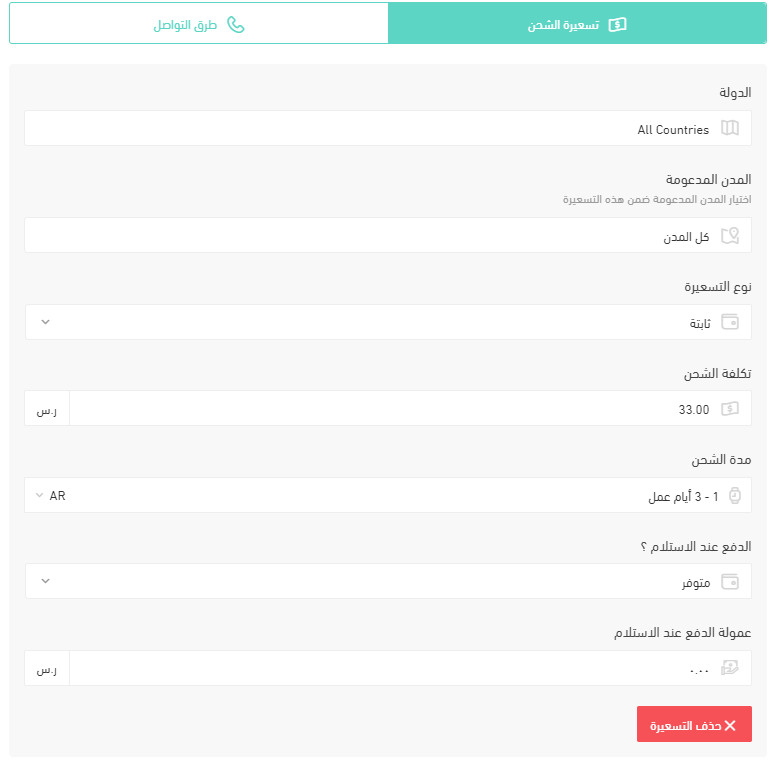
For more details, see setting up shipping and delivery options.
How do I temporarily turn the app off in my store?
1. From the side menu of your dashboard, click (Installed apps).
2. On the all apps page, find the Jawharat Al Saad app and click (App settings).
3. Switch the (Hide the shipping company from the checkout page) option on or off.
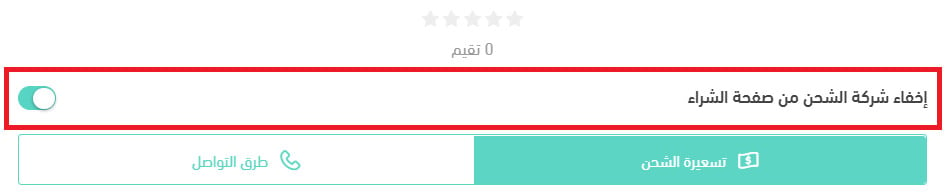
📝 Important notes
Turning that option on hides Jawharat Al Saad as a shipping choice at checkout. The app stays installed and connected, so you can bring it back at any time by switching the option off again.
How do I delete the Jawharat Al Saad app from my store?
1. From the side menu of your dashboard, click (Installed apps).
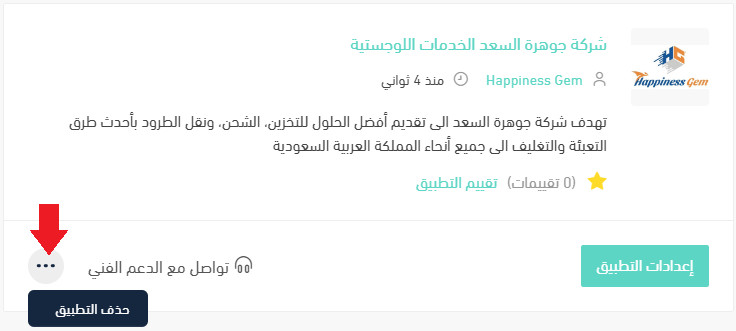
2. On the all apps page, find the Jawharat Al Saad app, click the (...) icon, then click (Delete app), as shown below.
Jawharat Al Saad service details
The answers below come from the shipping company itself.
Which cities does the company pick up from?
Everywhere in Saudi Arabia.
Which cities can customers receive deliveries in?
Everywhere in Saudi Arabia.
How does contracting and integration work?
Through the FASTCOO system.
How are payments settled?
By bank transfer.
When is the best time to reach the company's customer service?
Between 8:00 AM and 5:00 PM.
Do merchants get a report on amounts and stock levels?
Yes, where that data is available.
How are orders sent to the company?
Through an API connection.
Is there shipment tracking?
Yes.
What goes on the waybill?
Your store's details and the customer's details.
If a shipment has more than one box, does each box get its own waybill?
Yes. Every box is given its own waybill rather than being combined under one.
How do I change a customer's address after the waybill has been issued?
Through the FASTCOO system.
Do you ship within the same city and between cities?
Yes, both.
Is door-to-door pickup and delivery available?
Yes.
Does the company handle international shipping?
No.
Who do I contact when there's a problem with a shipment?
The company's customer service team.
Can I ship liquids?
No.
How many boxes can I ship at once?
Up to 1,000 boxes.
Can I ship valuables, and are they insured?
No. Valuables are not accepted, so no insurance cover applies.
Is there a two-hour delivery service?
No, including for restaurants and food orders.
What are the delivery limits inside and outside the city?
Inside the city: 4,000. Outside the city: 10,000. [Verify: the Arabic gives both figures with no unit, so whether these are SAR values, weights, or shipment counts is unclear.]
Is refrigerated shipping available?
Yes. The vehicles run between 1 and 6 °C.
Do you offer storage, preparation, and packing?
Yes.
What is the minimum shippable weight?
100 g. [Verify: the Arabic question also asks for the maximum weight, but the answer only gives the minimum.]
Is cash on delivery available, and what does it cost?
Yes. The cost depends on the store. [Verify: the Arabic question also asks whether card payment on delivery is supported, but the answer doesn't address it.]
How is the shipping price calculated?
By weight, size, and destination region.
When does the courier arrive for a home pickup?
At whatever time suits the customer.
Is there a returns service if the customer doesn't accept the goods, and what does it cost?
Yes. The cost depends on the store.
Who covers the cost if a shipment is delayed or damaged?
The company takes responsibility.
How long does delivery take?
Three days. [Verify: the Arabic asks separately about delivery time inside the merchant's own city and shipping time elsewhere, but gives a single figure for both.]
Shipping is where most stores lose margin quietly. Set your city rates deliberately before you switch the carrier on, and revisit them once you can see what real orders actually cost you.