Would you rather spend your week picking and packing orders, or growing the store that creates them?
Golden Storage is a logistics company for online stores that takes the whole fulfilment chain off your hands: storing your products, managing stock, packing and preparing orders, and delivering them to your customer's door. Connecting Golden Storage to your Salla store makes it available as a shipping option and lets you price delivery city by city. In this guide, you'll learn how to install the app, set your shipping rates, pause it temporarily, and remove it if you need to.
To connect Golden Storage, open (My installed apps) from your dashboard's side menu, browse the Salla App Store, and install the Golden Storage app. Review the permissions it asks for and click (Grant permission). Your Salla store is then linked to your Golden Storage account.
📌 Article overview
- What Golden Storage does
- How to connect Golden Storage to your store
- Frequently asked questions
🎯 What Golden Storage does
Golden Storage provides end-to-end support for running an online store: warehousing your products, keeping stock counts accurate, packing and preparing each order, and handing it to the customer at their door.
🚀 How to connect Golden Storage to your store
1. From the side menu of your dashboard, click (My installed apps).

2. From the Salla App Store banner, click (Browse Salla App Store).

3. On the Golden Storage app page, click (Install).

4. Review the permissions the app needs, then click (Grant permission).

Your Salla store is now linked to your Golden Storage account.

For more details, see managing your store's apps.
❓ Frequently asked questions
How do I set up my shipping rates with Golden Storage?
1. From the side menu of your dashboard, click (My installed apps).

2. On the all apps page, find the Golden Storage app and click (App settings).

3. From the (Shipping rates) tab, enter your rates for the cities and regions you deliver to.
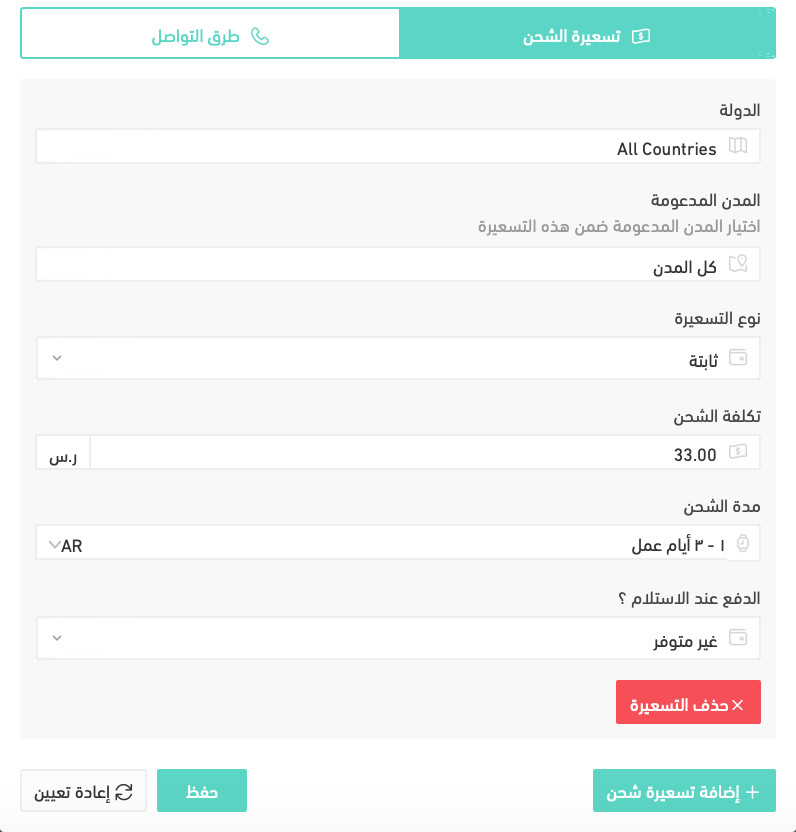
For more details, see shipping and delivery option settings.
How do I switch an app off temporarily?
1. From the side menu of your dashboard, click (My installed apps).
2. On the all apps page, find the Golden Storage app and click (App settings).
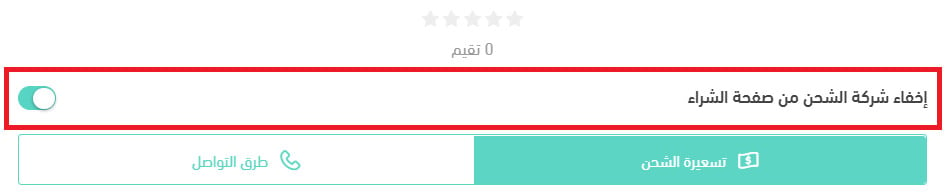
3. Turn the (Hide shipping company from the checkout page) option on or off.
How do I remove Golden Storage from my store?
1. From the side menu of your dashboard, click (My installed apps).
2. On the all apps page, find Golden Storage, click the (...) icon, then click (Delete app), as shown below.

Outsourcing storage and packing only pays off when your rates at checkout reflect what fulfilment actually costs you. Set those rates first, then let the app handle the rest.