• Salla - E-commerce Platform
  • Create your store for free
  • Home
    • Help Center

      A comprehensive library for everything you need to start your business with Salla

    • Salla Community

      Share experiences and get inspired by unique ways to succeed

    • Salla Blog

      Expand your knowledge with many interesting topics

    • Developer Platform

      Join the Salla developer community

    • Salla Academy

      Professional courses to help you succeed in business

    • App Store

      Many tools for your store's success

    • App Maker

      Build a custom app for your store

    • Salla Special

      Advanced tech solutions for large merchants

    • Payments

      Diverse and secure payment methods for your customers

    • Marketing Tools

      Multiple marketing solutions to increase your sales

    • Mahally

      A platform connecting local merchants with local consumers

    • Abayas & Fashion

      Elegant commerce without complexity

    • Digital Products

      Digital products without technical difficulties

    • Health & Fitness

      Present your products convincingly to your customers

    • Electronics

      The easiest experience for selling electronics

    • Jewelry

      Multiple features to showcase your jewelry

    • Beauty & Care

      With Salla, understand your beauty-seeking customers

    • Restaurants & Cafes

      Endless solutions for consumer products

    • Home Supplies

      A comfortable experience for you and your customers

    • Design Services

      Instant delivery for your products

    • Salla Stores in Sectors
  • Pricing
  • Sign In
  • Create your store for free
Salla
Download Salla app from Google PlayDownload Salla app from App Store

About Salla

  • Join the Salla team
  • Terms of Service
  • Affiliate Marketing Agreement
  • Privacy Policy
  • Complaints Platform

Salla Partners

  • Join as a partner
  • Partner Programs
  • Partners Community
  • Partner Resources
  • Join as an affiliate marketer

Resources

  • Help Center
  • Salla Academy
  • Salla Community
  • Salla Blog
  • Updates Center

Solutions

  • App Store
  • App Maker
  • Ready Stores
  • Marketing Tools
  • Mahally
  • Payments
  • Salla Special
  • Salla 4.0
  • Themes Store

Sectors

  • Abayas & Fashion
  • Digital Products
  • Health & Fitness
  • Electronics
  • Jewelry
  • Beauty & Care
  • Restaurants & Cafes
  • Home Supplies
  • Design Services
All rights reserved by Salla Holding © 2026
920031659
Mecca, Kingdom of Saudi Arabia
info@salla.sa
VAT Certificate
ع
  • Home
    • Help Center

      A comprehensive library for everything you need to start your business with Salla

    • Salla Community

      Share experiences and get inspired by unique ways to succeed

    • Salla Blog

      Expand your knowledge with many interesting topics

    • Developer Platform

      Join the Salla developer community

    • Salla Academy

      Professional courses to help you succeed in business

    • App Store

      Many tools for your store's success

    • App Maker

      Build a custom app for your store

    • Salla Special

      Advanced tech solutions for large merchants

    • Payments

      Diverse and secure payment methods for your customers

    • Marketing Tools

      Multiple marketing solutions to increase your sales

    • Mahally

      A platform connecting local merchants with local consumers

    • Abayas & Fashion

      Elegant commerce without complexity

    • Digital Products

      Digital products without technical difficulties

    • Health & Fitness

      Present your products convincingly to your customers

    • Electronics

      The easiest experience for selling electronics

    • Jewelry

      Multiple features to showcase your jewelry

    • Beauty & Care

      With Salla, understand your beauty-seeking customers

    • Restaurants & Cafes

      Endless solutions for consumer products

    • Home Supplies

      A comfortable experience for you and your customers

    • Design Services

      Instant delivery for your products

    • Salla Stores in Sectors
  • Pricing
Sign In

Help Center

Wallet & invoices | UAE

Wallet & invoices | UAE

Last updated: Saturday 18 April 2026.

Tracking payments and managing balances in your online store can sometimes feel overwhelming, especially when multiple financial processes are involved. Delays or unclear transactions may lead to accounting errors or confusion.


In this guide, we’ll explain how the Wallet & Invoices section works in UAE stores, and how you can use it to manage your store balance, subscriptions, and purchase invoices with full transparency.


📌Article overview

  • Store wallet overview
  • Wallet & invoices page
  • Managing store balance
  • Electronic payments balance 
  • Viewing transaction history
  • Filtering and sorting transactions
  • Frequently asked questions


Store wallet in Salla 

Your store wallet helps you manage financial activity through two main balances:

  • Store balance
  • Electronic payments balance

These balances allow you to organize subscription payments, platform purchases, and financial records.


Wallet & invoices page

To access the wallet:

  1. From the main menu, open the All tab.

Under Settings & Tools, click Payment Methods.
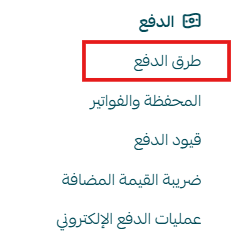
image.png

  1. Select the Wallet & Invoices tab.


This page contains the following sections:


1. Store balance

The wallet includes:

  • Store Balance

image.png


What is store balance used for?

Store balance can be used for:

  • Automatic subscription renewals
  • Purchasing services or apps from the Salla App Store


Electronic payments balance 

Note: The electronic payments balance is not available for UAE stores.

Payments are processed directly through the Tap Payment Gateway, and settlements are handled between Tap and the merchant.


2. Billing settings
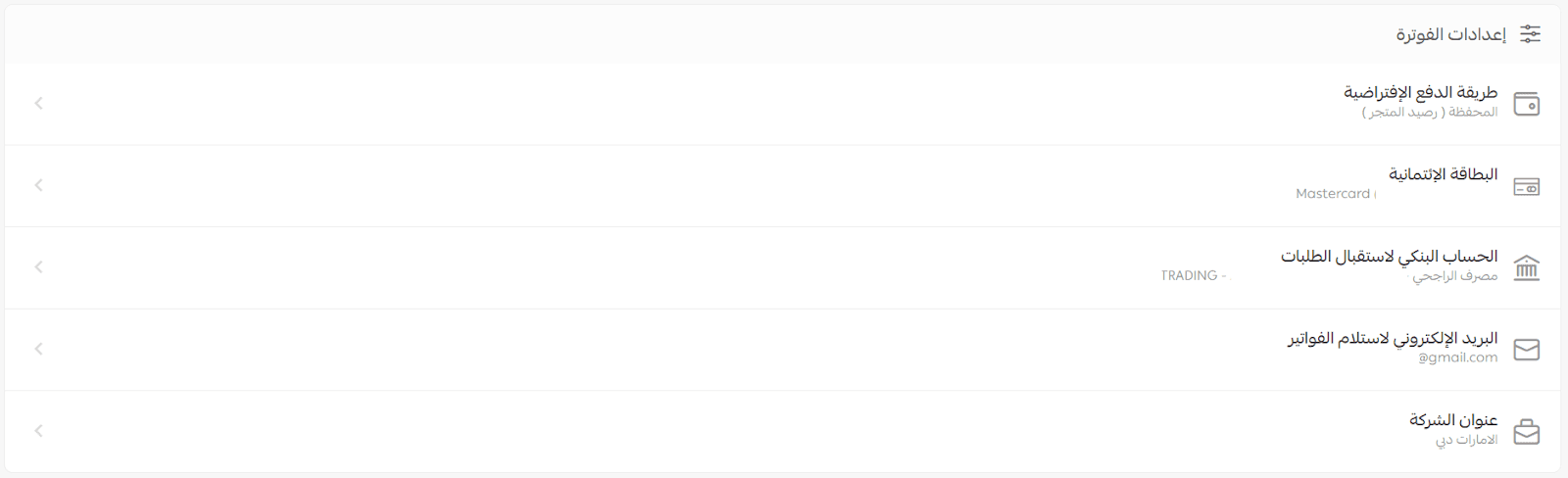
image.png

The wallet & invoices page also includes Billing Settings, where you can manage:

  • Default payment methods
  • Invoice email preferences
  • Company billing information

For more details, refer to: Billing settings in your store (UAE).


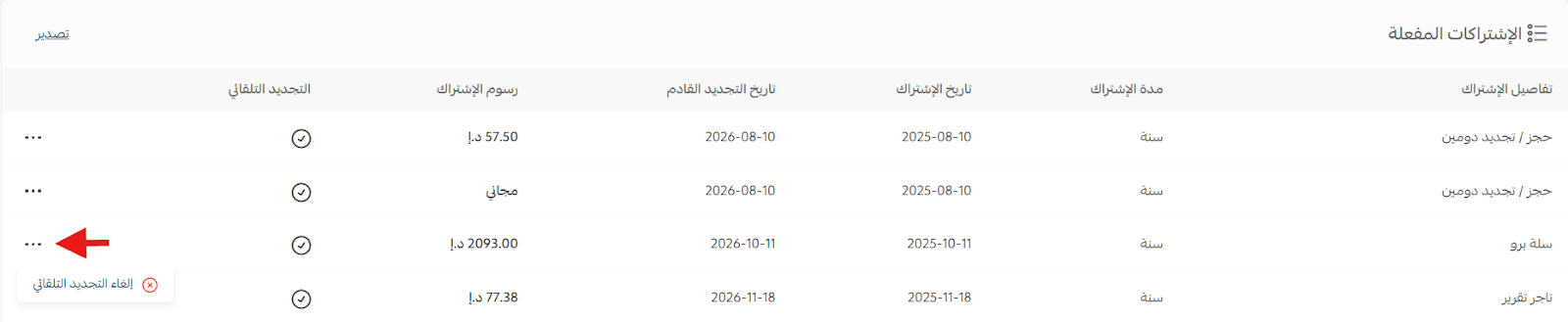
3. Active subscriptions

This section shows all subscriptions currently active in your store.


Cancel auto-renewal

To stop auto-renewal for any subscription:

  1. Click the (...) menu next to the subscription
  2. Select cancel auto-renewal

image.png

Subscription status indicators

You can identify renewal status by:

A ✓ icon for subscriptions with auto-renewal enabled

A – icon for subscriptions without auto-renewal


Export subscriptions

You can export your active subscriptions list:

  • From the Active Subscriptions section, click CSV

image.png

This will download a file that can be opened in Excel.


4. Purchase invoices

Purchase invoices are issued monthly and include all merchant purchases made through Salla.

image.png

This section also provides access to:


Credit notes

Credit notes are issued to document refunded amounts resulting from returned purchases or canceled services.

image.png

For more details, refer to: Credit notes.


Managing store balance

You can perform several actions to manage your Store Balance:


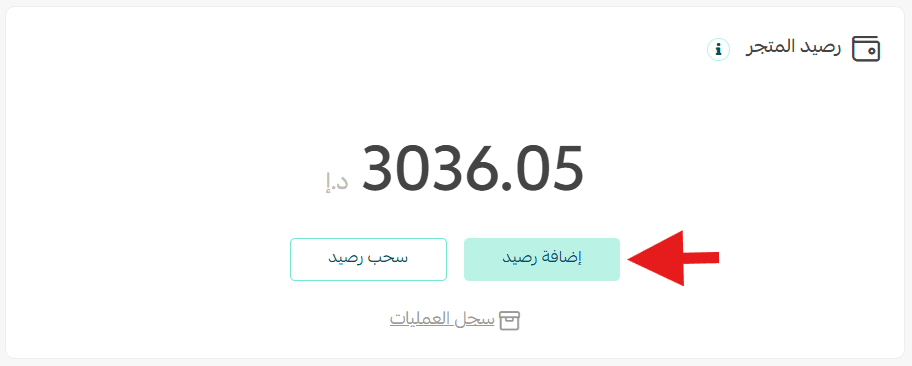
1. Add balance

To add funds:

  1. Click Add Balance

image.png

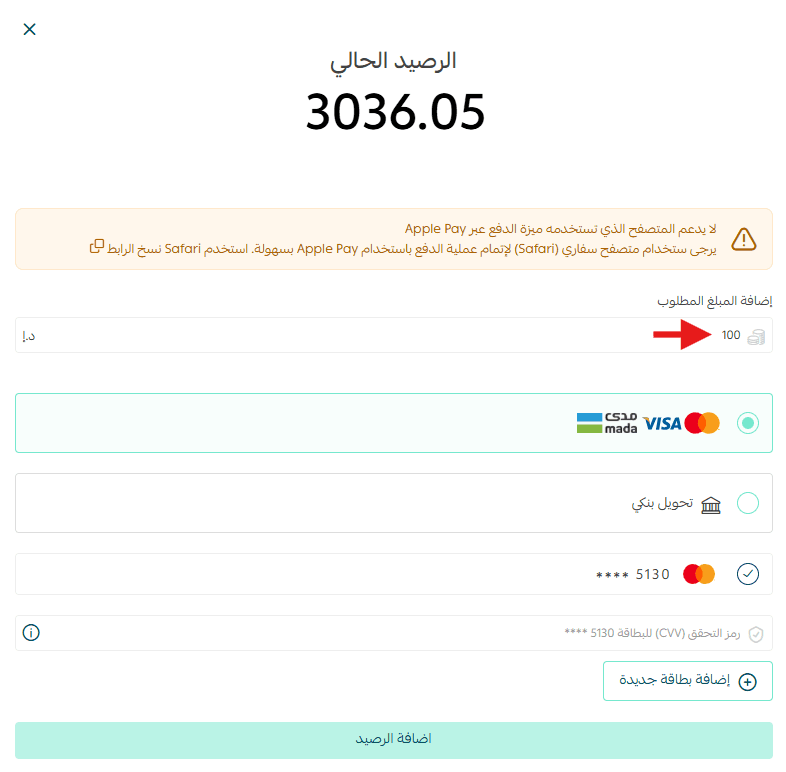
  1. Enter the amount
  2. Choose the transfer method
  3. Fill in the required details
  4. Click Add Balance

image.png


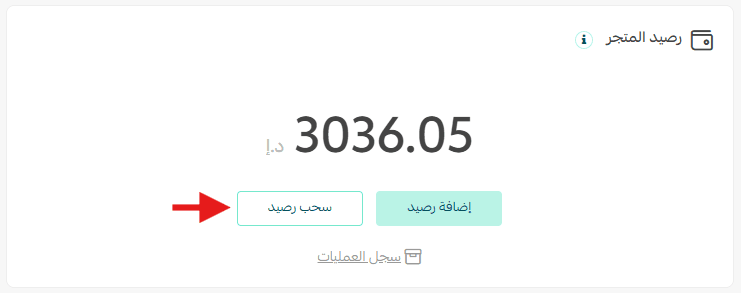
2. Withdraw balance

Note: Withdrawing store balance is currently not fully available in the UAE.


For more details, please contact Salla Support.


If available, the withdrawal process includes:

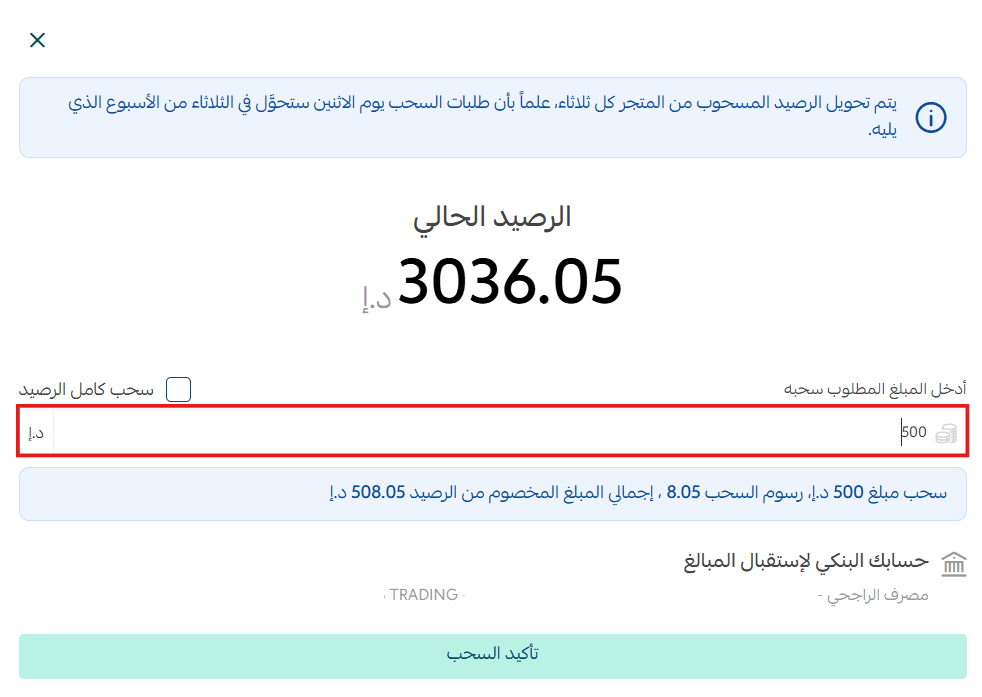
  1. Click Withdraw Balance

image.png

  1. Enter the amount
  2. Click Confirm Withdrawal

image.png


Withdrawal schedule (when applicable)

  • Requests are reviewed on Monday at 8:00 AM
  • Transfers are processed on the following Tuesday


Withdrawal may fail if:

  • There are open complaints on the store
  • Bank account information is incorrect


Viewing transaction history

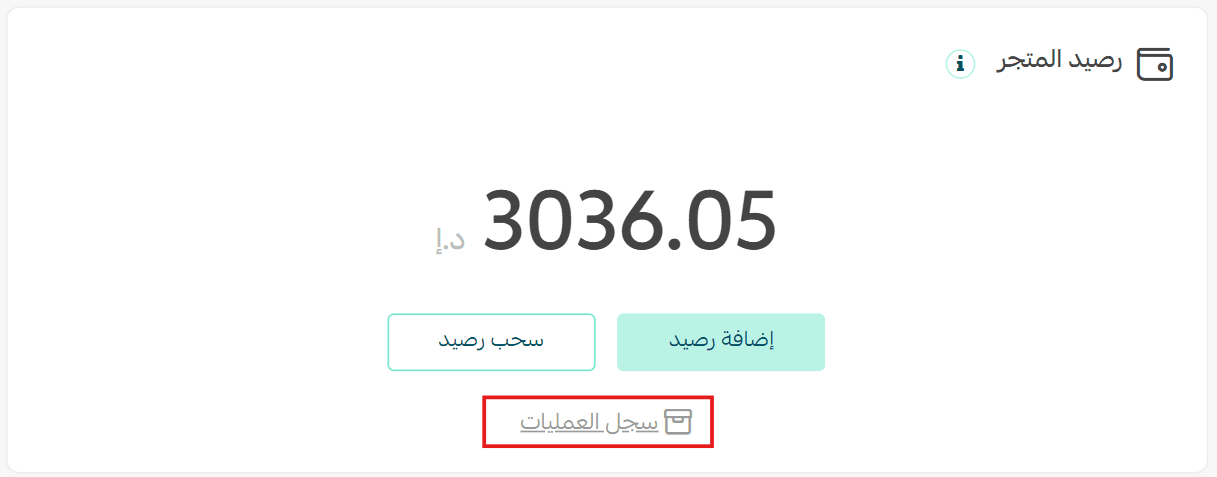
To view store balance transactions:

  • Click transaction history

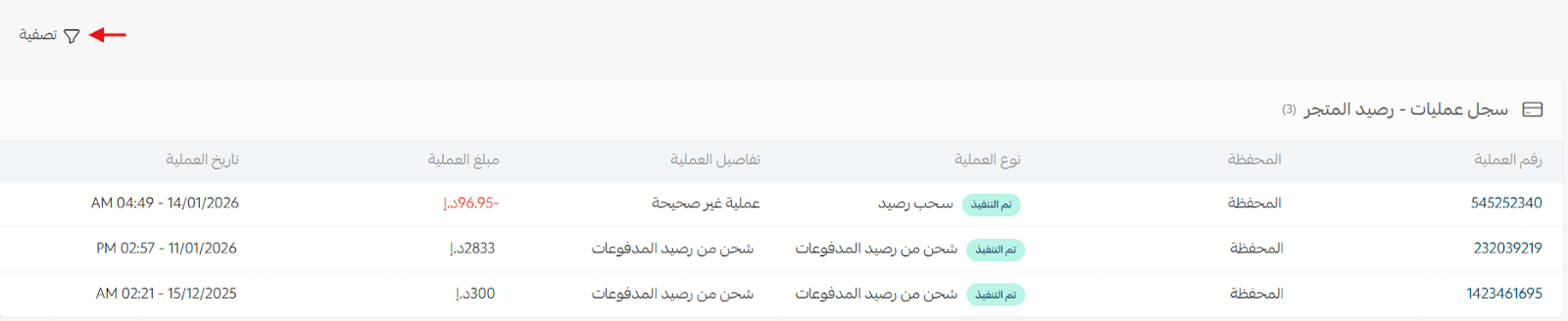
image.png

A full record of wallet operations will appear.

image.png


Filtering and sorting transactions

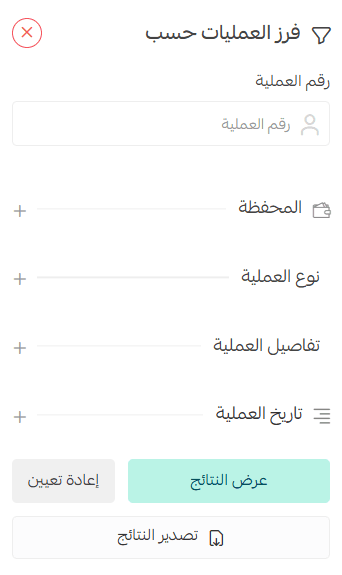
To filter transactions:

  1. Click Filter

image.png

  1. Select one or more filter conditions
  2. Click Show Results

image.png


This helps you quickly locate specific operations.


Frequently asked questions


What is the payout mechanism for merchants?

Payouts are handled according to the merchant settlement mechanism defined in the store verification agreement.


Does store verification affect wallet features?

Yes. Store verification is required to withdraw funds from the Store Balance.

Ask and request support from merchants and the Salla team.

Avatars
Previous
Next

Own a professional store on Salla

Create your store now with flexible tools and integrated solutions to help you at every step towards growing your sales

Create your store for free